
Related Party Matching
365 business Banking recognizes the payer of a bank transaction by IBAN, payment application fields, similar names and the account holder.
Before an open entry is applied, it must be determined who made the payment. Microsoft Dynamics 365 Business Central compares the name on the bank statement with the master data for this. 365 business Banking adds characteristics that are more reliable than a name, and a more tolerant name matching for different spellings.
Standard functionality in Business Central
The standard compares the name of the related party, that is, the name the bank reports for the counterparty, with the name and address of the customer or vendor of an open entry. The result (Fully, Partially or No) is included in the rating according to the Payment Application Rules, together with the document number and the amount.
For more information from Microsoft, see Set up rules for automatic application of payments.
What 365 business Banking adds
First, the standard compares the counterparty account number or IBAN with the bank accounts of the customer or vendor. If it matches, the party counts as Fully recognized and 365 business Banking checks nothing further. Otherwise, 365 business Banking checks each candidate before the standard name comparison, in decreasing order of reliability:
| Step | Characteristic | Result | Requirement |
|---|---|---|---|
| 1 | The counterparty IBAN is on a customer or vendor bank account of the candidate | Fully | none |
| 2 | A payment application field of the customer or vendor (such as the customer number) is in the payment reference | Fully for an exact match, Partially for a strong partial match | line with source table Customer or Vendor in the payment application fields |
| 3 | The name is similar to the name of the customer or vendor | Fully or Partially (50 % rule, see below) | Enable Advanced Related Party Matching |
| 4 | The name is similar to the account holder of a customer or vendor bank account | as in step 3 | Enable Advanced Related Party Matching |
The first match decides, and the standard name comparison is skipped. If none of the steps finds a match, the standard then compares name and address. If the candidate is a member of a payment group, 365 business Banking also checks the central account of the group, because the payment usually comes from there: Payment groups.
For payment service providers, only step 2 is considered. PayPal, Stripe and comparable services do not deliver an IBAN or account holder of the customer, because the transaction comes from the account of the payment service provider. 365 business Banking treats Universal accounts (Account Information Service Universal) in the same way.
All other accounts count as ordinary bank accounts and go through all four steps, regardless of whether the transactions are delivered via PSD2/XS2A (finAPI), EBICS or as a camt file. The partial document numbers of document no. matching also apply to these accounts.
Sender identification via IBAN
The IBAN is the most reliable characteristic, because it belongs to exactly one bank account. If the counterparty IBAN is on a bank account of the customer or vendor, the party counts as Fully recognized, regardless of how the name is spelled on the statement.
So that this matching applies to future payments, 365 business Banking creates a new bank account with the counterparty IBAN for applied customers and vendors when the payment reconciliation is posted, if none exists yet. This behavior is controlled by the Create Bank Accounts toggle in the Banking Setup.
New bank accounts have the status New
Newly created customer and vendor bank accounts receive the status New, because they were created automatically and have not been checked yet. Check the details and set the status to Released before you use the account for payments: Recipient bank accounts.
Extended related party name matching
Banks and payers often write names differently from your master data: Mueller GmbH instead of Müller GmbH, Doe, John instead of John Doe. With Enable Advanced Related Party Matching on the Payment Application Settings page, 365 business Banking compares such names tolerantly.
Comparison method:
- Both names are normalized: lower case,
ä→ae,ö→oe,ü→ue,ß→ss; periods and commas are removed;-,&and+become spaces. - Both names are split into words.
- At least 50 % of the words must occur in the other name, in both directions.
- If all words occur in both directions, the party is recognized Fully, otherwise Partially.
| Bank statement | Master data | Result | Reason |
|---|---|---|---|
Mueller GmbH | Müller GmbH | Fully | identical after normalizing |
Doe, John | John Doe | Fully | same words, different order |
Sample Trading GmbH | Sample GmbH | Partially | 2 of 3 words in one direction, all in the other |
Smith Construction GmbH & Co. KG | Miller Construction GmbH | no hit | only 2 of 5 words, below 50 % |
The check runs in both directions, because otherwise a short master data name like Construction GmbH would fit almost any company name on the statement. A payment could then be applied to the invoices of another company without being noticed.
A supplement only
Extended name matching only applies if the standard has not recognized the party Fully yet and neither IBAN nor payment application fields have produced a match.
Account holder
If the name does not match the name of the customer or vendor, 365 business Banking compares it by the same rule with the account holder of every bank account of this customer or vendor. This recognizes, for example, a payment from the private account of the managing director if that account is stored for the customer.
The account holder check only runs when the Enable Advanced Related Party Matching option is turned on. If the option is off, only IBAN, payment application fields and the standard comparison are considered.
Payment application fields for the business partner
Some business partners state a reference of their own in the payment reference, such as their customer number. On the Payment Application Settings page, in the Payment Application Fields part, create a line with the source table Customer or Vendor and the corresponding field (such as No. or GLN). If the value is in the payment reference, the party counts as recognized.
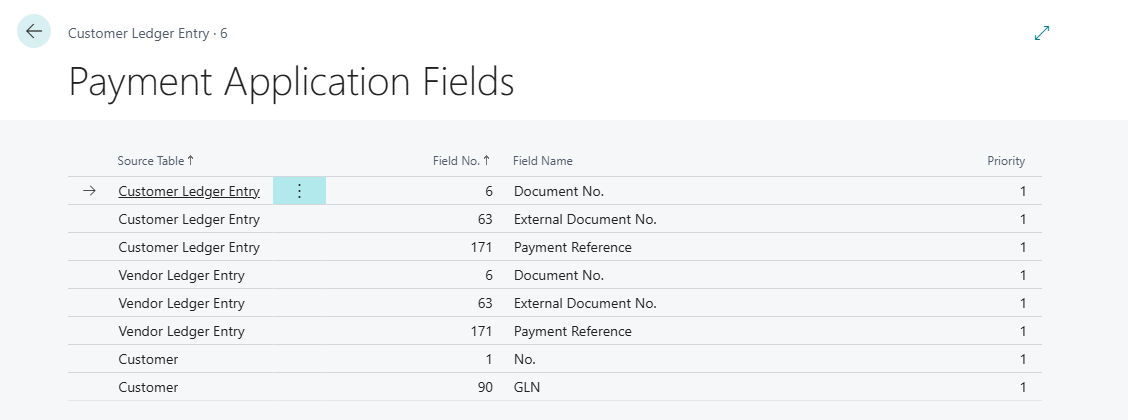
Setup of the fields and points to consider: Payment application fields.
See also
- How automatic application works
- Document no. matching and context words
- Payment application settings
- Own bank accounts
- Set up rules for automatic application of payments (Microsoft Learn)