
Direct matching for payment service providers
For payment service providers, 365 business Banking identifies the invoice directly by transaction ID or payment reference, even with many equal amounts.
A statement from PayPal, Stripe or Shopify often contains thousands of payments with similar amounts from customers without an IBAN. Rating by name and amount rarely produces an unambiguous result in this case. However, each payment carries an identifier, the transaction ID or an order number in the payment reference, that is also on the customer ledger entry. Direct matching uses this identifier. If it finds exactly one open customer ledger entry, it narrows the candidates down to this entry.
Standard functionality in Business Central
The standard rates every open entry for every line according to the Payment Application Rules. With many lines and many open entries, this takes a long time, and with equal amounts and no unique payer, there is often no unambiguous choice.
For more information from Microsoft, see Reconcile payments using automatic application.
What 365 business Banking adds
365 business Banking adds two direct matching methods that run before the rating:
| Matching | Applies to | Switch |
|---|---|---|
| Transaction ID matching | accounts at payment service providers and Universal accounts | Enable Transaction ID Matching |
| Direct purpose matching | all bank accounts | Enable Direct Purpose Matching |
Both only consider open customer ledger entries of the document types Invoice and Credit Memo. An incoming payment is searched among the invoices, an outgoing payment among the credit memos. A document number shared by an invoice and a credit memo therefore does not make the match ambiguous.
If a matching method has found exactly one entry, application only rates this entry. Vendors, employees and bank account ledger entries are no longer considered for the line. If the result is ambiguous, nothing is narrowed and normal application continues. In Quick Apply, both methods are the first stages. There, the entry found is applied directly.
Transaction ID matching
Payment service providers deliver a transaction ID for each payment, which is usually also written into the customer ledger entry on collection or import (typically into the External Document No.).
The search works as follows:
- The transaction ID of the line is compared exactly, in Priority order, with the value of each payment application field with the source table Customer Ledger Entry. If there is no such line, only the External Document No. is compared.
- If exactly one open entry contains the value, it is the candidate.
- If several entries contain the same value, the next field is used. If the result remains ambiguous, normal application decides.
The matching only runs for accounts that are not ordinary bank accounts. For a bank account, the transaction ID is an identifier of the bank that is not on any of your entries. Every account at a bank counts as an ordinary bank account, regardless of how its transactions are delivered: PSD2/XS2A via finAPI, EBICS, SWIFT or camt file, and likewise an account without an account information service. Transaction ID matching therefore only runs for payment service providers and for Universal accounts (Account Information Service Universal), because their transactions also carry the identifier of the provider.
Direct purpose matching
Many payment service providers write the order or invoice number into the payment reference, for example #LF2383883 - CHARGE. Direct purpose matching searches for such numbers via an index of all open customer ledger entries:
- Split. Transaction text and additional information are converted to upper case and split into words (tokens) at every character that is not a letter A–Z or a digit.
#LF2383883 - CHARGEbecomesLF2383883andCHARGE. - Look up. Each token is looked up in the index. The index contains the values of the payment application fields of the open customer ledger entries, split in the same way. Without a line for Customer Ledger Entry, it contains the Document No. and the External Document No.
- Uniqueness. A token that belongs to several entries is ignored. If different tokens point to different entries, the line is ambiguous and nothing is narrowed. Only if all unique matches point to the same entry is this entry the candidate.
- Payer check. If the account the money came from unambiguously belongs to another customer according to its IBAN, the match is not used. An IBAN that is assigned to no customer or to several customers does not exclude the match.
A match only counts while the entry is open. The index is rebuilt at the start of every run of Apply Automatically and Quick Apply, so an entry posted in the meantime is no longer offered.
This matching runs for all bank accounts, but only if the transaction ID has not narrowed anything.
Dynamic token lengths
Which tokens are searched depends on your data. The shortest and the longest string occurring in the payment application fields of the open customer ledger entries (invoices and credit memos) set the limits. This also finds short references, such as five-character shop order numbers like 46006, without arbitrarily short strings from the payment reference producing matches. However, a token always has at least 4 characters. Two- or three-character strings such as 12 also stand for amounts, days or house numbers in a payment reference and never count as a reference. If no limits can be determined, 4 to 30 characters apply. No setup is required for this. You control the behavior indirectly via the payment application fields.
Switches
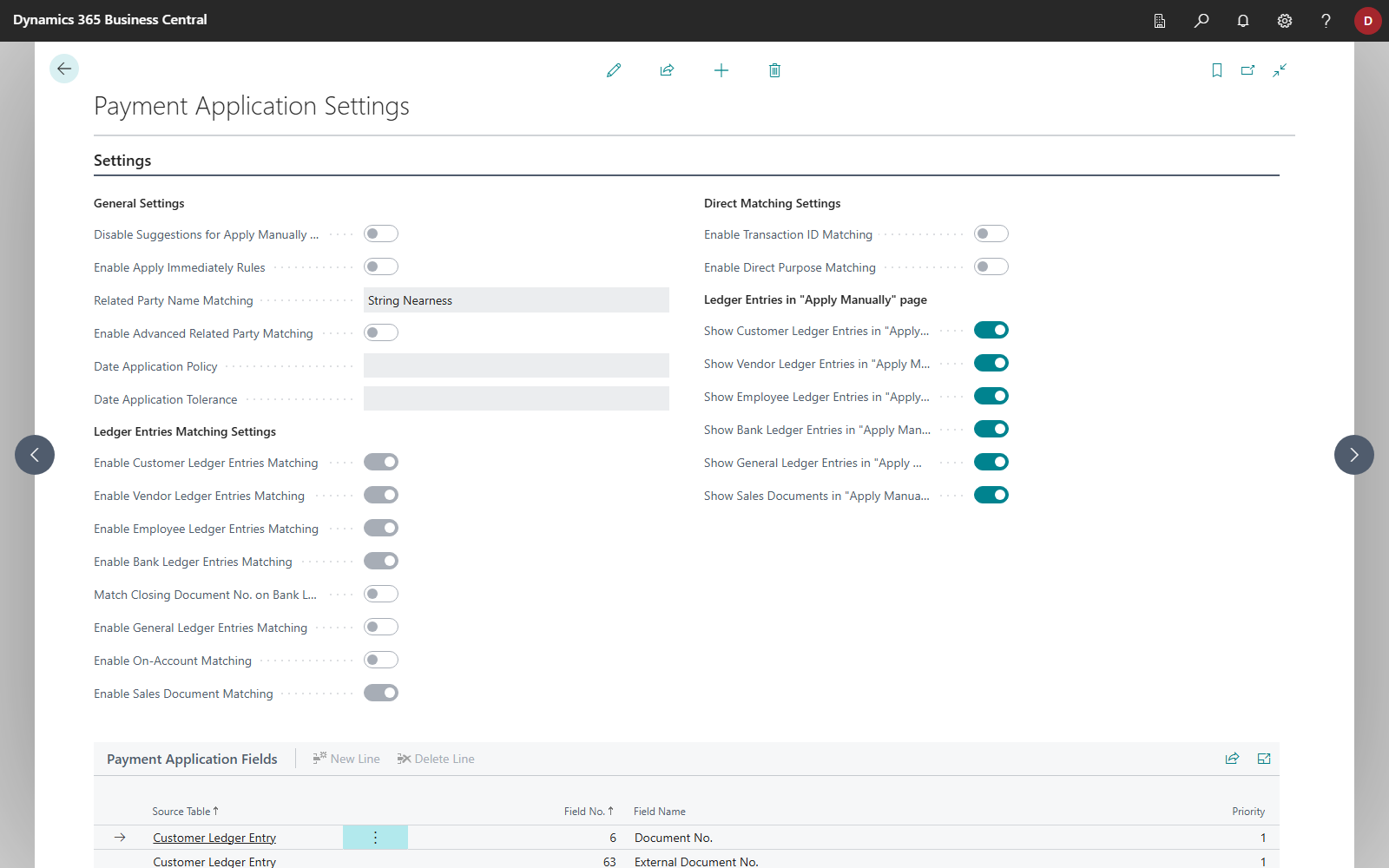
Both switches are on the Payment Application Settings page in the Direct Matching Settings group. They apply to Apply Automatically and to Quick Apply. If you turn one off, Apply Automatically rates the affected lines like any other line, and Quick Apply processes them with its remaining stages.
Default values and update to 18.4
In a newly set up company, both switches are off. Turn them on if you want to use direct matching. In an existing company in which the switches were turned on by default, the update to 18.4 turns both switches off once. As long as the switches are off, neither transaction ID matching nor direct purpose matching runs, and accounts at payment service providers with many equal amounts are applied automatically less often. After the update, check the Payment Application Settings and turn the switches back on if needed.
See also
- Payment application fields
- Apply bank transactions
- Check application
- Payment service providers
- Payment application settings