
Payment Application with Open Sales Documents
How 365 business Banking applies incoming payments to sales orders and invoices that are not yet posted, using on-account payments and preliminary entries.
The typical case is a prepayment: the customer pays before the document is invoiced. In Microsoft Dynamics 365 Business Central, there is no customer ledger entry yet to apply the payment to. 365 business Banking therefore posts the payment on account to the customer and stores the document reference as a preliminary entry. When the document is invoiced, Business Central applies the payment to the new invoice automatically.
Standard functionality in Business Central
In the standard, a payment can only be applied to posted entries. For a prepayment, you post it on account to the customer and apply it to the invoice manually after invoicing.
For more information from Microsoft, see Reconcile customer payments.
What 365 business Banking adds
- Open sales orders and invoices are offered as candidates during application, both during automatic application and on the Payment Application page.
- One payment can be distributed over several documents of the same customer.
- On posting, a preliminary entry is created per document. On invoicing, it is applied to the posted invoice automatically.
Only released sales orders and sales invoices (status Released) and only incoming payments are considered.
Setup
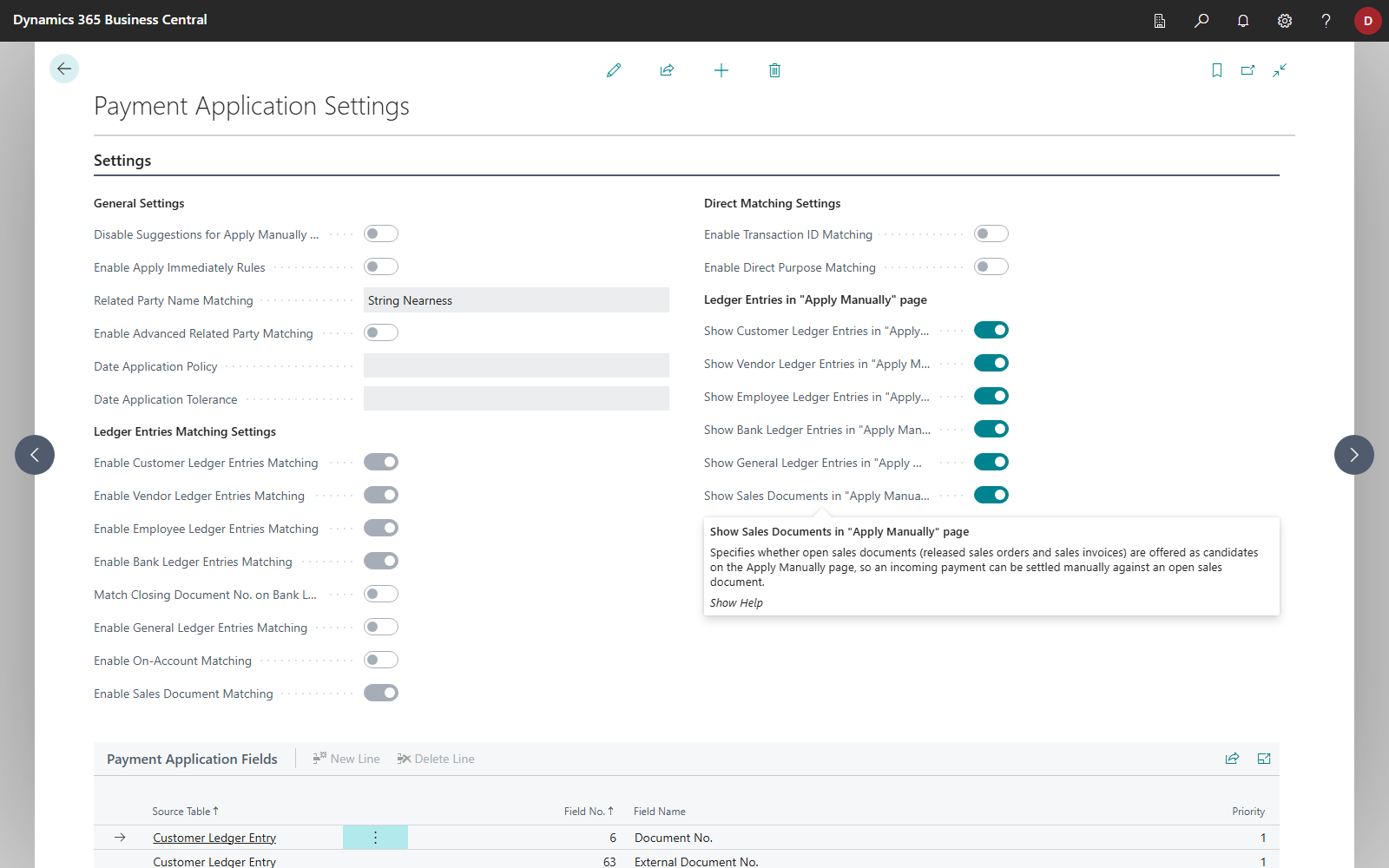
- Choose the Search icon, enter Payment Application Settings and open the page.
- Turn on Enable Sales Document Matching so that incoming payments are assigned to open sales documents automatically.
- Leave Show Sales Documents in "Apply Manually" page turned on (default) so that open sales documents appear as lines during manual application.
Note
The two options are independent of each other. You can turn automatic matching off and still offer sales documents for manual application, or the other way round.
Automatic application
With Apply Automatically (or Apply Selected Automatically), 365 business Banking checks for each line:
- Only incoming payments without a posted open entry. The line is an incoming payment, has no application yet, and application found no posted open entry for it. A posted invoice always takes precedence.
- Exactly one payer. The customer is recognized via IBAN or payment application fields. If the payer cannot be identified uniquely, 365 business Banking derives the customer from the document numbers in the payment reference, but only if all documents named belong to the same (bill-to) customer.
- At least one named document. A document counts as named if its No., External Document No. or Your Reference is in the payment reference (at least 4 letters and digits; special characters are ignored in the comparison). Without a named document, no automatic assignment takes place.
- Allocation. The amount is allocated to the named documents first, then, if an amount remains, to the customer's other open documents, oldest first (by document date, then No.). Each document receives at most its outstanding amount, see below.
- The line receives the match confidence High - Sales Document.
Because the line then already has an application, assignment to a sales document also takes precedence over reconciliation rules and on-account matching for the same line.
Maximum amount per document
A document is allocated at most what is still open on it: its Amount Including VAT, less what has already been invoiced (for a partially invoiced order, including an invoiced prepayment) and less open preliminary entries that already cover it. A second payment for the same order therefore does not settle it twice. An order and an invoice with the same number are told apart. Payment discount is not deducted.
Manual application
- Select the line and choose Apply Manually.
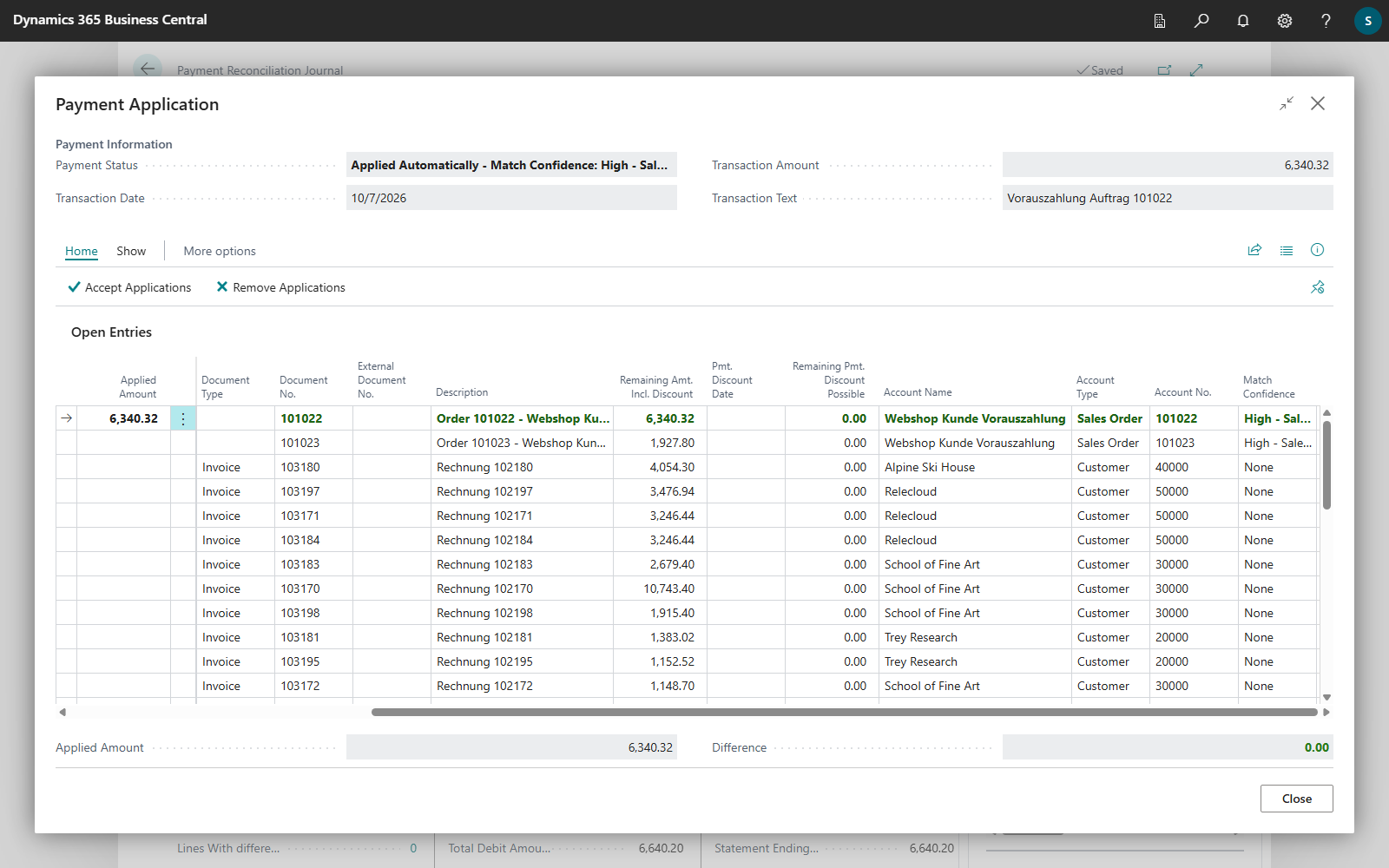
- On the Payment Application page, the open, released sales documents appear as separate lines with the account type Sales Order or Sales Invoice. If the payer is recognized, only that payer's documents are shown; otherwise, all documents are shown. As Remaining Amount and Remaining Amt. Incl. Discount, a document line shows the open amount of the document: the amount including VAT minus the part already invoiced and the payments already assigned to the document as open preliminary entries, such as a posted prepayment. The Account Name column shows the bill-to customer of the document. Choose the name to open the customer card.
- Select Applied for the documents you want. The applied amount per document is capped at its outstanding amount. The remaining amount is available for further documents.
- Close the page and post the reconciliation.
Rules for one line
- A line only settles documents of a single customer: "This statement line already settles a sales document of customer …; one payment can only settle documents of a single customer."
- Sales documents cannot be combined with other entries on the same line: "A sales-document settlement cannot be combined with other applications on the same statement line."
- A document is only on one line in a reconciliation: "Sales document … is already applied on statement line … of this reconciliation."
Posting and resolution
When the reconciliation is posted, one on-account payment to the customer is posted per line. The Sales Order and Sales Invoice account types serve for selection only. At the same time, one preliminary entry per assigned document is created with the amount allocated to that document.
As soon as the document is invoiced, Business Central applies the document's open preliminary entries to the posted sales invoice automatically. For an order, this is the invoice posted from that order, also for partial shipments. If the invoice does not cover the whole preliminary entry, the entry is applied partially and remains open with the remaining amount. Requirement: payment and invoice have the same currency.
If the posted payment reconciliation is reversed, the related preliminary entries are closed: Reverse a posted payment reconciliation.
Reviewing preliminary entries
Choose the Search icon, enter Preliminary Entries and open the list. It shows:
| Field | Meaning |
|---|---|
| Entry No. | unique number |
| Type | Sales Document or Remittance Advice (REMADV) |
| Open | whether the preliminary entry is still open |
| Account Type, Account No. | customer or vendor it refers to |
| Source No. | document it was created for, such as the order or invoice number |
| Applies-to Document No. | posted document it was applied to |
| Amount, Remaining Amount | original amount and amount not yet settled |
| Currency Code | currency |
| Payment Date | posting date of the underlying payment |
| Ledger Entry No. | customer or vendor ledger entry holding the payment |
| Match Source | Bank Reconciliation, Manual or Remittance Advice Import |
| Match Quality | quality of the assignment |
| Created Automatically | whether the preliminary entry was created automatically |
| Manually Verified | flag for reviewed entries |
| Closed At | when it was closed |
Preliminary entries are kept
Preliminary entries are never deleted. They are closed once they have been settled in full and remain in the list as evidence. Use the Manually Verified field to mark preliminary entries you have checked. It is the only field you can change on the page.
You can also find the preliminary entries for an order, an invoice or a payment via Find entries.
See also
- Apply bank transactions
- How automatic application works
- Payment application settings
- Payment Application with Open Sales Documents (feature)