
Payment groups
With payment groups, 365 business Banking applies a collective payment of a central account to the open entries of all members, for incoming and outgoing payments.
In purchasing associations, branch networks, franchise systems and corporate groups, a central account settles the open entries of several members with a single payment. A payment group maps this relationship, and 365 business Banking distributes the collective payment to the members' entries on posting.
Standard functionality in Business Central
In the standard, a payment only applies entries of a single account. A collective payment for several customers or vendors must be split and reposted manually in the standard. For more information about application in the standard, see Reconcile payments using automatic application (Microsoft Learn).
What 365 business Banking adds
- Automatic collective application in the payment reconciliation journal across the entries of all members.
- Collective payment for outgoing payments through the extended payment suggestion: one payment to the central account for the entries of all members.
- Distribution on posting in the same transaction, through regular applications.
- Payment Group FactBox and Payment Group action on customers and vendors.
Set up a payment group
- Choose Payment Groups in the Microsoft Dynamics 365 Business Central search.
- Create a payment group with New and enter a Code and Description.
- On the Central Account FastTab, choose the Account Type:
- Customer: for incoming collective payments,
- Vendor: for outgoing collective payments.
- Choose the Central Account No., the account that makes or receives the collective payment.
- In the Members part, enter the Account No. of each member.
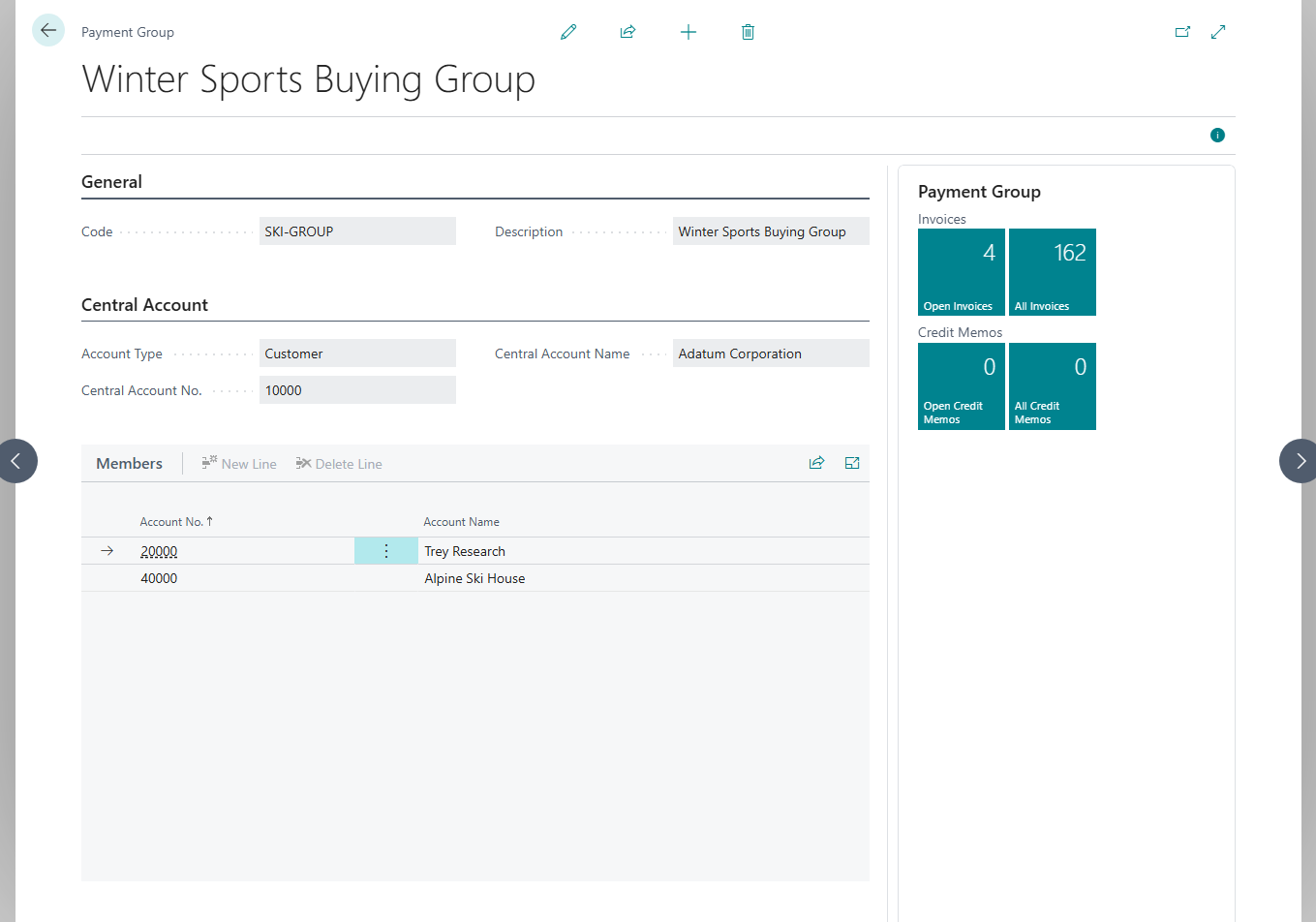
The central account is not a member
The central account is not entered as a member. The collective payment also applies its own entries, as in the standard.
The following applies:
- The Account Type can no longer be changed once the payment group has members.
- An account can belong to only one payment group and cannot be the central account of one payment group and a member of another at the same time.
- A customer or vendor that is the central account of a payment group cannot be deleted. If a member account is deleted, it is removed from the payment group.
Apply an incoming collective payment (account type Customer)
Automatically
- Retrieve the bank transactions into a Payment Reconciliation Journal.
- Choose Apply Automatically.
365 business Banking forms a collective application across the entries of the central account and the members when the entries to apply are unambiguous:
- by document numbers: the payment reference names several documents of the payment group. Only the most clearly recognized document numbers count. An invoice whose number merely ends in the same three digits by chance is not included.
- by amount: without document numbers, the open entries of the payment group together must add up to the payment amount, within the bank account's tolerance.
If entries of several accounts are applied, the line then shows the central account as its account. If neither condition is met, the standard applies the best matching single entry. Why no collective application was formed is shown by Check Application with a reason such as "These … open entries come to … and the transaction is for …. The tolerance does not cover this difference." See Check application.
Manually
Choose Apply Manually. If the line is assigned to an account of the payment group, the Payment Application page offers the open entries of all accounts of the payment group. The Payment Group Account No. column shows the central account. You can apply entries of several members on the same line.
Posting
- The payment is posted to the central account. It applies the central account's own entries directly.
- In the same transaction, 365 business Banking distributes the amount to the members: for each member entry, a pair of postings with the payment's document number is created, consisting of one posting on the central account that applies the payment and one on the member that applies its entry.
- If the applied entries concern only a single member, the payment is posted directly to that member, without going through the central account.
At the end, the payment and the member entries are closed, and the central account is balanced.
Outgoing collective payment (account type Vendor)
For a payment group, the extended payment suggestion creates a single payment line against the central account, paid to its bank account. The members' entries are earmarked through the line's applies-to ID. When the Payment Journal is posted, the payment is distributed to the members in the same transaction, as for incoming payments. For a payment group with account type Customer, the same applies to refunds.
Do not change the amount after the suggestion
The distribution checks whether the posted payment exactly matches the earmarked member entries. If you changed the line amount after the suggestion, posting stops: "The posted payment of … does not match the suggested member applications of …. The journal line was changed after the payment suggestion. Delete the line and run the payment suggestion again." Delete the line and run the payment suggestion again.
Netting
Members of a payment group are excluded from the customer/vendor netting of the extended payment suggestion because their entries are applied through the central account.
View the payment group on the account
On the Customer Card and Vendor Card and in the lists, there is the Payment Group action. It opens the payment group the account belongs to as central account or member. On the card, it is only visible if the account belongs to a payment group. In the Customers and Vendors lists, it is always available and, for an account without a payment group, reports for example "Customer … is not part of a payment group."
The Payment Group FactBox on the card shows Payment Group Code, Name, No. of Members, Central Account No. and Central Account Name. For the central account (customer or vendor), the FactBox also contains the Group Documents section with Open Invoices, All Invoices, Open Credit Memos and All Credit Memos across the central account and members, and the Members cue, which opens the member accounts. Choosing a value opens the respective entries.
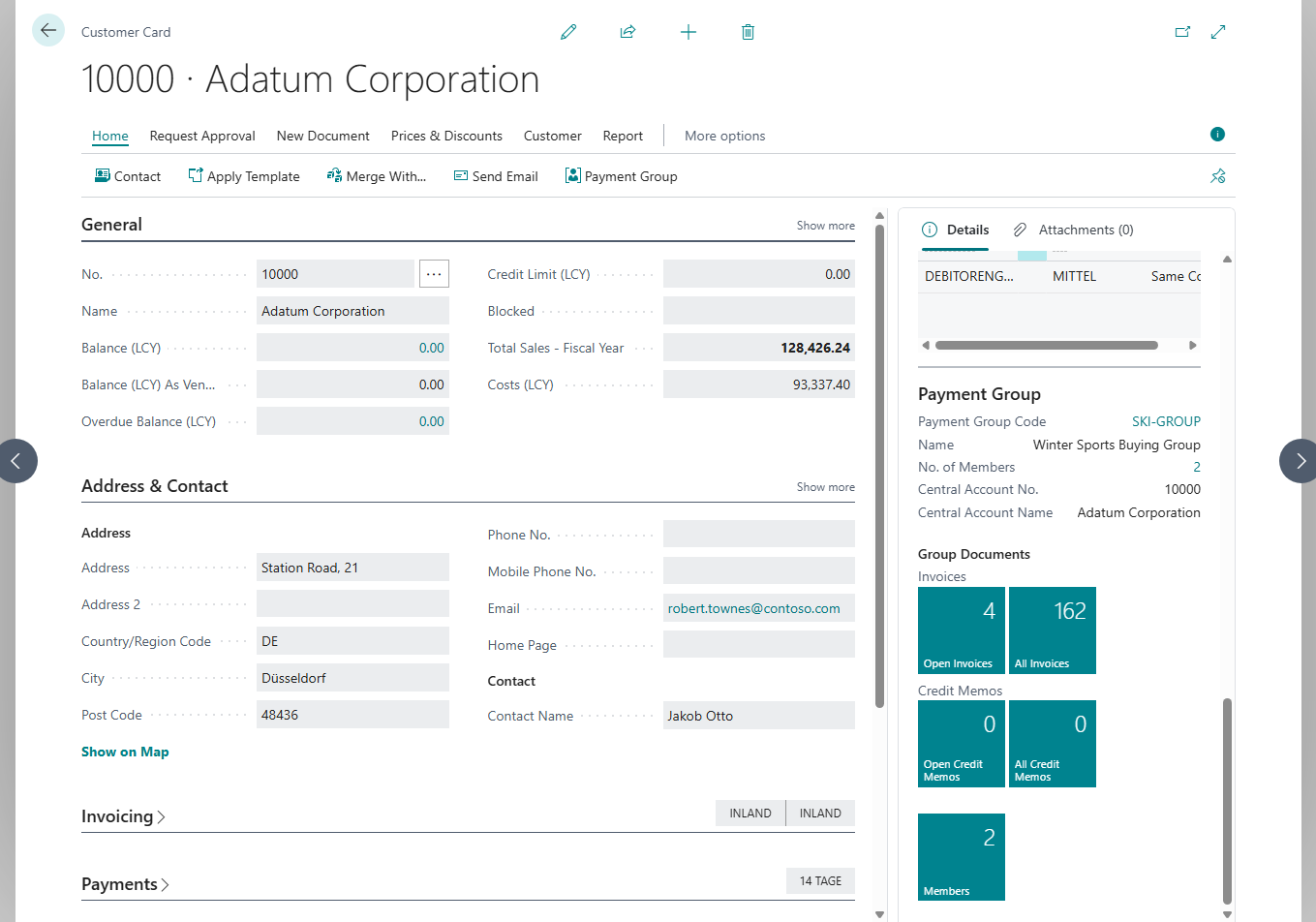
The payment group card also has a Payment Group FactBox with the open and all invoices and credit memos of the payment group.
All Invoices and All Credit Memos
All Invoices and All Credit Memos count all posted documents, including applied ones. The open documents are shown by Open Invoices and Open Credit Memos.
Unapply
The distribution consists of regular customer or vendor applications. You can therefore undo it with the standard Unapply Entries action.
Troubleshooting
| Message | Cause and remedy |
|---|---|
| "You cannot change the account type because the payment group already has members." | Remove the members first. |
| "… is already a member of payment group …." / "… is already the central account of payment group …." | An account belongs to only one payment group. |
| "… is the central account of payment group … and cannot be added as a member." | The central account is not entered as a member. |
| "You cannot delete … because it is the central account of payment group …." | First assign a different central account to the payment group or delete the payment group. |
| "Statement line … applies payment group entries together with entries of another account type. …" | A line with a collective application also applies G/L entries or bank account ledger entries. Apply those on a separate line, for example after splitting the line. |
| "The posted payment of … does not match the suggested member applications of …. …" | The amount of the payment line was changed after the suggestion. Delete the line and run the suggestion again. |
See also
- How automatic application works
- Apply bank transactions
- Extended payment suggestion
- Payment journal
- Payment groups (new feature)