
Document No. Matching
365 business Banking finds document numbers in the payment reference even if they contain a line break, have no prefix, or are given as a partial number with a context word.
After the IBAN, the document number in the payment reference is the strongest indicator of which open entry was paid. However, payers rarely enter it exactly as it is in Microsoft Dynamics 365 Business Central. The prefix is missing, the bank wraps the number, or several numbers are listed in shortened form. 365 business Banking recognizes such document numbers and excludes matches that only fit by coincidence.
Standard functionality in Business Central
The standard searches the transaction text for the Document No. and External Document No. of the open entry. If it finds them, the document number counts as matched. This result is included in the rating according to the Payment Application Rules together with the related party and the amount.
For more information from Microsoft, see Set up rules for automatic application of payments.
What 365 business Banking adds
- Values searched: You define which values are searched via the payment application fields, not only Document No. and External Document No.
- Search scope: the transaction text including additional information, the Transaction ID, the Sender Customer Reference and the End To End Reference of the bank transaction.
- Search method: three stages, from exact to a partial number with a context word (see below).
Three stages
Document numbers with fewer than 3 characters are not searched because they would match by coincidence. The search is not case-sensitive.
| Stage | Condition | Result |
|---|---|---|
| 1 | The complete document number is in the text, bounded left and right by a character that is neither letter nor digit. | exact |
| 2 | The complete document number is in the text but split by exactly one space, as created by a line break from the bank. With more spaces, it is discarded. | exact |
| 3 | Only an end part of the document number is in the text (the prefix is missing). Only for bank accounts, not for payment service providers and Universal accounts, and only in the transaction text. | strong, weak or exact, see below |
Partial numbers (stage 3)
365 business Banking shortens the document number from the front, character by character, and searches for each end part with at least 3 characters. An end part only counts under the following conditions:
- It must end a word in the payment reference.
332as the end of103332does not count if it is only contained in103328. - It must not come from a structured SEPA field. The values of
IBAN,BIC,CRED,DEBT,MREF,KREF,ABWA,ABWE,COAMandOAMTare removed first because they never contain your document number.EREFandSVWZare kept.
| End part | Without context word | With weak context word | With strong context word |
|---|---|---|---|
| 5 characters or more | strong | strong | exact |
| 3 or 4 characters and at least 70 % of the document number | no hit | weak | strong |
| 3 or 4 characters, less than 70 % | no hit | no hit | no hit |
A weak match is discarded if the payer does not match the business partner of the entry (Related Party Matched No), because a short number alone is not sufficient evidence. Context words are words like Invoice, RE or INV that indicate that a document number is meant: Context words.
Reason for the 70 % limit
Shortening from the front is intended to remove a prefix such as VR, RG or INV, not to reduce a document number to any ending. Otherwise, 2021 would fit every document number ending in 2021.
Examples
| Document No. | Payment reference | Result | Reason |
|---|---|---|---|
103045 | Invoice 103045 | exact | stage 1 |
103045 | Invoice 1030 45 | exact | stage 2: one space from the line break |
VR103045 | Payment 103045 | exact | end part 103045 has 6 characters, PAYMENT is a strong context word |
VR103045 | 103045 | strong | end part with 6 characters, no context word |
A4711 | Re 4711 | weak | end part with 4 characters (80 %), RE is a weak context word. Discarded if the payer does not match. |
A4711 | Invoice 4711 | strong | as above, INVOICE is a strong context word |
103332 | RE 103328 | no hit | 332 is inside 103328 and does not end a word |
25002019 and 25002021 | Invoice 25002019, 2021 | only 25002019 | 2021 is only 50 % of 25002021 and therefore below the 70 % limit |
In the last example, 25002021 is not applied, because an end part with half the digits is not sufficient. Check application shows why a number was not considered. The log then contains a reason such as "The payment purpose contains 2021, which is the end of document number 25002021. That is too little of the number to count as a reference to it."
Which fields are searched
Which values of an open entry count as a document number is defined by the Payment Application Fields on the Payment Application Settings page.
- After installation, Document No., External Document No. and Payment Reference are entered for Customer Ledger Entry and for Vendor Ledger Entry.
- If a source table has no line, 365 business Banking only uses Document No. and External Document No., not the payment reference.
You can add further fields from Customer Ledger Entry, Vendor Ledger Entry or G/L Entry, including fields from extensions of other publishers, as long as they are text or code fields.
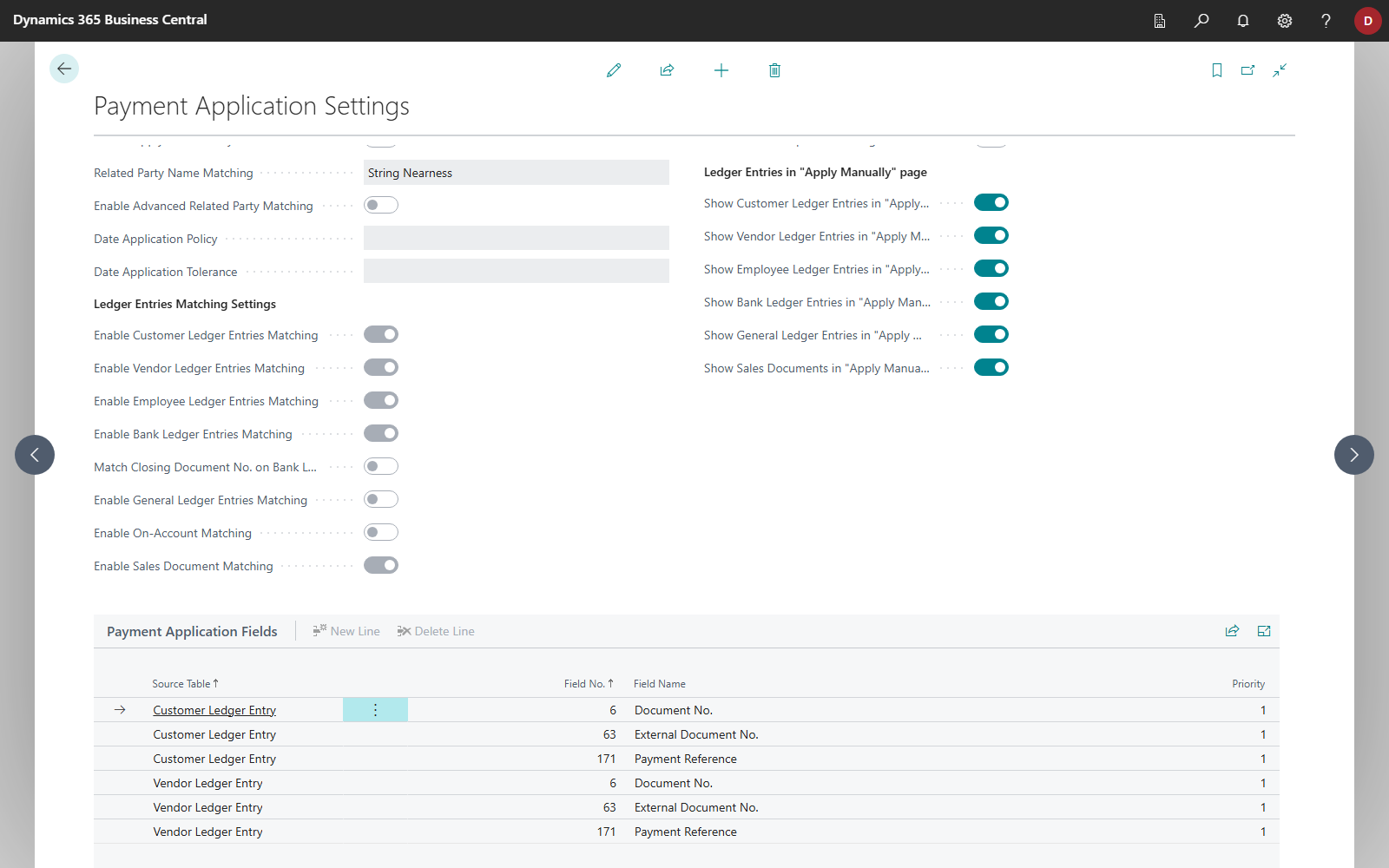
Details: Payment application fields.
See also
- Context words
- Payment application fields
- Related party matching
- Direct matching for payment service providers
- Check application