
Foreign currency settings
With fixed exchange rates and the applied-to exchange rate, 365 business Banking posts foreign currency payments without unnecessary exchange rate differences.
Foreign currency business is frequently conducted at fixed exchange rates. In addition, applying a foreign currency invoice with a payment in the same foreign currency on a foreign currency bank account produces an exchange rate difference whenever invoice and payment were posted at different rates, although no amount remains open in the foreign currency.
Standard functionality in Business Central
The standard converts every foreign currency amount into local currency at the dated exchange rate of the currency and posts differences between invoice and payment as realized gains or losses. For more information from Microsoft, see Update currency exchange rates.
What 365 business Banking adds
- Fixed exchange rates per bank account and per customer/vendor, dated like the standard rates.
- Use Applied-to Exchange Rate: the payment adopts the rate of the entry it is applied to.
Both are part of the licensed scope: without a valid license, the standard rate applies.
Order of precedence
When posting through the Payment Reconciliation Journal and the General Journal, the currency factor of a line with a bank account, customer or vendor is determined in this order:
- Applied-to entry: If Use Applied-to Exchange Rate is set to Applied-to Entry on the bank account and the line is applied to an entry, the rate of the applied entry is used. With several applied entries, the earliest entry date counts.
- Fixed customer/vendor rate
- Fixed bank account rate
- Standard exchange rate of Business Central
Note
The customer/vendor rate overrides the bank account rate. The rate of the applied entry takes precedence over both, but only if Use Applied-to Exchange Rate is set and the line is actually applied to an entry. Otherwise, the fixed rates apply.
Storing a fixed exchange rate on the bank account
Fixed rates are maintained by date per account and currency, in the same way as the standard currency exchange rates.
- Open the Bank Account Card.
- Choose the Fixed Exchange Rates action. The Bank Account Currency Exchange Rates page opens.
- Enter per line:
- Currency Code
- Starting Date
- Exchange Rate Amount and Relational Exch. Rate Amount
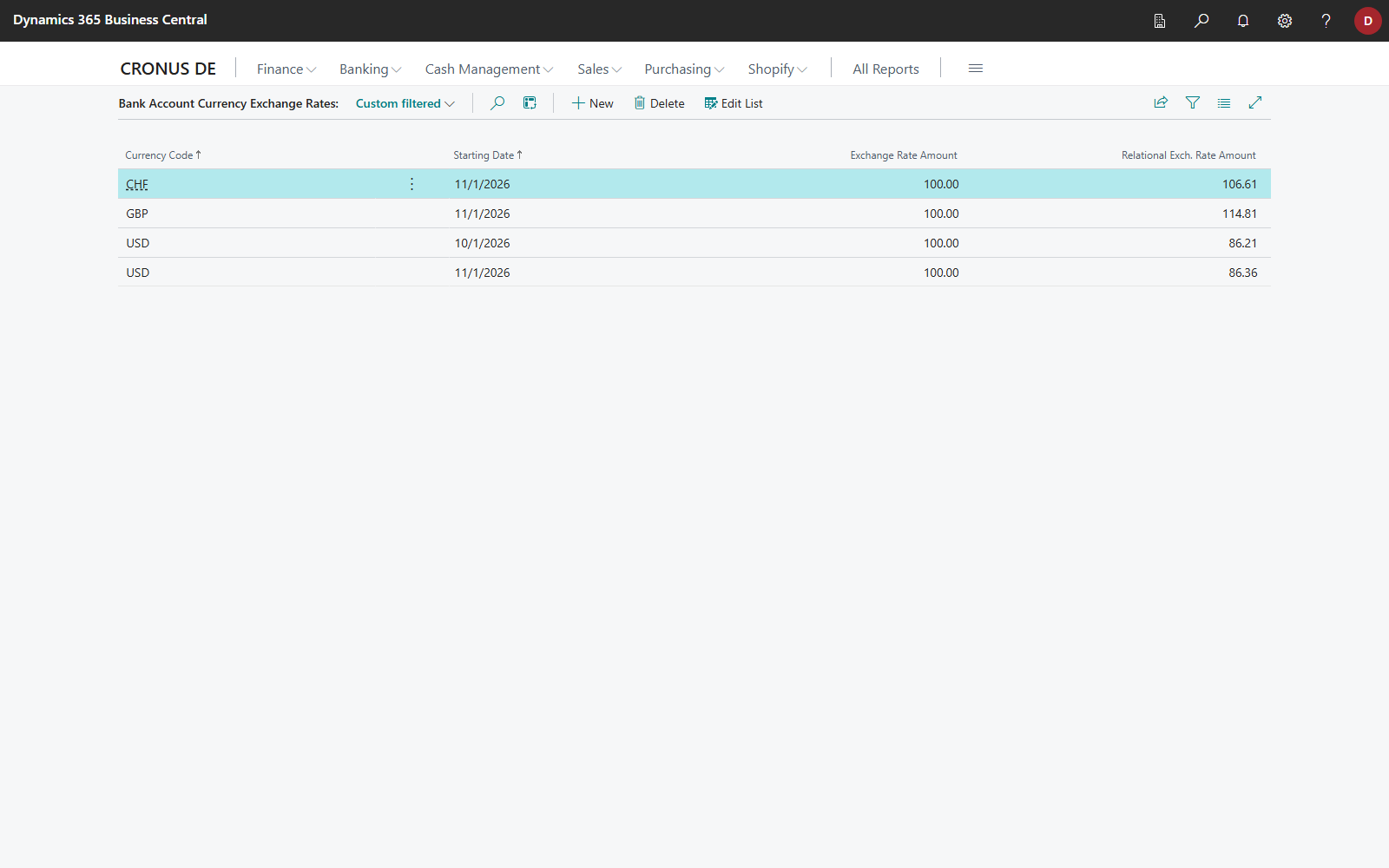
The currency factor is the exchange rate amount divided by the relational exchange rate amount.
The Has Fixed Exchange Rate field on the bank account card indicates whether fixed rates exist for the account.
Storing a fixed exchange rate on the customer or vendor
- Open the Customer Card or Vendor Card.
- Choose the Fixed Exchange Rates action. The Customer/Vendor Currency Exchange Rates page opens, filtered to the respective account.
- Enter the rates as on the bank account.
Here as well, the Has Fixed Exchange Rate field indicates whether rates exist.
Enabling the applied-to exchange rate
- Open the Bank Account Card.
- Set the Use Applied-to Exchange Rate field to Applied-to Entry.
- When a payment through this bank account is applied to an entry in the payment reconciliation journal or general journal, the payment adopts the exchange rate of that entry.
Example: An invoice of USD 1,000 was posted at rate 1.10. The payment of USD 1,000 is received on the USD account while the daily rate is 1.12. Without the option, an exchange rate difference arises, even though no amount remains open in USD. With the option, the payment is posted at 1.10, and no exchange rate difference occurs.
Exchange rate adjustment
The Exchange Rates Adjustment report revalues open entries in foreign currency at the standard adjustment rate, that is, the Adjustment Exch. Rate Amount from the Currency Exchange Rates. This also applies to entries that were posted at a fixed rate. The fixed exchange rates of 365 business Banking only take effect when the payment is posted. If the adjustment rate differs from the fixed rate, the adjustment therefore produces an exchange rate difference.
Scope
Fixed rates (bank account as well as customer/vendor) and the applied-to exchange rate are supported in the Payment Reconciliation Journal and the General Journal. What is recalculated is the local currency amount of the payment line; VAT amounts in local currency keep the rate they were calculated with. For payment lines, this is irrelevant because they carry no VAT.
See also
- Incoming payments and bank reconciliation
- Bank account card
- Foreign currency settings (new feature)
- Set up currencies (Microsoft Learn)