
Bank accounts of customers, vendors and employees
Status, account holder, release and remit-to address: what 365 business Banking checks on your business partners' bank accounts before a payment is made.
The destination of a payment is stored in the recipient's bank account: the vendor bank account, the customer bank account or the IBAN on the employee card. 365 business Banking adds a release status and an account holder to these bank accounts. As a result, not every newly created bank account can be used for payments immediately, and the Verification of Payee checks the correct name.
Standard functionality in Business Central
In the standard product, customers and vendors can have any number of bank accounts; one of them is set as the preferred bank account. Vendors can also have remit-to addresses that invoices are to be paid to. Employees have no bank accounts but an IBAN and SWIFT Code on the employee card. See Microsoft Learn: Set up vendors.
What 365 business Banking adds
| Field or action | Where | Purpose |
|---|---|---|
| Status (New / Released) | card and list of the customer and vendor bank account | New bank accounts must be released before they are entered for payments. |
| Release, Reset Status | card | change the status |
| Account Holder | card and list | name used for payment and verification |
| Verification of Payee (VoP), action and status | card and list | see Verification of Payee (VoP) |
| Verification of Payee (VoP) action, VoP Status field | employee card, after SWIFT Code | verifies the employee's IBAN and name, see Employees |
| Bank Account on the remit-to address | remit-to address, Payments FastTab | bank account for invoices with this remit-to address |
| Diff. Message to Recipient | purchase invoice, posted purchase invoice | a separate payment reference for one invoice |
The IBAN is formatted when it is entered.
Status New and Released
A new customer or vendor bank account has the Status New. This also applies to bank accounts that 365 business Banking creates automatically when posting a payment reconciliation (Create Bank Accounts in Banking Setup). An IBAN from a bank statement is not yet a verified payment destination.
Release sets the status to Released, Reset Status back to New. Both actions ask "Do you really want to set the status to …?".
Only users with the permission set Banking - Release Bank Accounts (bdev.BNK RELEASE) can release bank accounts. It is also part of 365 Banking - Setup. All other users receive the message: "You do not have permission to release bank accounts for payments. Ask your administrator to assign you the 'Banking - Release Bank Accounts' permission set." See Permissions and licenses.
If you change the IBAN, the SWIFT Code, the Bank Account No., the Bank Branch No., the Account Holder or the Country/Region Code of a released bank account, the status is reset to New, because the release applied to the previous details. Release the bank account again after checking. Other fields, such as the address, do not change the status.
If you choose a bank account with status New as Recipient Bank Account on a journal line or as the customer's or vendor's preferred bank account, Business Central asks:
… for … is currently not released for payments. Do you want to release …?
With Yes, the bank account is released and taken over; with No, it is rejected ("… is currently not released for payments.").
Suggest Payments does not ask per line. If the recipient's bank account is not released, it creates the line without a Recipient Bank Account and states the number of such lines in its closing message: "… line(s) were created without a recipient bank account, because the bank account of the recipient is not released for payments. …" Release the bank account and select it on the line. It is recommended to release new bank accounts before the payment run.
When 365 business Banking is installed, all existing bank accounts are set to Released so that existing payment routes can still be used.
When the status is checked
The status is checked when the bank account is entered on a journal line or as the preferred bank account, and again at Carry Out Payment: a customer or vendor line without a recipient bank account or with a bank account in status New is not paid ("The bank account … of … is not released for payments. …"). If you reset the status later, a line that already contains the bank account is therefore also not paid.
Account holder
The Account Holder is the name under which the account is held at the recipient's bank. It is prefilled with the customer's or vendor's name when the bank account is created and is mandatory.
- When paying, this name is sent to the bank as the recipient, not the name on the customer or vendor card.
- In the Verification of Payee, this name is compared with the name the bank holds for the IBAN. The field caption shows the result directly, for example "Account Holder 🟢".
If you change Account Holder, IBAN or SWIFT Code, the Verification of Payee result is reset, because it applied to the previous details. When a different account holder is appropriate is described under Manage different account holders.
Employees
For employees, the employee's full name is sent to the bank as the recipient, with the IBAN and SWIFT Code on the employee card. There is no release status for employees.
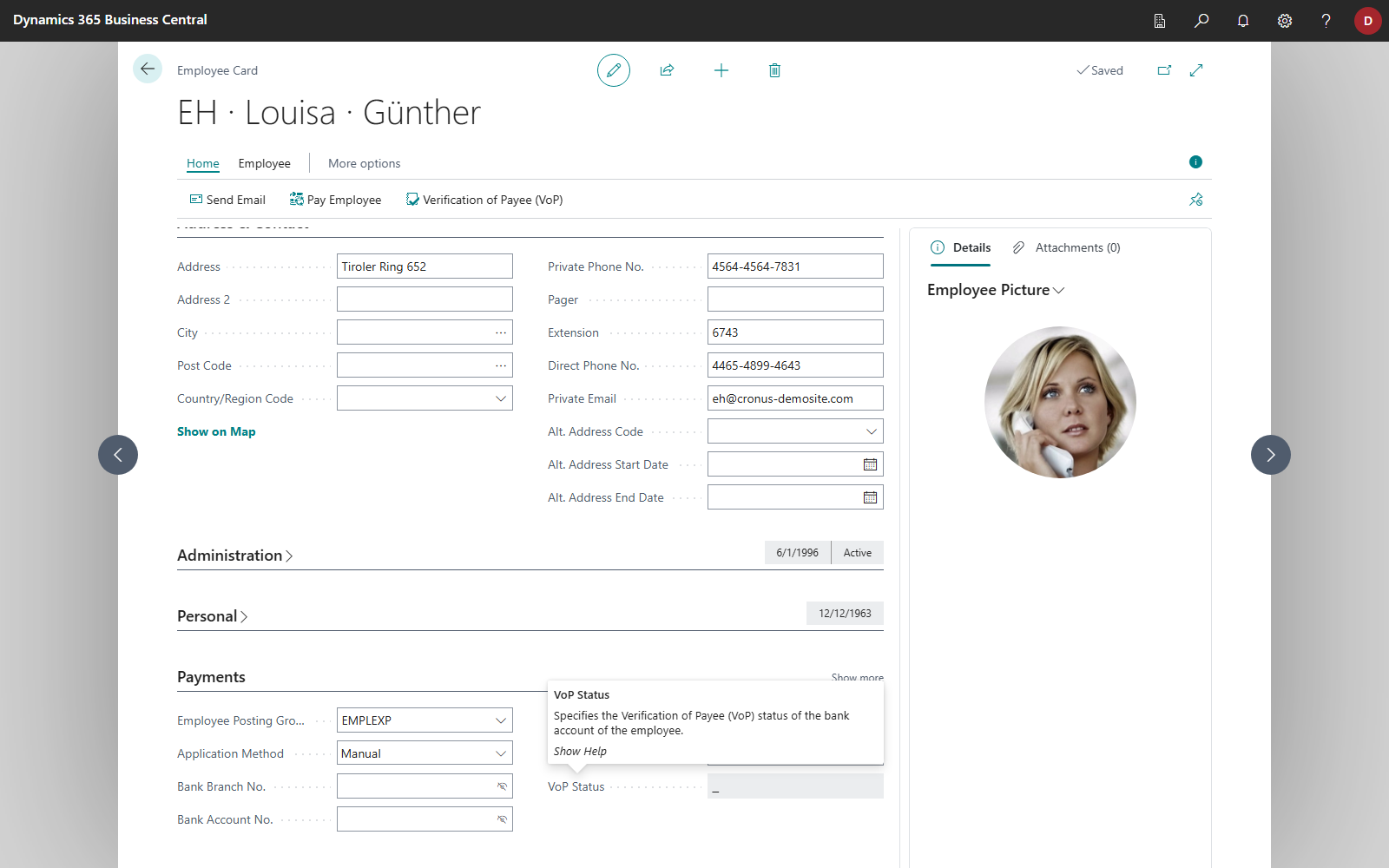
Verification of Payee is also available for employees: on the employee card, the VoP Status field after SWIFT Code shows the result, and the Verification of Payee (VoP) action runs the check. The action is only available with a license. If you change the IBAN, the SWIFT Code or any part of the name (first, middle or last name), the result is reset. Carry Out Payment reads this field for employee lines.
Remit-to address
Some vendors have certain invoices paid to a different place, for example a head office or a factoring partner. For this purpose, the standard product provides the remit-to address with a remit-to code on the purchase invoice. 365 business Banking adds a Bank Account to the remit-to address.
- Open the vendor and its Remit Addresses.
- Open the remit-to address and, on the Payments FastTab, choose a vendor bank account of this vendor in the Bank Account field.
If a line in the payment journal has a remit-to code:
- Suggest Vendor Payments enters the remit-to address's bank account as the recipient's bank account.
- When the payment is carried out, the payment is made to the remit-to address's bank account, even if the line shows a different bank account.
The extended payment suggestion does not set a remit-to code on the lines. The remit-to address only has an effect there if you add the code to the line.
Diff. Message to Recipient
The purchase invoice has the Diff. Message to Recipient field. Depending on whether a remit-to code is set, it is shown with the remit-to address or after the remit-to code; after posting, it is also shown on the posted purchase invoice. The field is intended for vendors that require a particular payment reference, for example a contract or customer number. On posting, the text is copied to the Message to Recipient of the vendor ledger entry and is used as the payment reference when this invoice is paid.
Both payment suggestions use this text:
- Single payment: the line's Message to Recipient is the entry's text. It takes precedence over the message from the extended payment suggestion template and over the default "document type + external document no." of Suggest Vendor Payments.
- Summarized payment: the entry appears in the list with its text, in the place where its document type and external document number would otherwise be. See Summarize payments.
Like any message to recipient, the text is checked against the SEPA character set and 140 characters when the payment is carried out.
See also
- Verification of Payee (VoP)
- Which entries are suggested: recipient bank account
- Suggest Vendor Payments
- Collect payments via payment service providers: the payment service type on the customer bank account