
G/L Entry Matching
365 business Banking applies bank transactions to open G/L entries under review and marks these entries as reviewed automatically on posting.
Not every bank transaction belongs to a customer or vendor. Deposits, transitory items, cash or clearing accounts are kept as G/L accounts with open entries. With G/L entry matching, 365 business Banking also applies bank transactions to such G/L entries.
Only from Business Central 2025 release wave 2 (BC 27)
G/L entry matching is based on the Review Entries function, which is only available from Microsoft Dynamics 365 Business Central 2025 release wave 2 (BC 27). In older versions, the switches are not shown. Check whether an update is available.
Standard functionality in Business Central
With Review Entries, you manage open entries for a G/L account. You mark G/L entries as reviewed and thereby reconcile debits and credits of an account. This requires a Review Policy on the G/L account that allows review.
For more information from Microsoft, see Review G/L entries.
What 365 business Banking adds
- Automatic matching of bank transactions to G/L entries under review
- Manually apply G/L entries on the Payment Application page
- On posting, the applied G/L entries are marked as reviewed automatically
- Remaining Amount column and Bank Transaction FactBox in the G/L entries
Setup
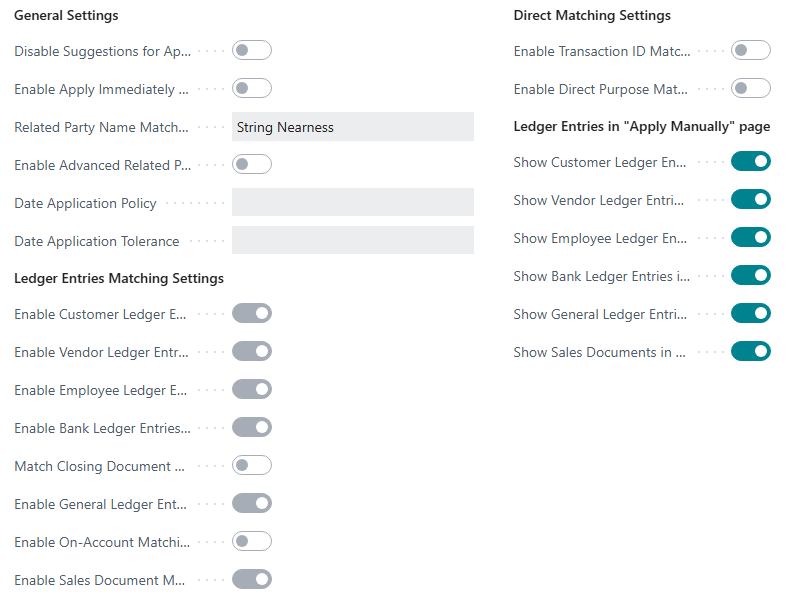
You set up G/L entry matching on the Payment Application Settings page. Both switches are available from Business Central 27:
| Field | Description |
|---|---|
| Enable General Ledger Entries Matching | Turns automatic matching on. Off by default. |
| Show General Ledger Entries in "Apply Manually" page | Shows the G/L entries under review on the Payment Application page. On by default, even if automatic matching is off. |
Candidates are the unreviewed G/L entries of G/L accounts that
- have the Review Policy Allow Review or Allow Review and Match Balance, and
- are not blocked.
A G/L entry is open as long as its amount minus the reviewed amount is not zero. This applies to debit and credit entries alike.
No business partner to compare
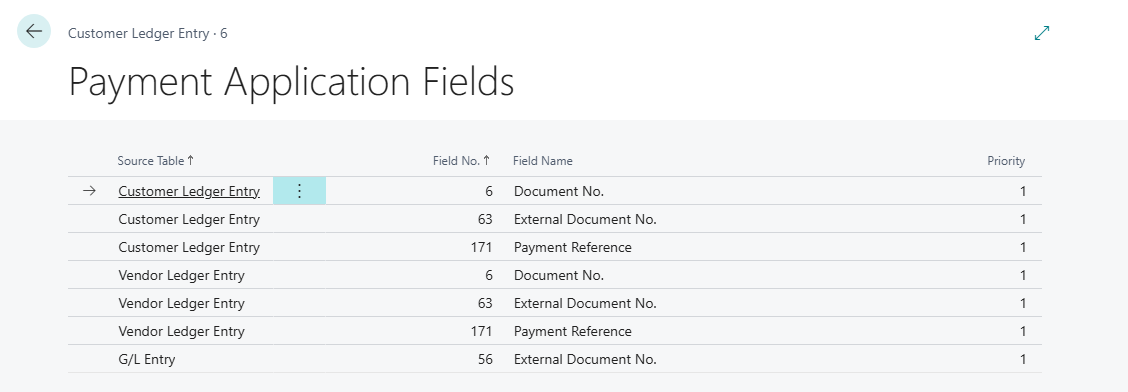
A G/L entry has no customer or vendor. Matching therefore cannot check the payer and relies on document number, amount and date. Define in the Payment Application Fields which fields of the G/L Entry are searched as references (such as Document No. or External Document No.): Payment application fields. Without a line with the source table G/L Entry, Document No. and External Document No. are used.
Automatic G/L entry matching
A G/L entry under review is a candidate for a line if
- its remaining amount (amount minus amount already reviewed) equals the amount of the bank transaction, including the sign and without splitting over several G/L entries. On bank accounts in LCY, the amount must match exactly; on foreign-currency accounts, within the payment tolerance (see below).
- its posting date fits the date application policy. Without a policy, it must be on or before the transaction date.
Each candidate is rated according to the Payment Application Rules: related party No, amount One Match if only one G/L entry has the amount, otherwise Multiple Matches, and document number depending on whether a payment application field is in the payment reference. Only candidates that meet at least one rule with a match confidence are offered. The line receives the best candidate. In one run, a G/L entry is applied to one statement line only. If two lines have the same amount, only one line receives the entry. If the payment reference names the document number of several G/L entries that all have the amount of the bank transaction, the line receives one of them with match confidence Medium: the G/L entry with the earliest posting date, or with the same date, the one with the lower entry number. The others stay open, and the Match Details of the line name them. A G/L entry already applied to a line in another payment reconciliation journal that has not been posted yet is not applied a second time by the automatic application. You can still apply it manually on the Payment Application page.
Sign
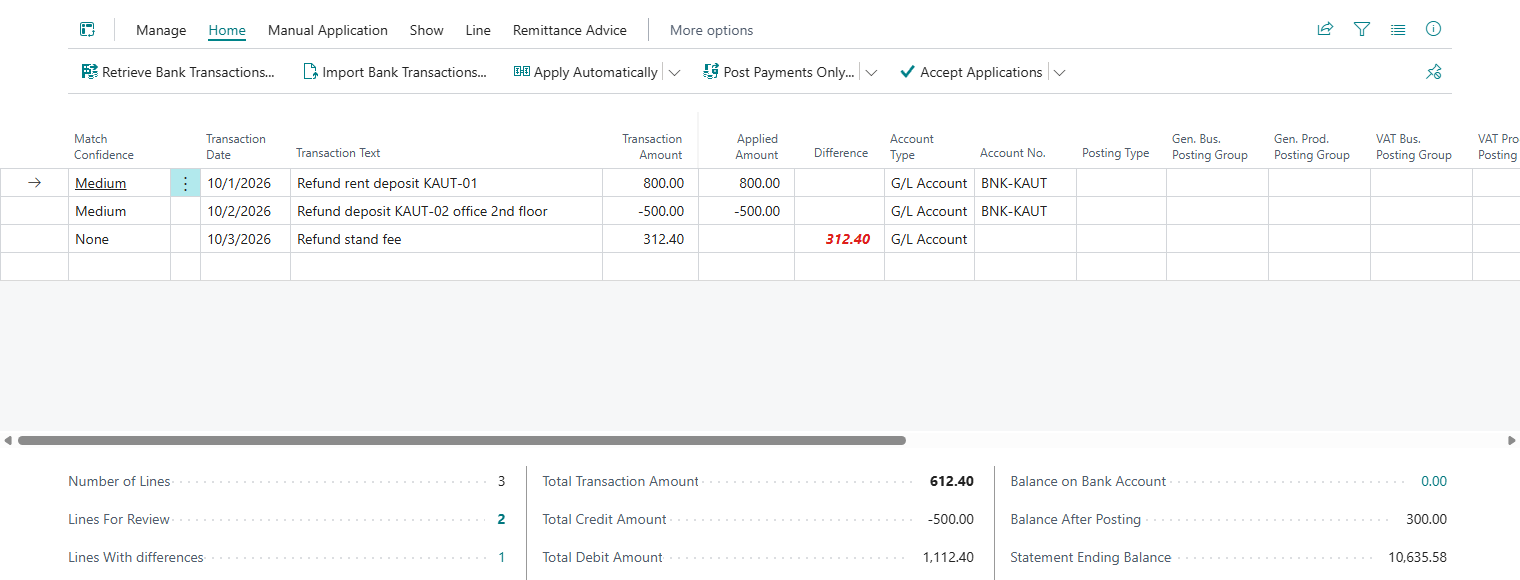
Amounts are compared with their sign. An incoming payment (+) fits a debit G/L entry (+), an outgoing payment (−) fits a credit G/L entry (−). Example: The refund of a deposit of −500.00 fits the credit entry of −500.00.
Bank accounts in a foreign currency
G/L entries are always in LCY. For the comparison, 365 business Banking converts the statement amount to LCY at the exchange rate of the transaction date. The converted amount may differ within Payment Tolerance % and Max. Payment Tolerance Amount from the General Ledger Setup. Without a tolerance, it must match exactly after rounding to LCY.
Manually apply G/L entries
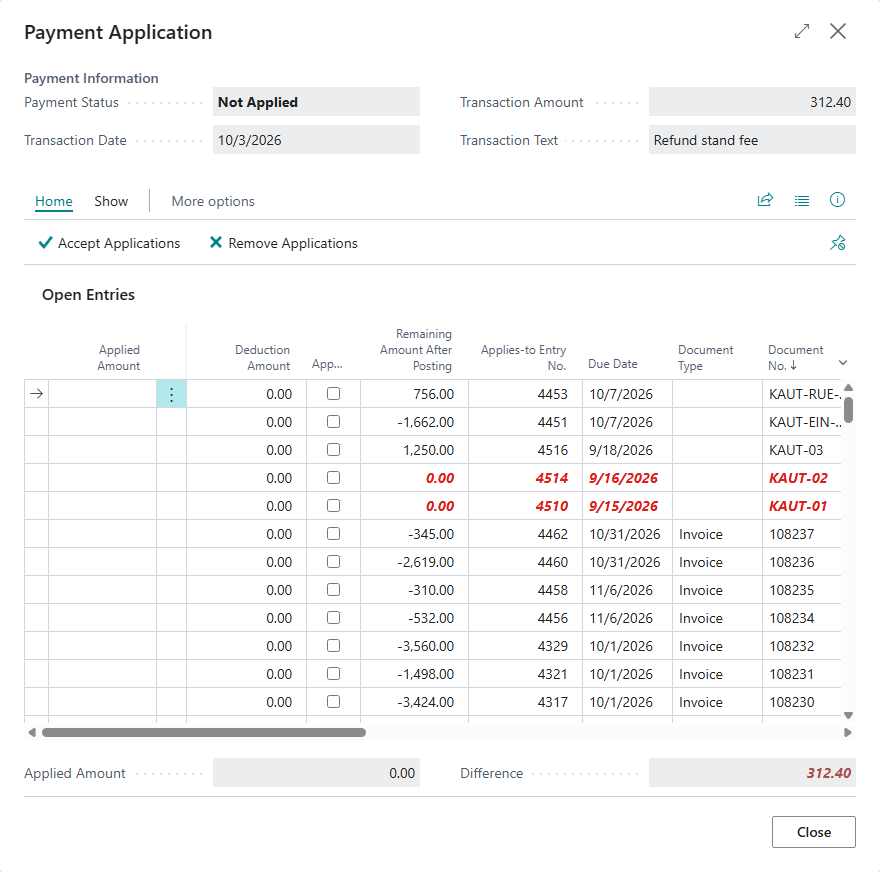
On the Payment Application page (Apply Manually), the G/L entries under review appear with the account type G/L Account next to the other open entries, regardless of whether suggestions for manual application are turned on or off. Select Applied as for any other entry. As Remaining Amount, the page shows the amount not yet reviewed. Remaining Amount After Posting also takes into account the amounts already applied to lines of the same reconciliation. On foreign-currency accounts, the amount is shown in the currency of the bank account. For more information, see Apply bank transactions.
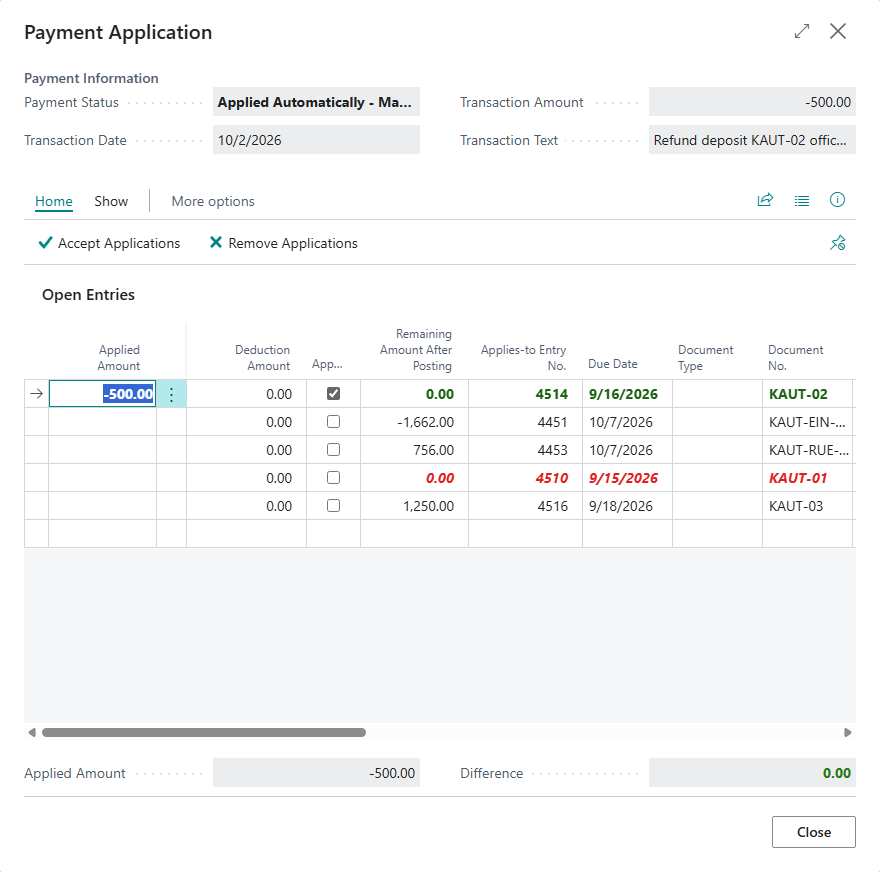
For a line without an application, the page lists the G/L entries together with the open customer and vendor ledger entries. G/L entries that are already fully applied to other lines appear in red with Remaining Amount After Posting 0.00, because nothing of them would remain open after posting.
Review entries on posting
When the payment reconciliation is posted, 365 business Banking runs Review Entries automatically. The following entries are marked as reviewed:
- the applied G/L entry for the applied amount, and
- the balancing entry the posting creates on the same G/L account.
Other entries of the same posting, for example on the G/L account of the bank or a VAT account, remain unreviewed, even if those accounts are reviewable. On foreign-currency accounts, the LCY amount actually posted is reviewed. An exchange rate difference remains open on the G/L entry and can be reviewed separately.
If there is nothing to review, posting stops with the message "There's nothing to review for the applied G/L Entries."
Remaining amount in the G/L entries
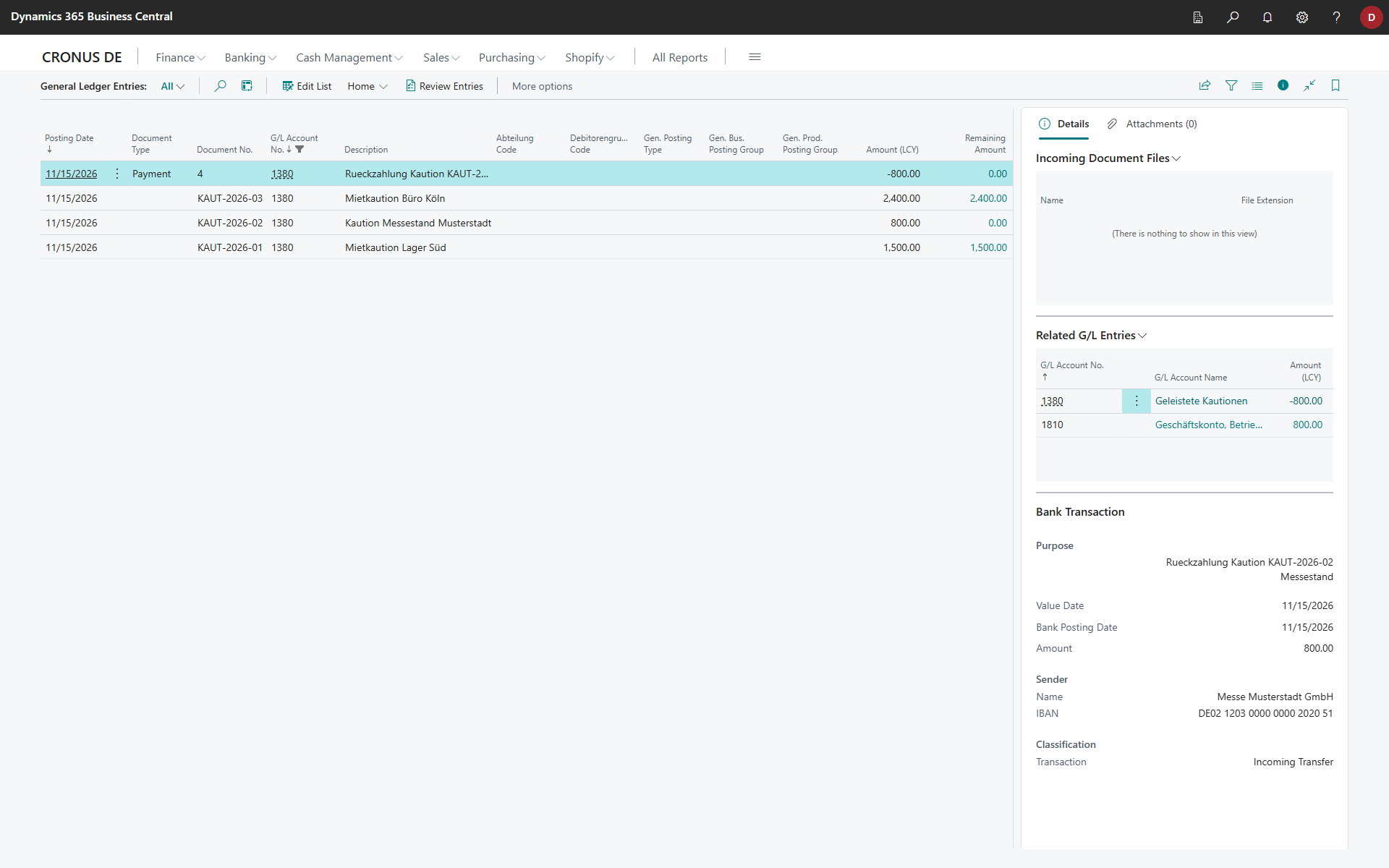
In the General Ledger Entries list, 365 business Banking shows the Remaining Amount column after Amount. It contains the amount that can still be reviewed (amount minus reviewed amount). The column only appears for G/L accounts with a review policy that allows review. Choosing the value shows the reviews of this entry.
If a G/L entry comes from a bank transaction, the Bank Transaction FactBox shows the payment reference, counterparty and classification: Bank account ledger entries.
See also
- How automatic application works
- Payment application fields
- Payment application settings
- Review G/L entries (Microsoft Learn)