
Role center actions for banking
Where to find 365 business Banking in the role center: action bar, navigation menu with setup, cues and the balance chart.
365 business Banking adds the banking pages to the Accountant and Business Manager role centers of Microsoft Dynamics 365 Business Central. You open the pages for daily work directly from the role center, without using search.
No customization required
The actions ship with the app and are available automatically after installation. You do not need to customize the role center.
Action bar
The role center's action bar contains the Banking group with the tasks you need every day:
| Action | Target |
|---|---|
| Pmt. Reconciliation Journals | overview of the payment reconciliation journals |
| Payment Journals | journal batches of the payment journals |
| Cash Receipt Journals | journal batches of the cash receipt journals |
| SEPA Payment Import | overview of SEPA payment imports |
| REMADV Import | the REMADV Imports page; see Import remittance advices |
Navigation menu
In the navigation menu you find the Banking group before Cash Management:
- Bank Accounts
- Pmt. Reconciliation Journals
- Payment Journals
- Cash Receipt Journals
- SEPA Payment Import
- REMADV Import
Setup subgroup
The Banking group contains the Setup subgroup with the setup pages:
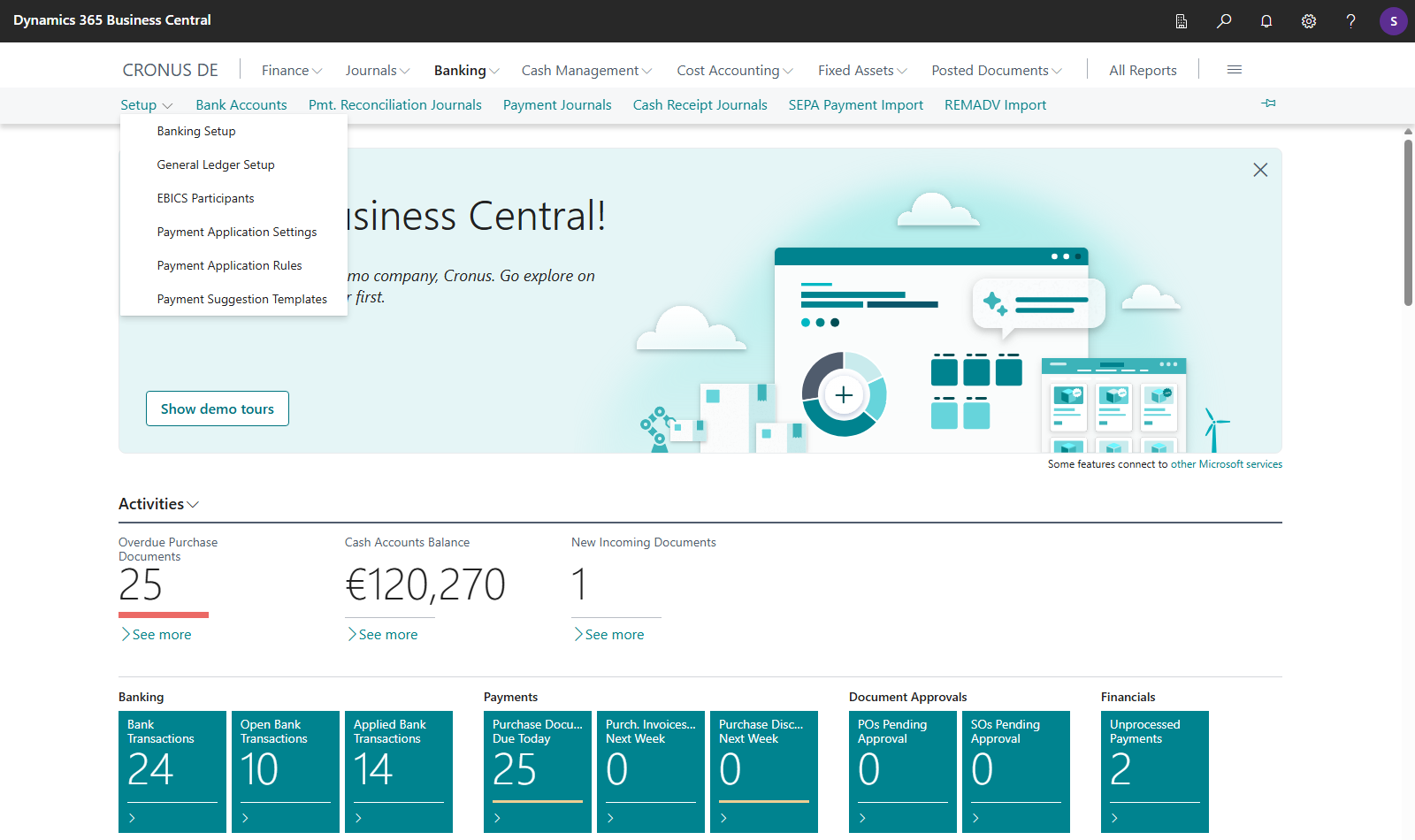
| Action | Page |
|---|---|
| Banking Setup | company bank access, personal bank accesses, verification of payee; see Banking setup |
| General Ledger Setup | Standard Business Central page. Its Banking Setup action opens the banking settings; see Banking Setup |
| EBICS Participants | the participants for EBICS; see Set up an EBICS participant |
| Payment Application Settings | see Payment application settings |
| Payment Application Rules | the standard matching rules; see How automatic application works |
| Payment Suggestion Templates | see Payment suggestion templates |
You reach Personal Bank Accesses via Banking Setup, not directly from the role center. You open the Own Bank Accounts page only from General Ledger Setup; the role center has no action for it. See Own bank accounts.
On the setup pages, the Technical details FastTab of the bank accesses and other people's bank accesses are only visible to users with SUPER or with the 365 Banking - Setup permission set. See Permissions and licenses.
Note
Payment Journals and Cash Receipt Journals each open the journal batches of that journal type and not a single journal. There, you choose the journal you want.
Permissions
The SEPA Payment Import action is only shown if you have the required permission for the payment import. Likewise, REMADV Import is only shown if you are allowed to create REMADV imports. See Permissions and licenses.
Cues
In the Accountant role center, the activities include the Banking cue group:
| Cue | Counts |
|---|---|
| Bank Transactions | all retrieved bank transactions in payment reconciliation journals |
| Open Bank Transactions | those not yet applied |
| Applied Bank Transactions | those already applied |
When you choose a cue, the payment reconciliation journal opens if there is only one for a connected bank account. Otherwise, the Pmt. Reconciliation Journals list opens.
Balance chart
Both role centers show the Balance chart of a bank account, with the account's name in the heading. Use Previous Bank Account and Next Bank Account to move between your bank accounts. When you choose a data point, the bank account ledger entries of that period open. The meaning of the lines is described in Bank balance and balance chart.
See also
- Payment receipt and bank reconciliation
- Payment journal
- SEPA direct debit in the cash receipt journal
- Setup
- Role center actions for banking (new feature)