
Import remittance advices (REMADV)
How you import REMADV files into 365 business Banking, how the payer is resolved, and what happens to each invoice on the advice.
Supported formats
Import reads EANCOM (D.96A, D.01B) as well as plain UN/EDIFACT without a subset, in syntax 3 (UNOA, UNOC, …) or syntax 4. It evaluates the separators and release character from the file's UNA segment, works with or without line breaks, and handles several messages (UNH) in one file.
REMADV Imports
You import files on the REMADV Imports page.
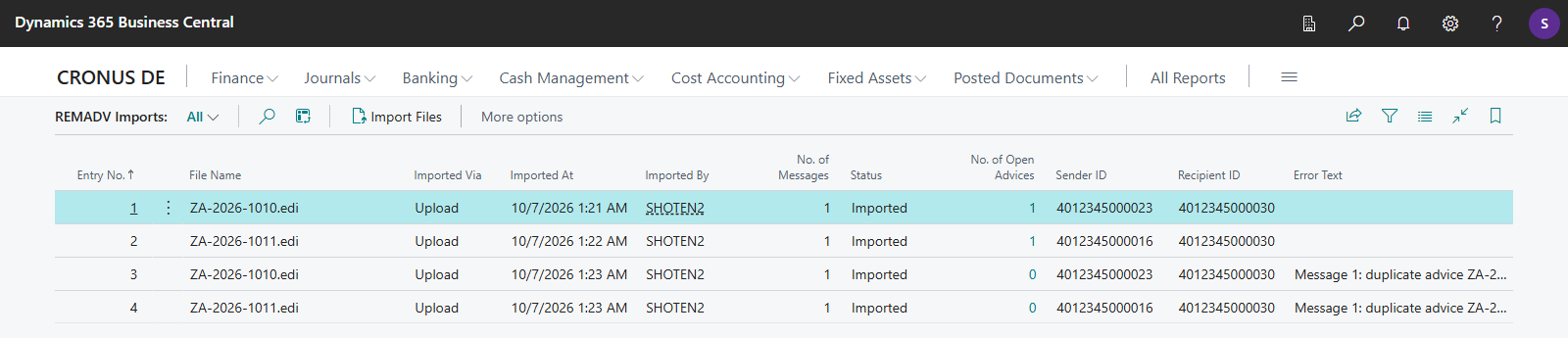
- Open the REMADV Imports page.
- Choose the Import Files action. You can import several files in a row. After each file, Business Central asks whether you want to import another one.
- After the import, a message shows how many files were imported.
Each file produces a row in the list, even a file that cannot be processed:
| Field | Meaning |
|---|---|
| Entry No. | unique number |
| File Name | name of the imported file |
| Imported Via | Upload or Integration (through a partner solution, see Extensibility for partners) |
| Imported At, Imported By | time and user of the import |
| No. of Messages | number of REMADV messages (UNH) in the file |
| Status | Imported or Error. Error is shown when the file could not be read or a message could not be processed completely. |
| No. of Open Advices | how many remittance advices from this file are still open |
| Sender ID, Recipient ID | from the file's interchange header (UNB) |
| Error Text | why the file or a message could not be processed, or a note about a skipped duplicate |
Download Original File downloads the file exactly as it was imported, even if the import failed. The Remittance Advices action opens the remittance advices that resulted from this file.
The original file is kept
Even a file that cannot be read gets a row with status Error and the reason in Error Text. The original file stays saved and can be downloaded again or handed to your partner.
How the payer is resolved
For every message, 365 business Banking resolves the payer in this order:
- REMADV Partner: The message's ID qualifier and partner ID are in the REMADV Partners table.
- Customer's GLN: The message's ID qualifier is blank,
9or14, the ID fits the GLN field, and exactly one customer carries that GLN. If several customers carry that GLN, resolution ends here, and Status Text names the ambiguity. - REMADV Partner ID of the customer or vendor: The ID is entered on their card. The card's REMADV ID Qualifier is only compared if it is filled in. Customers are checked before vendors. See Customer and vendor card.
- IBAN: The IBAN that the payer states uniquely belongs to a customer or vendor bank account. If it belongs to several customers or vendors, Status Text names the ambiguity.
If the payer cannot be resolved by any of these, the remittance advice is created without a customer/vendor, and Status Text contains the message "The payer could not be resolved to a customer or vendor." In this case, enter the customer or vendor manually on the remittance advice card.
Document lookup and match status
For each document on the message (invoice, credit memo, debit note), 365 business Banking looks up the document/external document number among the payer's open, and then closed, customer or vendor ledger entries and sets the Advice Match Status:
| Status | Meaning |
|---|---|
| Found | exactly one open entry, amount matches (within 0.01) |
| Amount Deviation | exactly one open entry, amount differs |
| Ambiguous | more than one open entry matches |
| Already Closed | no open, but a matching closed entry |
| Not Found | no matching entry |
Only documents with Found or Amount Deviation are later applied automatically in payment reconciliation. The rest remain as preliminary entries and can be resolved manually.
Duplicate detection
A message whose payer ID, advice no. and advice date already match an imported remittance advice is not created again. A message without an advice no. counts as a duplicate if a remittance advice of the same payer exists from a file with the same interchange control reference (UNB). The import's Error Text contains the reason.
The message function in the BGM segment is evaluated:
- Cancellation (
1): A still open remittance advice of the same payer with the same advice no. gets the status Cancelled and is no longer open. The cancellation message itself does not create a remittance advice. Error Text notes it. - Replacement (
5): A still open remittance advice of the same payer with the same advice no. gets the status Closed. The replacement message is created as a new remittance advice.
The remittance advice card
For every message (or camt transaction), 365 business Banking creates a Remittance Advice.
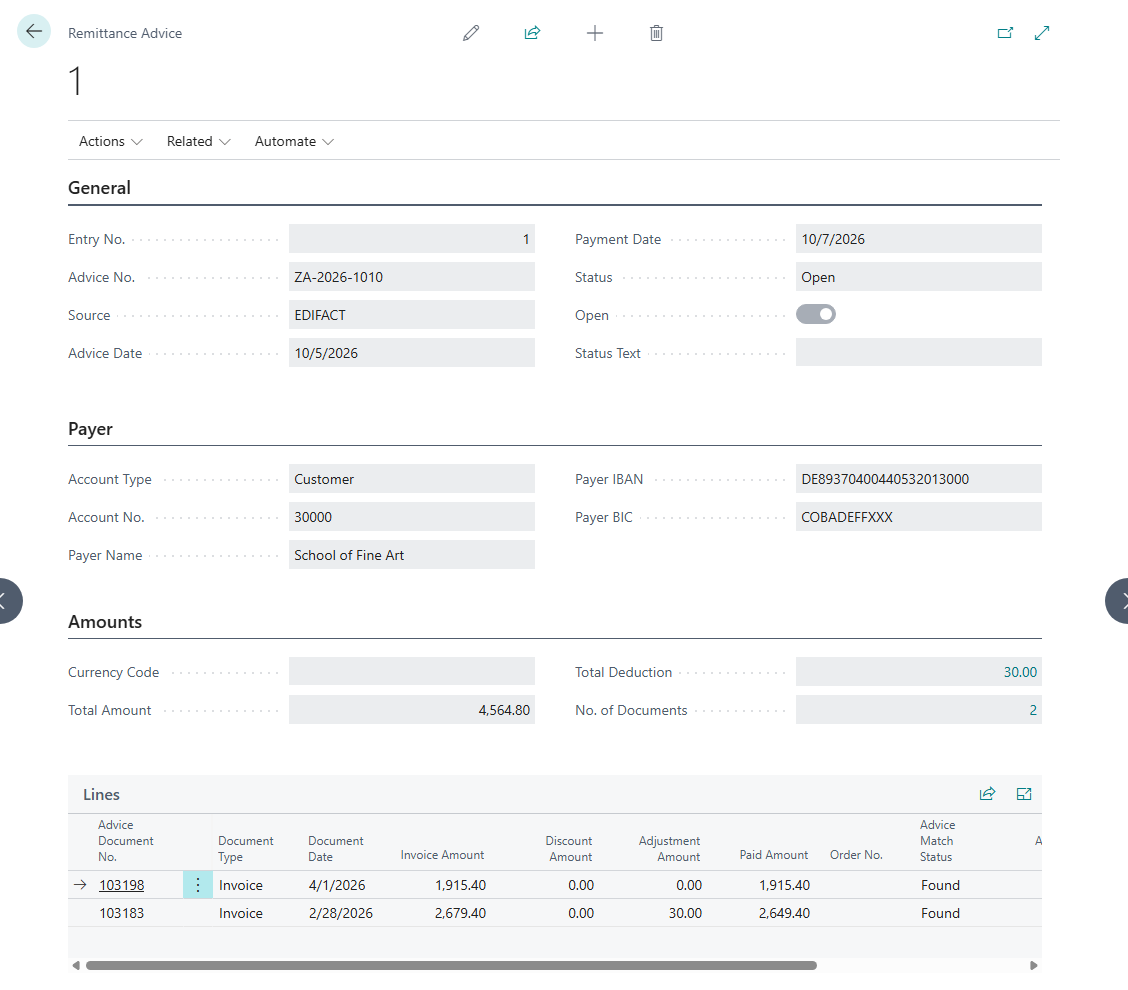
| Field | Meaning |
|---|---|
| Advice No. | the number the payer assigned |
| Source | EDIFACT or camt Structured Remittance |
| Advice Date, Payment Date | |
| Account Type, Account No., Payer Name | resolved customer or vendor |
| Payer IBAN, Payer BIC | |
| Currency Code, Total Amount | |
| Total Deduction | sum of all deductions on the advice |
| No. of Documents | number of lines |
| Status | Open, Applied, Closed or Cancelled, see below |
| Open | whether the advice is still open |
| Status Text | notes, such as an unresolved payer or an ambiguity |
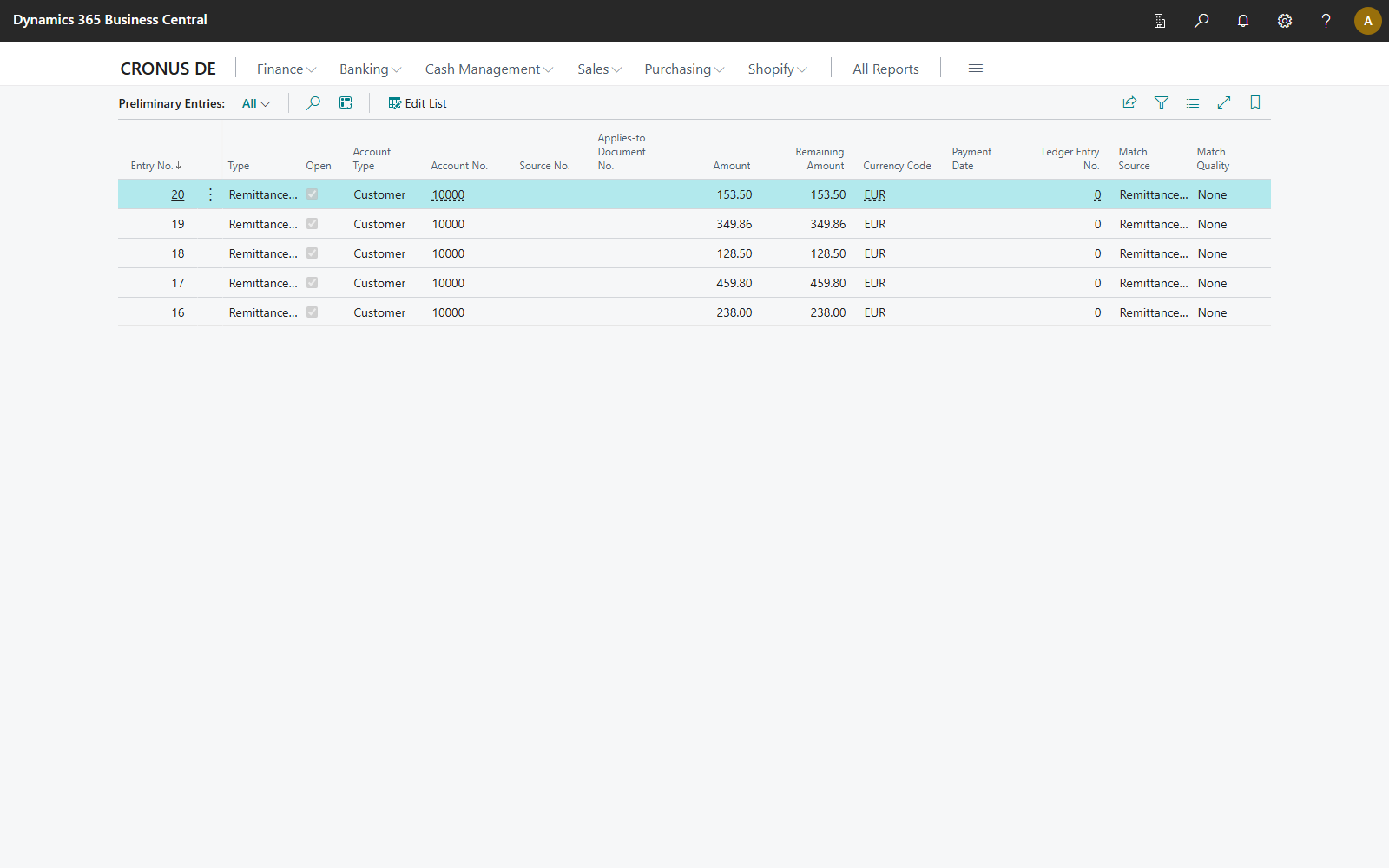
The card shows the advice's lines in the Lines part. The Adjustments action opens the advice's deductions. In the Remittance Advices list, the Preliminary Entries and Adjustments actions open the lines and deductions of the selected advice.
The values of the Status field mean:
| Status | Meaning |
|---|---|
| Open | The advice is not yet applied to a line in the payment reconciliation journal. |
| Applied | The advice is applied to a line that is not yet posted. |
| Closed | The payment reconciliation is posted, the advice was closed manually, or it was replaced by a replacement message. |
| Cancelled | A cancellation message has cancelled the advice. |
Remittance advice lines (preliminary entries)
Each line of the advice is a preliminary entry with type Remittance Advice (REMADV). The Lines part of the remittance advice card shows the following fields. The general fields of a preliminary entry (Entry No., Open, Account Type, Account No., Amount, Remaining Amount, Match Source and more) are described in Reviewing preliminary entries. REMADV advices add the following fields:
| Field | Meaning |
|---|---|
| Advice Document No. | document number as stated on the advice |
| Document Type | Invoice, Credit Memo, Debit Note or Other |
| Document Date | |
| Invoice Amount | amount per the advice, with sign |
| Discount Amount | discount deducted by the payer |
| Adjustment Amount | sum of the deductions on this document |
| Paid Amount | amount actually paid |
| Order No. | referenced order |
| Advice Match Status | see above |
| Applies-to Entry No. | the entry found |
| Status Text | such as an explanatory message about the amount deviation |
Remittance advice adjustments
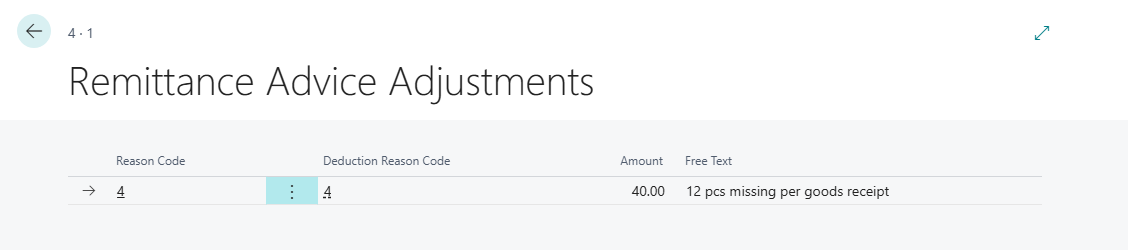
If the advice states one or more deduction reasons for a document, a Remittance Advice Adjustment is created per reason:
| Field | Meaning |
|---|---|
| Reason Code | the raw code as stated on the advice |
| Deduction Reason Code | the deduction reason that is not blocked and whose EDIFACT Code equals the reason code; blank if there is no such reason |
| Amount | deduction amount (always positive) |
| Free Text | additional text from the advice |
If a document states only a lump-sum deduction with no individual reasons, an adjustment without a reason code is created. As a result, the amount is always kept.
Preliminary entries are never deleted
A preliminary entry from a REMADV advice stays open until the matching bank transaction arrives and the payment reconciliation is posted. It is closed on posting and never deleted, not even if you close the remittance advice manually.
camt.053/054: structured remittance data
If a camt.053 or camt.054 statement carries structured remittance data (RmtInf/Strd) for an incoming transaction, 365 business Banking creates a remittance advice with source camt Structured Remittance automatically when the statement is read. The advice is firmly linked to the bank transaction. Document lookup, match status and deductions work as for an imported REMADV. No separate file import is required.
Close a remittance advice manually
You close an open remittance advice that you no longer want to apply with the Close Manually action on the remittance advice card or in the Remittance Advices list. Business Central asks for confirmation first. The advice gets the status Closed and is no longer offered for automatic or manual matching. The advice's documents stay unchanged and open, and can still be applied through payment reconciliation or manually.
See also
- Setup for remittance advices
- Application in payment reconciliation
- Application with open sales documents
- camt/pain files as a bank connection