
Payment methods: the banking payment method
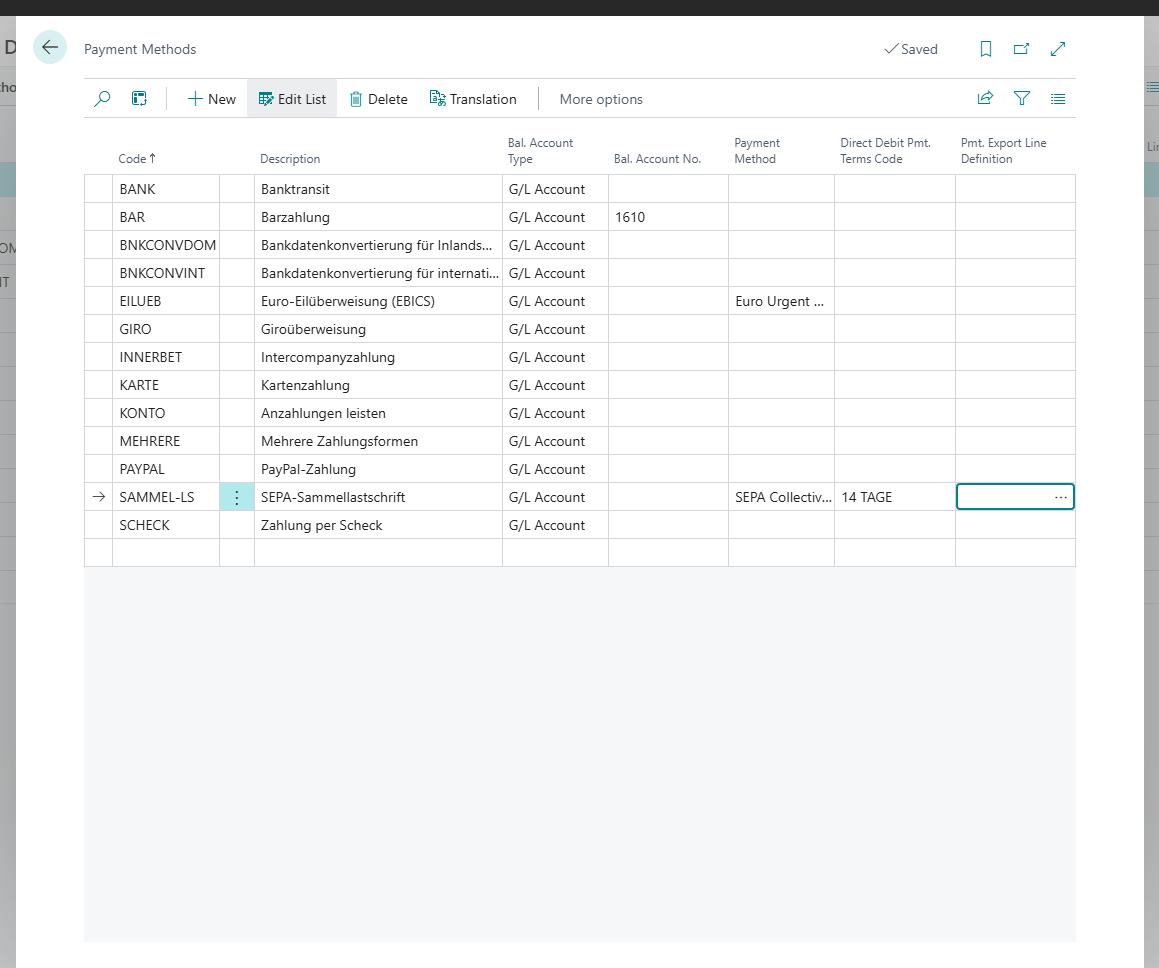
The Payment Method field on a payment method decides whether 365 business Banking sends a payment as a credit transfer, instant or urgent transfer, or direct debit.
Payment Methods is a standard table of Microsoft Dynamics 365 Business Central. 365 business Banking adds the Payment Method field (the banking payment method). It decides how a payment with this payment method code goes to the bank. The payment method code in turn is set on the journal batch, on customers, vendors and documents.
Standard functionality in Business Central
In the standard product, payment methods describe how a customer pays or a vendor is paid, with an optional balancing account for immediate payments and the Direct Debit flag. See Define payment methods on Microsoft Learn.
What 365 business Banking adds
- Choose the Search icon, enter Payment Methods and open the page.
- In the Payment Method column, choose the value for every payment method code you use with 365 business Banking:
| Payment Method | Purpose | Journal |
|---|---|---|
| SEPA Credit Transfer | single credit transfers | payment journal |
| SEPA Instant Credit Transfer | transfers that reach the recipient within seconds | payment journal |
| SEPA Collective Credit Transfer | several credit transfers as one batch booking | payment journal |
| Euro Urgent Credit Transfer | same-day urgent transfer in euro, via EBICS only (see Euro urgent payment via EBICS) | payment journal |
| Direct Debit | single SEPA direct debits | cash receipt journal |
| SEPA Collective Direct Debit | several direct debits as one batch booking | cash receipt journal |
| Payment Service | collection via PayPal, Stripe or Adyen. Set automatically if the field is empty and the balancing account is the bank account of a payment service provider; only allowed for such bank accounts. See Collect payments via payment service providers | cash receipt journal, also when posting the invoice and with Collect Payments |
If Payment Method stays blank, 365 business Banking does not carry out payments with this payment method code.
A standing order cannot be chosen on a payment method: you create standing orders on the Standing Orders page, see Standing order.
What changes on the payment method
- The standard Direct Debit flag is hidden. 365 business Banking sets it automatically: on for Direct Debit and SEPA Collective Direct Debit, otherwise off.
- Direct Debit Pmt. Terms Code is only editable for Direct Debit and SEPA Collective Direct Debit and is then marked as mandatory. If you switch to another payment method, Business Central clears the field.
- For Payment Service, Direct Debit is off and Direct Debit Pmt. Terms Code stays empty, because a collection through a payment service needs no mandate. If the balancing account is not the bank account of a payment service provider, Business Central refuses the payment method: "Payment method … collects through a payment service, so it can only collect into the bank account of a payment service (Adyen, PayPal or Stripe). …" Choose Direct Debit for a bank account.
- As Bal. Account No., 365 business Banking refuses a banking bank account with a bank connection (PSD2/XS2A, EBICS or camt/pain file): "Bank Accounts are not supported as balancing accounts on a payment method. …" The bank account of a payment service provider that can collect payments (PayPal, Stripe, Adyen) is allowed. Business Central asks for confirmation, because invoices with this payment method are then collected through the payment service. If the payment service cannot collect payments, Business Central reports "PSP bank account … is not supported as a balancing account on a payment method." See Collect payments via payment service providers.
Payment methods per bank connection
| Payment Method | PSD2/XS2A via finAPI | EBICS | camt/pain file |
|---|---|---|---|
| SEPA Credit Transfer | if the bank permits it | if the EBICS contract includes it | yes |
| SEPA Instant Credit Transfer | if the bank permits it | if the EBICS contract includes it | no |
| SEPA Collective Credit Transfer | if the bank permits it | wherever credit transfers are permitted | yes |
| Direct Debit | CORE or B2B, if the bank permits it | if the EBICS contract includes it | only for accounts under the SEPA scheme |
| SEPA Collective Direct Debit | if the bank permits it | wherever direct debits are permitted | only for accounts under the SEPA scheme |
| Euro Urgent Credit Transfer | no | if the EBICS contract includes it (CCU or XCT with option URG) | no |
| standing order (separate page) | yes | no | no |
There is no separate payment method for international payments. For a file account with the Payment Scheme International, SEPA Credit Transfer and SEPA Collective Credit Transfer run as SWIFT credit transfers under the international rules. With EBICS, Business Central decides per line: a payment that does not go in euro to an IBAN in the SEPA area is submitted as a foreign credit transfer if your EBICS contract includes it. See Payments via EBICS. Carry Out Payment refuses SEPA Instant Credit Transfer for such accounts, because instant credit transfers are only possible within SEPA. See International payments.
What the bank permits for an account is stored as bank account capabilities; the SEPA capabilities are shown in the Capabilities FactBox on the bank account card. If the payment method does not fit, Carry Out Payment stops with "We're sorry, but payment method … is not supported by bank account …."
Derived payment types
SEPA future-dated credit transfer
A future-dated credit transfer is a SEPA Credit Transfer with an execution date in the future. You set it via the Posting Date of the line in the payment journal. This is only possible if the account has the SEPA Future Dated Money Transfer capability. With PSD2/XS2A, this is the case if the bank allows future-dated transfers, with EBICS if the EBICS contract includes credit transfers, and with file accounts always. Otherwise, Business Central reports "The bank account does not support future dated SEPA credit transfer. The posting date must be today." Business Central always refuses a posting date in the past.
SEPA collective credit transfer
A SEPA collective credit transfer combines several transfers to different recipients into one submission. The bank books it as a single transaction; the statement therefore only shows the total. All lines of a payment block get the same base of the end-to-end reference, each with its own ending (-1, -2 …). A block holds the lines of one execution date, for EBICS foreign credit transfers also of one currency.
SEPA collective direct debit
A SEPA collective direct debit combines several direct debits from different payers into one submission. It too appears on the statement as one transaction.
See also
- Set up journal batches for banking
- SEPA credit transfer
- SEPA direct debit mandates
- Bank account capabilities