
Payments via EBICS
This page describes payments via EBICS in 365 business Banking: submitting SEPA, foreign and Euro urgent credit transfers, the status Pending and the bank's status report.
Applies to: EBICS as payment initiation service
Process
Up to the payment, the process is the same as with any other bank account: payment suggestion in the payment journal, review, then Carry Out Payment. The differences concern the subsequent steps.
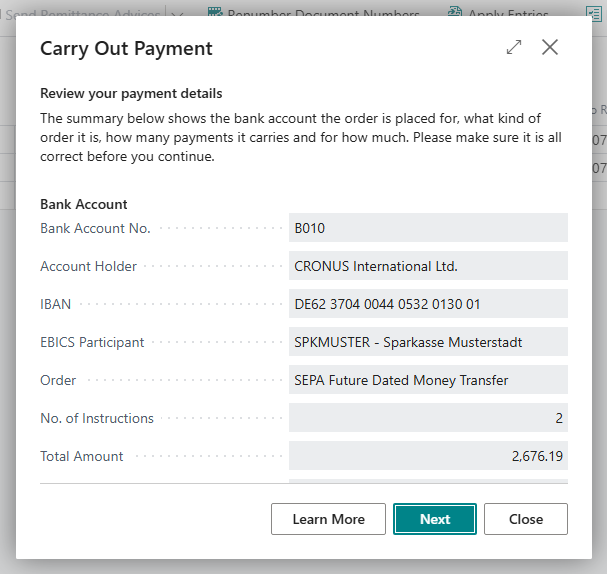
- Business Central combines the lines into a payment file (pain.001 for credit transfers, pain.008 for direct debits), signs it electronically with the EBICS participant's signature key and submits it to your bank. No web form and no TAN are required. Before that, the summary Review your payment details shows the bank account, the order, the number of payments, the amount and the message ID.
- The journal lines get the Payment Status Pending and can no longer be edited from this point on. They cannot be posted yet either.
- In the background, Business Central requests the bank's status report (pain.002) every hour for two days.
- When the bank accepts the payment, the lines change to Completed and can be posted.
Difference from the file route
Via EBICS, the bank reports the processing result of the file. With pain file export, the result is only visible on the next bank statement.
Which orders EBICS submits
Your EBICS contract determines which orders you can submit. Business Central reads the order types that your bank has permitted for the participant from the customer data (HTD) and, when connecting, sets up the account's bank account capabilities from them.
| Order | Use | Order type (EBICS 3.0 / 2.5) | Bank account capability |
|---|---|---|---|
| SEPA credit transfer, collective, instant | payment in euro to an IBAN at a bank in the SEPA area | SCT or SCI / CCT or CIP | SEPA Money Transfer, SEPA Collective Money Transfer, SEPA Instant Money Transfer |
| Foreign credit transfer | any other credit transfer: another currency, a payee without an IBAN, or a bank outside the SEPA area | XCT / AXZ | SWIFT Money Transfer, SWIFT Collective Money Transfer |
| Euro urgent credit transfer | a separate payment method, same day in euro | XCT with option URG / CCU | Euro Urgent Money Transfer |
| SEPA direct debit (CORE, B2B) | Carry Out Direct Debit in the cash receipt journal | SDD with option COR or B2B / CDD or CDB | SEPA BASIC Direct Debit, SEPA B2B Direct Debit |
If your bank adds an order to your contract after you connected the account, choose Get Bank Accounts on a bank account of the participant, in the Bank Accounts list or on the bank account card. This reads the customer data (HTD) again and updates the capabilities of every account of the participant, including Euro Urgent Money Transfer. See Get Bank Accounts. Refresh Customer Data (HTD) on the card of the EBICS participant only reads the order types again that Business Central checks on submission. For foreign credit transfers, this is sufficient.
Foreign credit transfers
You do not select a foreign credit transfer separately. Business Central checks each line of a payment journal with the payment method SEPA Credit Transfer or SEPA Collective Credit Transfer individually:
- SEPA is a payment in euro to an IBAN at a bank in the SEPA area; all three conditions must be met.
- A foreign credit transfer is any other payment: in another currency, to a payee without an IBAN, or to a bank outside the SEPA area.
If the journal contains both types, one Carry Out Payment creates two orders: the SEPA payments as usual and the foreign payments as a separate pain.001 file. The summary before submission shows both orders in the Orders field, with the number of payments, the totals per currency and the message ID. Afterwards, Business Central names both order numbers, and the EBICS Submissions page shows one submission per order.
Requirements for a foreign payment:
- the payee's name, their IBAN or Bank Account No., and the BIC of their bank. A bank code alone is not sufficient;
- the payee's town and country, if the payment is not in euro or the payee's bank is outside the EU/EEA. Business Central takes this information from the address of the vendor, customer or employee, or from the remit-to address.
Charges are shared (SHAR). Each currency and execution date gets a separate payment block. In a collective credit transfer, all payments of a block share one base of the end-to-end reference, each with its own ending (-1, -2 …).
Your bank reports on foreign payments in a separate status report. Update Payment Status and the hourly check fetch it in the same way as the SEPA report.
If the second order fails
The SEPA payments are submitted first. If the foreign credit transfer fails after that, the message names the order number of the SEPA payments. These payments have the status Pending. Do not submit them again. Only the foreign payments remain open in the journal. Carry them out again once the cause is resolved.
Instant credit transfers are never foreign payments. A journal with SEPA Instant Credit Transfer rejects a line that cannot be processed as a SEPA payment. Carry out this line from a journal with SEPA Credit Transfer or SEPA Collective Credit Transfer.
Euro urgent credit transfer
The Euro urgent credit transfer is a same-day urgent transfer in euro. It is not a SEPA scheme, and your bank offers it only by separate agreement. Use cases and the differences from an instant credit transfer are described in Euro urgent payment via EBICS.
- Set up a payment method with the Payment Method Euro Urgent Credit Transfer and assign it to a journal batch. See Set up payment methods.
- Enter the payments in this payment journal and choose Carry Out Payment.
The whole journal is sent to the bank as one order; it is never split into SEPA and foreign payments. Each line requires:
- the amount in euro,
- the payee's name and IBAN. The BIC is optional.
- the payee's town and country, if their bank is outside the EU/EEA.
The bank reports the status in a separate status report; on the EBICS Submissions page, the submission is marked Euro Urgent Credit Transfer.
The Euro urgent credit transfer is only available via EBICS. Other banking connections (PSD2/XS2A via finAPI, pain file, payment service providers) reject the journal with "We're sorry, but payment method … is not supported by bank account …".
Reporting under section 67 AWV
If a payment run contains payments of more than EUR 12,500 (converted) to a recipient outside Germany (based on recipient or bank country), Carry Out Payment asks before submitting: "… of these payments go to a recipient outside Germany and amount to more than EUR …. Payments to non-residents over EUR … must be reported to the Deutsche Bundesbank under section 67 of the German Foreign Trade and Payments Ordinance (AWV). The payment does not carry that report, so it has to be filed separately, for example through the reporting portal of the Bundesbank. Do you want to continue?" Yes carries out the payment; you file the report yourself. No cancels the payment run, and nothing is submitted. The prompt is shown for SEPA and foreign payments and for every banking connection; when run in the background (job queue), it is skipped.
Payment status
| Payment Status | Meaning | Editable | Can be posted |
|---|---|---|---|
| Open | not submitted yet | yes | no |
| Pending | submitted, the bank has not answered yet | no | no |
| Rejected | the bank rejected the payment (the whole file or the single payment in the status report); the submission gives the reason | yes, can be carried out again like Open; the payment is then sent to the bank with a new end-to-end reference | no |
| Completed | accepted by the bank | no | yes |
If you do not want to wait for the next hourly check, choose Update Payment Status in the journal or Check Status Now on the EBICS Submissions page.
Carry Out Payment and Post submits the file in the same way. Because the lines are Pending afterwards, nothing is posted at first. Business Central reports "… journal lines were handed in to the bank but not posted, because they wait for the bank's status report. …" Post the lines once they are Completed.
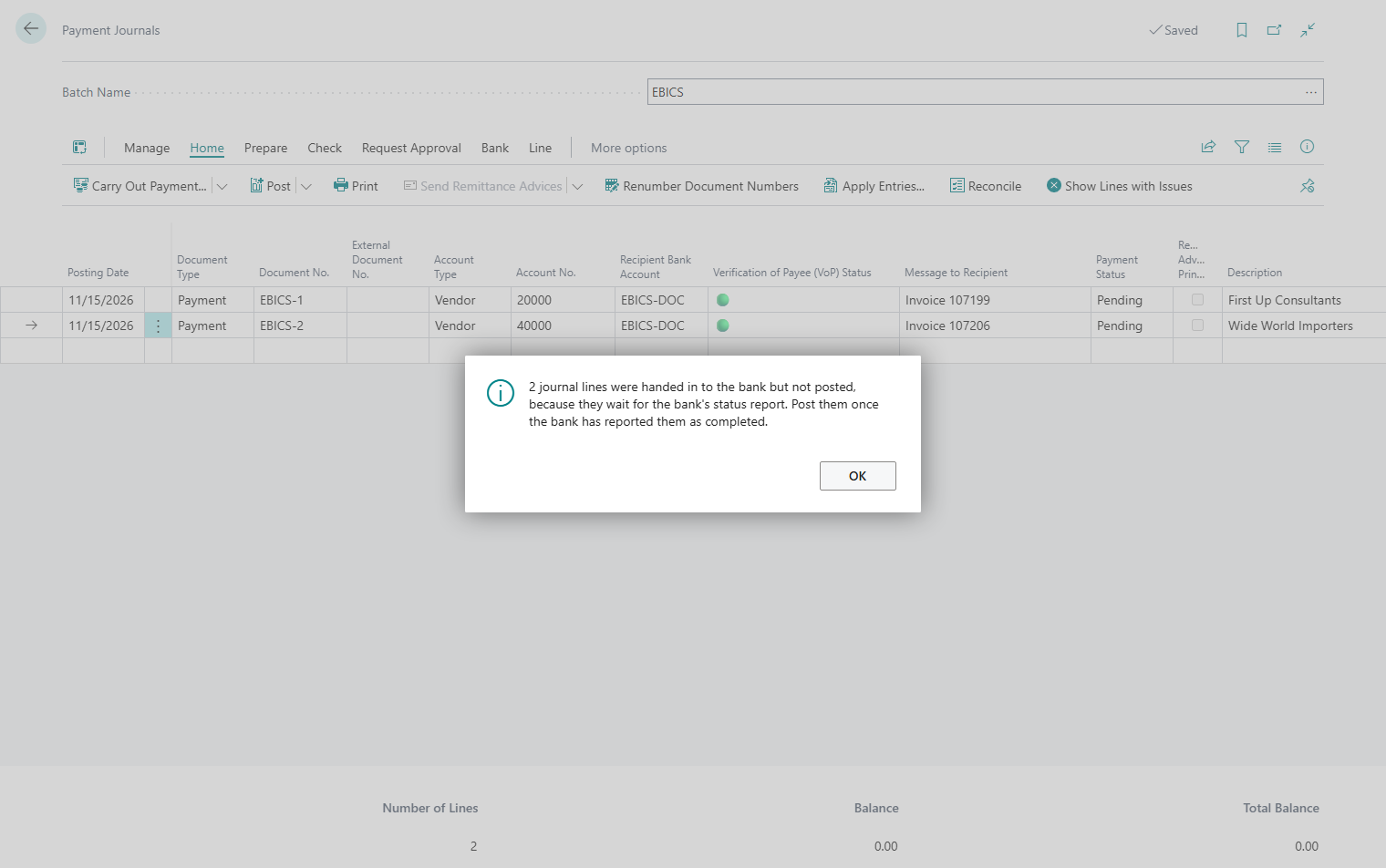
Choosing Carry Out Payment again skips lines with the status Pending. They are therefore not submitted a second time.
Where the message ID comes from
Every payment and collection file contains a message ID:
- Your bank files the submission under this ID and rejects a second file with the same ID.
- In the status report, your bank quotes exactly this ID. This is how Business Central identifies which submission an answer belongs to.
The ID is taken from the Payment Message ID Nos. in the Banking Setup, FastTab Numbering. The series is created during installation. Only replace it with your own series if the IDs remain unique, also across companies if several companies use the same EBICS participant. If you leave the field empty, Business Central assigns a technical ID, which, however, is not suitable for communicating by phone. With two orders from one journal, each file gets its own message ID.
When the bank does not confirm (In Doubt)
This case is rare but important: the file is being transferred to the bank and the connection breaks before it is certain whether the bank accepted it. The job then has the status In Doubt.
As long as this status applies, the payment cannot be submitted again. The bank may already have received the file, and a second attempt would result in a second payment.
- Open the EBICS Jobs page. A job in doubt is highlighted in red.
- Select it and choose Resolve. Business Central determines the actual outcome.
- Afterwards, the job has the status Succeeded (the bank has received the file, and the submission continues normally) or Failed (the file never reached the bank, and you can carry out the payment again).
Do not pay another way
Do not submit a payment in doubt another way before it is resolved, neither as a file nor in online banking. The Resolve action is provided for this case.
Direct debits
Direct debits are processed in the same way: Carry Out Direct Debit in the cash receipt journal submits a pain.008 file, and the lines remain Pending until the status report arrives. See SEPA direct debit in the cash receipt journal. The bank provides the status report on direct debits and on instant credit transfers separately from the status report on credit transfers. Business Central fetches each report through the order that your contract provides for it.
- Sequence type: it comes from the mandate. A one-off mandate is collected as OOFF, a recurring mandate as FRST on the first collection and as RCUR after that.
- Payment blocks: each collection date and sequence type gets a separate payment block, with its own count and total. In a collective direct debit, all direct debits of a block share one base of the end-to-end reference, each with its own ending (
-1,-2…). - CORE or B2B: customers with the partner type Company are collected as B2B direct debits, all others as CORE direct debits. The two types cannot be in one file. A run with both is rejected: "CORE and B2B direct debits cannot be sent in one file. Carry them out separately."
Business Central updates the mandate counter as soon as the file is submitted. If the bank rejects the direct debit, the count is reversed.
Troubleshooting
| Message | Cause and solution |
|---|---|
| "The bank does not offer foreign credit transfers for this EBICS participant (XCT/AXZ). …" | The journal contains foreign payments, but your EBICS contract has no foreign credit transfer. Nothing was submitted. Ask your bank to add the order to the contract, then choose Refresh Customer Data (HTD) on the participant card. |
| "The bank does not offer SEPA credit transfers for this EBICS participant (SCT/CCT). …" | Your contract contains only the foreign credit transfer, but the journal contains SEPA payments. Solution as above. |
| "The bank does not offer Euro urgent credit transfers for this EBICS participant (XCT/URG or CCU). …" | The Euro urgent credit transfer is not part of your contract. Have it added and read the customer data again, or carry out the payments as SEPA credit transfers. |
| "We're sorry, but payment method Euro Urgent Credit Transfer is not supported by bank account …." | The bank account does not have the Euro Urgent Money Transfer capability. Either it is not connected via EBICS, or the order was added to your contract only after connecting. In the second case, choose Get Bank Accounts, see Which orders EBICS submits. |
| "Recipient details are incomplete for payment journal line … An international credit transfer needs the recipient name, the IBAN or the account number, and the BIC." | Add the BIC and the IBAN or account number on the recipient bank account. |
| "Line … has no recipient town and country. …" | Enter the town and country on the vendor (or customer, employee, or remit-to address). |
| "Payment journal line … cannot be carried out as a Euro urgent credit transfer. …" | The line is not in euro. Carry it out from a journal with SEPA Credit Transfer; it is then processed as a foreign credit transfer. |
| "Payment journal line … cannot be carried out as an instant credit transfer. …" | The line cannot be processed as a SEPA payment. Carry it out from a journal with SEPA Credit Transfer or SEPA Collective Credit Transfer. |
| "The SEPA credit transfers were handed in at your bank under order number …. …" | The second order failed, see Foreign credit transfers. Do not submit the SEPA payments again. |
| "CORE and B2B direct debits cannot be sent in one file. …" | Carry out direct debits to companies and to persons in separate journals or runs. |
See also
- Carry out payment: process per bank connection
- International payment
- Euro urgent payment via EBICS
- Second signature at the bank (VEU)
- EBICS jobs and submissions