
Second signature at the bank (VEU)
Four-eyes principle via EBICS: 365 business Banking submits with the first signature, and you give the second signature in your banking program.
Many companies require a second person to approve a payment before the bank carries it out. With EBICS, this procedure is called Distributed Electronic Signature (VEU).
Applies to: EBICS as payment initiation service
The second signature is not given in Business Central
Business Central submits the payment file with the EBICS participant's signature and marks it as requiring a further signature. Approval takes place outside Business Central, in your banking program or your bank's corporate portal, for example Profi cash, SFirm, Multicash or your bank's EBICS portal.
If you require an approval in Business Central as well or instead, before a payment is sent to the bank, use Approvals.
Setup
- Open the EBICS Participant card.
- On the Payments FastTab, turn on Second Signature Required at the Bank.
All payment files of this participant are then submitted for a second signature. The signatures that the participant may give at your bank are shown on the Authorization at the Bank FastTab, for example First signature (A) or Single signature (E).
Each time the customer data (HTD) is retrieved, for example with Refresh Customer Data (HTD) or when bank accounts are connected, Business Central sets the switch again based on these authorizations: if the participant may send at least one payment order with a single signature (E), the switch is turned off, otherwise it is turned on. If your bank names no payment order, the setting remains unchanged.
Daily workflow
| Location | Person | Activity |
|---|---|---|
| Business Central | accounting | create the payment suggestion, review, Carry Out Payment |
| Business Central | automatic | the file is submitted with the first signature, payment status Pending |
| Banking program | person authorized to co-sign | open the submission, check amount and count, approve or reject |
| Bank | automatic | carries out the payment after the second signature |
| Business Central | automatic | the next status report sets the lines to Completed |
As long as no approval is given, the status remains Pending. This status means that the payment is waiting for its second signature and does not indicate an error. If the payment is rejected in the banking program, the bank reports this in the status report, and Business Central sets the submission to Rejected with the bank's Status Reason.
The co-signing person does not need access to Business Central, because they work exclusively in the banking program.
Orders awaiting signature
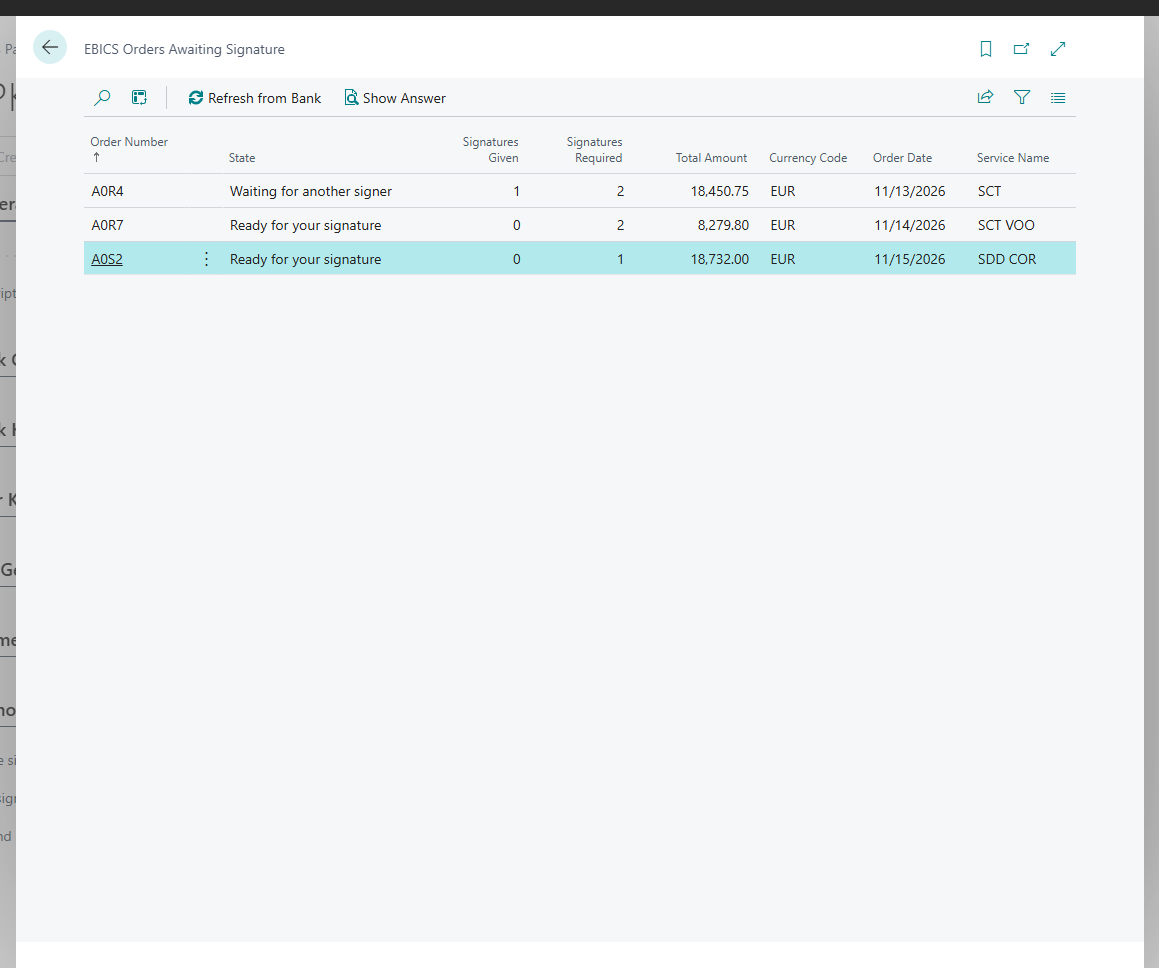
You can also see in Business Central which orders are still waiting for a signature at your bank: on the EBICS participant card, choose Orders Awaiting Signature (VEU) and then Refresh from Bank. The EBICS Orders Awaiting Signature page shows the signatures already given for each order.
Find the submission in the banking program
In Business Central, open the EBICS Submissions page and note the Order Number, Total Amount and No. of Instructions. Your bank files the submission under the same order number in the banking program.