
Connect PayPal
How to connect PayPal to 365 business Banking: create a REST API app and enter its Client ID and Client Secret in the Connect Bank Account wizard.
Applies to: PayPal
Prerequisites
- An active PayPal business account.
- A REST API app in the PayPal Developer Dashboard with Client ID and Secret and the Transaction Search permission. See PayPal. Collecting payments requires further permissions.
Step by step
- Choose the Search icon, enter Bank Accounts and choose the Connect Bank Accounts action. The Connect Bank Account wizard opens.
- Choose Next.
- On the Choose your banking provider page, set Provider to PayPal and choose Next.
- The payments that PayPal receives for you are posted to a bank account. On the Choose the bank account page, choose Create a new bank account or Use an existing bank account and choose Next.
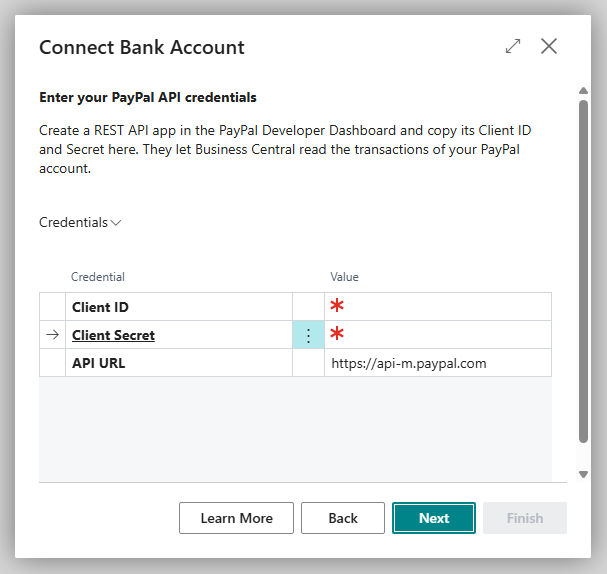
- On the Enter your PayPal API credentials page, copy the Client ID and Client Secret from your REST API app and choose Next. Business Central checks them with PayPal immediately.
- Choose Finish.
PayPal Connection Setup
You change the details later on the PayPal Connection Setup page. You open the page on the Bank Account Card via Actions > Banking Provider > Configuration.
| Field | Description |
|---|---|
| Client ID | Client ID of your REST API app |
| Client Secret | Secret of your REST API app (masked) |
| Success Redirect URL / Cancel Redirect URL | pages to which the customer is redirected after a payment authorization; empty = the standard pages of 365 business Banking; see Collect payment |
| Is Authenticated | whether the connection is established |
After a change, choose Authenticate to check the connection again.
Disconnect
On the Bank Account Card, choose Actions > Banking Provider > Disconnect and confirm the question "Do you really want to disconnect this bank account from the … banking service?". Business Central deletes the payment service provider's setup for this bank account, including the credentials; transactions that are already imported are kept. To connect the account again later, enter the credentials in the wizard again.