
Import a bank statement as a camt file
This page describes how to import a camt.052, camt.053 or camt.054 bank statement in 365 business Banking and apply the transactions.
Applies to: account information service Bank Account (camt File Import)
Step by step
- Download the bank statement from your online banking as a camt file (XML). Business Central reads camt.052, camt.053 and camt.054.
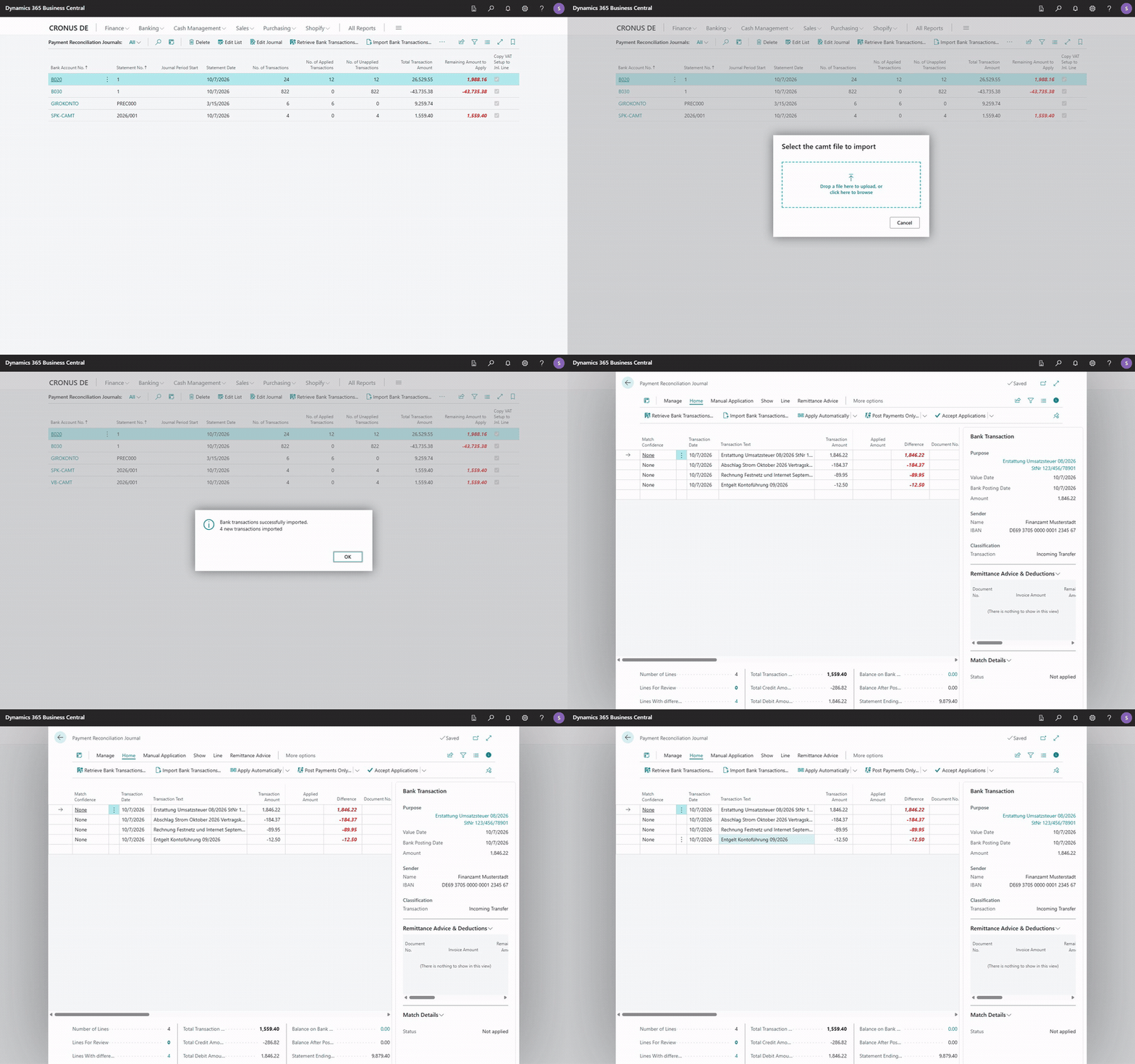
- In Business Central, choose Retrieve Bank Transactions in the payment reconciliation journal or in the list of payment reconciliation journals.
- The file selection "Select the camt file to import" opens. Choose the downloaded file.
- As with any other route, the transactions are transferred to the payment reconciliation journal and applied there. See Apply bank transactions. A camt account counts as a regular bank account: matching uses IBAN, name and account holder, and partial document numbers. See How automatic application works.
Importing the same file more than once
Business Central recognizes transactions that are already in the payment reconciliation journal or posted by their transaction fingerprint and skips them. This also applies to transactions that were previously imported via finAPI or EBICS.
Not in the background
The file is always selected by a person. Therefore, the regular retrieval in the job queue skips camt accounts instead of stopping with an error; the other bank accounts of the run are still retrieved. If an import is nevertheless started in a background session, the following message is shown: "A camt file can only be imported by a user who selects it. Import it from the payment reconciliation journal, not in a background session such as the job queue."
The bank account's Import Until Date Formula does not apply to the camt import: Business Central takes over all transactions in the file.
What Business Central checks
Before reading the file, Business Central checks it:
| Message | Meaning |
|---|---|
| "The file is not an ISO 20022 account report. …" | It is not a camt file. Often a PDF statement or an MT940 file was downloaded instead. |
| "The file is a … document, which this version does not read." | A camt version that is not supported. Ask your bank for one of the supported versions. |
| "The file contains no transactions." | The file is valid but empty; there were no bookings in the chosen period. |
Last statement balance
For a file account, the balance cannot be requested from a bank. After every import, the ISO 20022 File Setup, FastTab Last Imported Statement, therefore shows the file's closing balance: Last Statement Balance, Last Statement Date and Last Statement ID.