
Payment proof and retention
The payment proof in 365 business Banking records when and by whom a SEPA payment import was paid, without recipient data. The import can only be deleted after that.
A carried-out payroll file is the only evidence that the transfers were ordered. At the same time, it contains particularly sensitive data, because it lists every person with name and salary. The SEPA Payment Proof proves the payment without naming any recipient. For this reason, it is kept when the import is deleted.
Print the payment proof
- Open the carried-out import on the SEPA Payment Import card. The General FastTab shows Carried Out At and Carried Out By.
- Choose Functions > Print Payment Proof. The action is available as soon as the import has been carried out.
- Print or save the SEPA Payment Proof report, for example as a PDF for your accounting records.
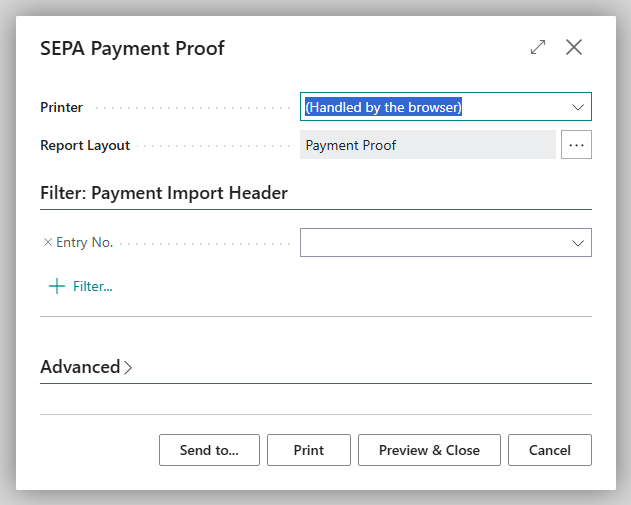
Afterwards, Payment Proof Printed At shows the time of printing. A preview with Preview & Close is not taken into account. It does not fill in the field and therefore does not release the import for deletion. You can print the proof again at any time.
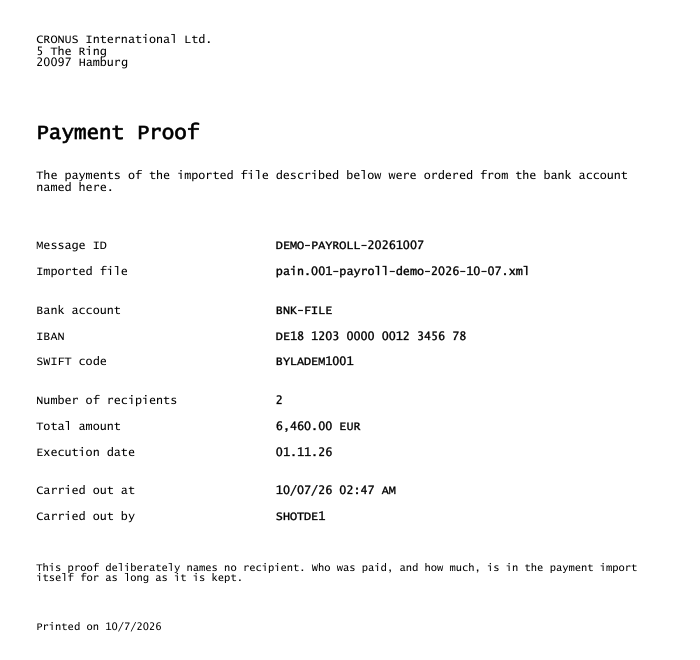
What the proof contains
| Item | Source |
|---|---|
| Your company with address | Company Information |
| Message ID and Imported file | file header, Source File Name |
| Bank account, IBAN, SWIFT code | the import's Bank Account FastTab |
| Number of recipients and Total amount | total of the payment instructions, with currency code; with several currencies, one amount per currency, separated by "/" |
| Execution date | as in the import |
| Carried out at and Carried out by | time and person of Carry Out Payment |
| Printed on | date of printing |
The proof also contains the following note: "This proof deliberately names no recipient. Who was paid, and how much, is in the payment import itself for as long as it is kept."
Adding euros to dollars would result in an amount that was not ordered in this form. For this reason, the proof shows the total per currency. For this, it reads only amount and currency from the lines, never a recipient. As a result, users with only the Banking SEPA Import (no recipient details) permission set can also print it. See Who may see the recipients.
Deleting
A carried-out payment import can only be deleted once its proof has been printed. If you try earlier, Business Central reports: "Print the payment proof for this payment import before you delete it. It is what remains as evidence that the payments were ordered."
An import that was never carried out can be deleted as long as its Approval Status is Open, because there is no payment to prove. An import that is Pending Approval or Released must be reopened first. See Change after release: Reopen. Deleting the import also deletes its lines, the line errors and its approval entries.
Retention policy
You decide how long imports are kept. Business Central does not create a policy for this, but the SEPA payment import table is available under Retention Policies:
- Choose the Search icon, enter Retention Policies and create a new policy.
- Choose the table Payment Import Header.
- The period counts from Carried Out At. A period of one year and a filter on imports whose Payment Proof Printed At is filled in are suggested. Adjust the period to your retention obligations.
- Enable the policy.
Keep the filter on the proof
A carried-out import without a proof cannot be deleted. If a retention policy includes such an import, it stops instead of skipping it. Therefore, keep the suggested filter and print the proofs promptly.
How retention policies work in general is described in Define retention policies on Microsoft Learn. The Banking tables that are available are listed in Retention policies for Banking data.
Troubleshooting
| Message | Cause and remedy |
|---|---|
| "Payment import … has not been carried out, so there is nothing to prove yet." | The report was run for an import that has not been carried out. Carry out the payment first |
| "Print the payment proof for this payment import before you delete it. …" | Print the proof, then delete |