
Application in payment reconciliation
How 365 business Banking applies remittance advices automatically in the payment reconciliation journal, shows deductions, and how both are posted.
Automatic application
If Enable Remittance Advice Matching is turned on, Apply Automatically makes 365 business Banking check every line with an incoming payment that is not yet applied for a matching open remittance advice of a customer:
- From camt structured data: The advice is already firmly linked to the bank transaction. No amount or payer check is needed.
- From a REMADV file: The advice's Total Amount exactly equals the bank transaction's amount, the advice's currency equals the bank account's currency, and at least one of the following conditions is met: the advice's customer is resolved from the bank transaction's related party, the Payer IBAN equals the related party's IBAN, or the advice no. or a document number of the advice is contained in the payment reference.
If several remittance advices match, none is applied automatically. The match is noted as ambiguous in the application log. An applied line gets one applied payment entry per document with the advice match status Found or Amount Deviation, with the paid amount plus the granted discount, and the match confidence High - Remittance Advice. A deduction is created per adjustment.
Remittance advices are also considered when they were imported before the bank transaction. They stay open until a matching transaction arrives. If the bank transaction is already in a payment reconciliation journal when the REMADV file is imported, 365 business Banking applies the advice to the line that is not yet applied directly on import.
Remittance advices whose payer was resolved as a vendor are not applied in payment reconciliation.
Columns and FactBox
The payment reconciliation journal shows two extra columns:
| Column | Meaning |
|---|---|
| Deduction Amount | sum of the deductions on this line; highlighted when not 0. Selecting it opens the Payment Deductions page for this line. |
| Remittance Advice No. | number of the applied advice; selecting it opens the remittance advice card. |
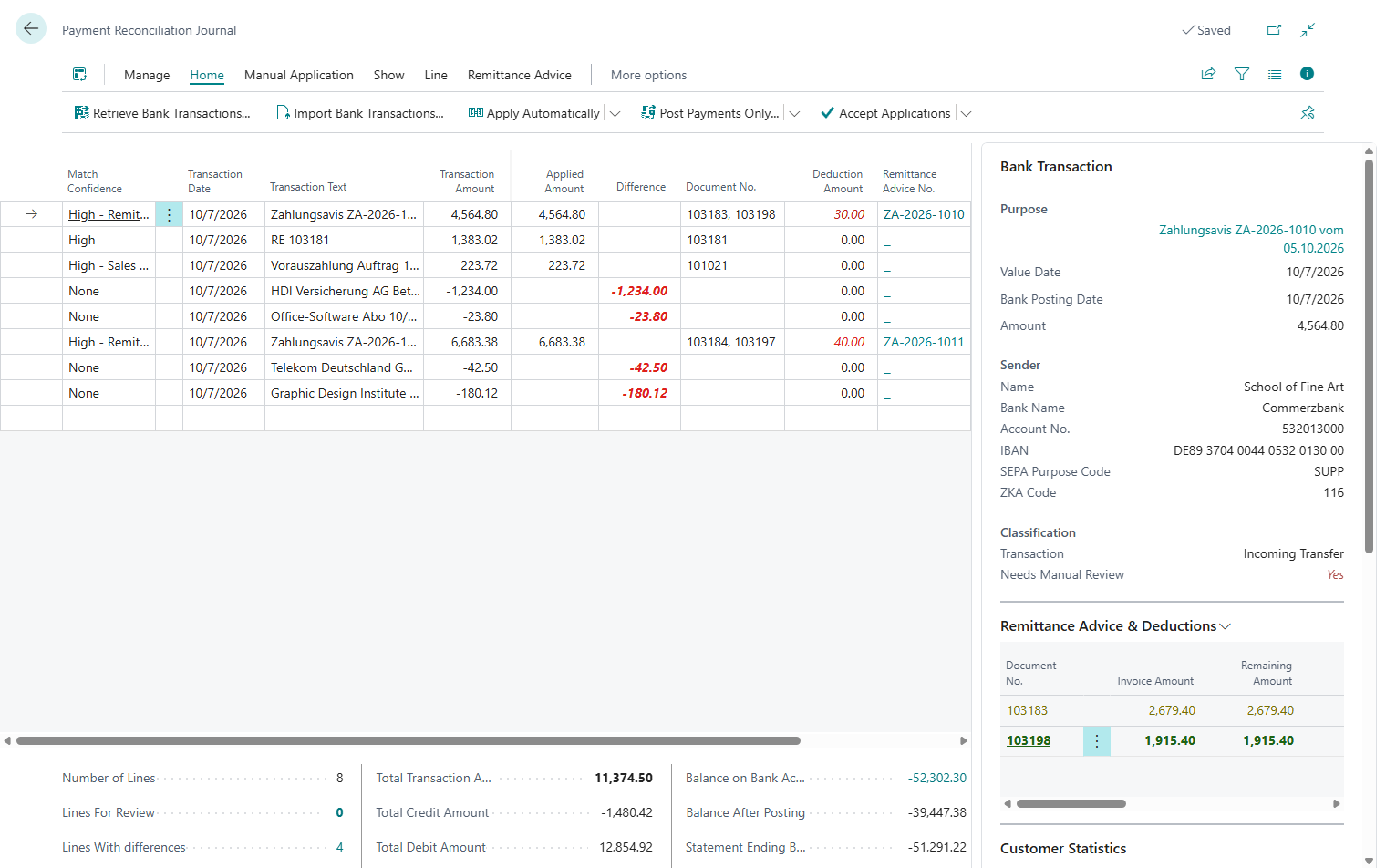
The Remittance Advice & Deductions FactBox shows one row per applied entry of the line. If a remittance advice is applied to the line, one more row follows for each document of the advice with the advice match status Not Found or Ambiguous:
| Column | Meaning |
|---|---|
| Document No. | applied document |
| Invoice Amount | original amount of the entry; for an unmatched document, the amount per the advice |
| Remaining Amount | amount still open on the entry |
| Payment Discount Amount | discount granted; for an unmatched document, the discount per the advice |
| Deduction Amount | deduction on this document; the value opens the Payment Deductions page |
| Paid Amount | amount actually paid |
| Reason | description of the deduction reason; (multiple reasons) if there are several |
| G/L Account No. | deduction account |
| Status | Found or Amount Deviation for an applied entry, Not Found or Ambiguous for an unmatched document |
Rows are color-coded: green when the paid amount and discount explain the remaining amount without a deduction, yellow when a deduction contributes to the explanation, and red for an unexplained amount deviation or an advice document that could not be matched to an entry.
Discount rule
Discount within the term or discount tolerance is applied the same way as in standard Business Central. See Payment discount, tolerance and partial payments. If the advice claims more discount than is still possible after that, 365 business Banking only posts the allowed part as discount. The excess is posted as a deduction with reason 46 Discount beyond terms.
The standard discount is only granted in full. If the advice claims less discount than the payment terms allow (more than 0.01 less), or if the transaction date is after both the payment discount date and the payment discount tolerance date, no discount is granted. The advice's whole discount amount is then posted as a deduction with reason 46.
Purpose of the rule
This rule keeps an overstated discount visible and traceably explained. The invoice does not stay open, and the full discount claimed is not accepted without notice.
Undocumented differences
If the advice states no deduction for a document with the advice match status Amount Deviation, and the discount does not explain the deviation between the entry's remaining amount and the paid amount either, the line stays with an open difference. If Record Undocumented Difference as Deduction is selected, 365 business Banking posts the difference automatically as a deduction with the configured Undocumented Deduction Reason. For setup details, see Payment application settings.
Recording, changing or discarding a deduction manually
Deductions can also be recorded without a remittance advice, for example on a line that was applied through a different match.
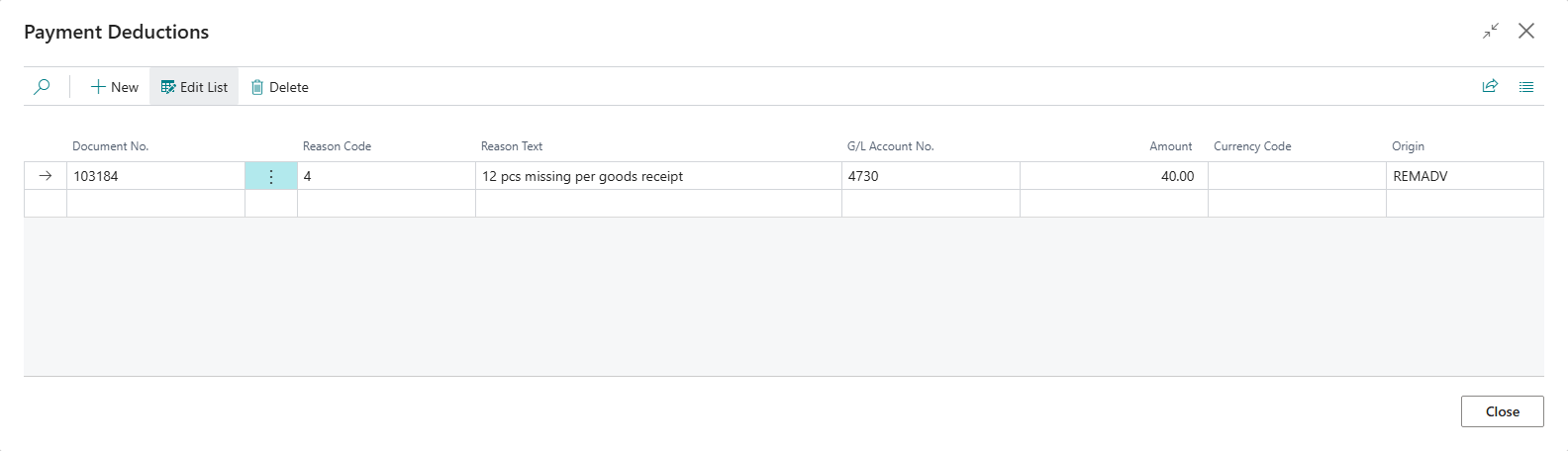
- On the line, choose Record Deduction, or select the value in the Deduction Amount column. The Payment Deductions page opens.
- In Document No., choose an entry that the line applies, and enter Reason Code and Amount. Optionally, add a Reason Text. G/L Account No. is taken from the reason. If the reason has no G/L account of its own, the G/L account from Default Deduction G/L Account No. is used. If none is set up there either, Business Central shows an error.
- To change a deduction, reopen the same page. To discard it, delete the line.
The amount must be positive and must not exceed the amount still open on the entry after the applied amount, the payment discount and other deductions.
Manual application with a deduction
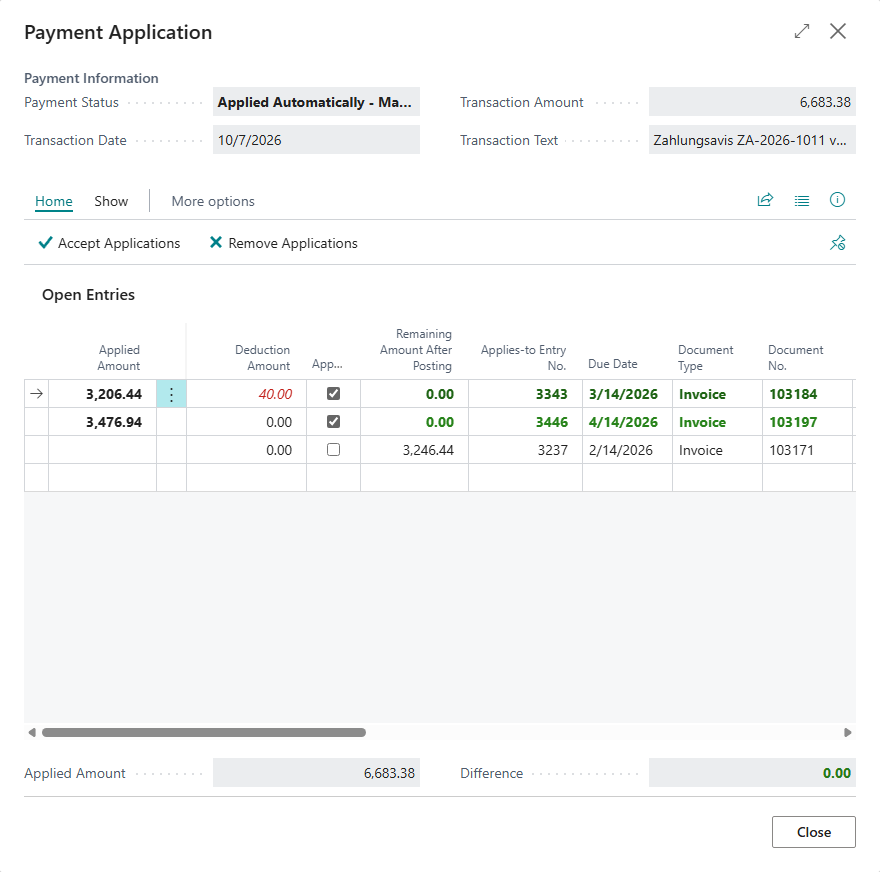
Record Deduction is also available per entry on the Payment Application page (Apply Manually), regardless of whether a remittance advice exists. The Deduction Amount column shows the recorded deduction per entry. Remaining Amount After Posting takes the recorded deductions of the entry into account: if the payment and the deduction cover the entry completely, the column shows 0.00.
Apply or remove a remittance advice
Two actions in the payment reconciliation journal act on the line directly:
| Action | Effect |
|---|---|
| Apply Remittance Advice | opens the open remittance advices of customers for you to choose from, limited to the line's customer if it is already known, and applies the chosen advice to the line; an existing application is replaced after confirmation |
| Remove Remittance Advice | undoes the application, deletes the deductions it created, and reopens the remittance advice |
Posting
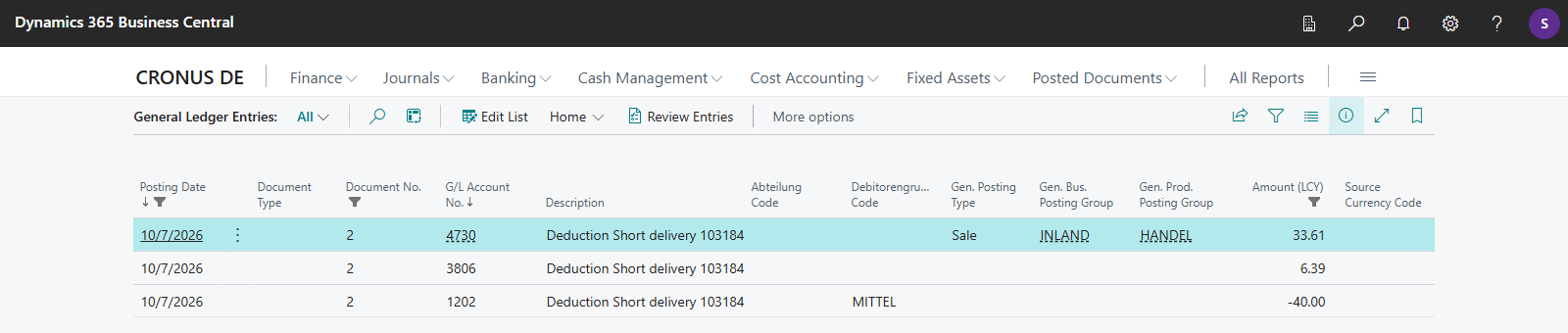
When the payment reconciliation is posted, the payment itself is first posted as in the standard (bank account against customer or vendor, applied with the paid amount). 365 business Banking then posts, per deduction:
- an application entry on the customer or vendor, with the same document number as the payment, that finally settles the invoice,
- a balancing entry on the reason's deduction G/L account.
VAT: Unless No VAT Adjustment is set on the reason, 365 business Banking splits the deduction proportionally across the invoice's VAT lines (as a reduction in consideration under German VAT law, § 17 UStG). For an invoice with mixed rates (such as 19% and 7%), each rate is reduced in proportion to its share of the invoice, and VAT is corrected accordingly. If No VAT Adjustment is set (for bank charges or agent commission, for example), the deduction is posted gross, without a VAT correction.
Posting text
The deduction posting's text is built from Deduction Posting Text in the payment application settings. The following placeholders are available:
| Placeholder | Content |
|---|---|
{Reason} | the deduction reason's description |
{ReasonCode} | the deduction reason's code |
{ReasonText} | free text of the deduction, if recorded |
{DocumentNo} | document no. of the settled invoice |
{AdviceNo} | advice no., if the deduction came from a remittance advice |
The default Deduction {Reason} {DocumentNo} yields, for example, Deduction Short delivery R-1002.
Preliminary entries and the remittance advice: A fully applied preliminary entry is closed on posting. Once every preliminary entry of an advice is closed, the remittance advice itself is set to Closed. If you reverse the posted payment reconciliation, the preliminary entries are reopened. If this reopens an entry, the remittance advice is also reopened.
Example
A remittance advice for 2,628.00 EUR applies three invoices (each at 19% VAT) in one line:
| Document | Invoice Amount | Discount | Deduction | Paid | Reason |
|---|---|---|---|---|---|
| R-1001 | 1,190.00 | none | none | 1,190.00 | paid in full |
| R-1002 | 952.00 | none | 102.00 | 850.00 | 4 Short delivery |
| R-1003 | 600.00 | 12.00 | none | 588.00 | 2% discount (standard) |
| Total | 102.00 | 2,628.00 |
Posting produces:
- the payment of 2,628.00 EUR, applied to R-1001 (in full), R-1002 (850.00) and R-1003 (588.00, including the 12.00 discount per the payment terms),
- a deduction of 102.00 EUR on R-1002: the customer application entry of 102.00 EUR settles the rest of the invoice. The deduction account is debited 85.71 EUR (net), and the remaining 16.29 EUR is the proportional VAT correction (the 19% VAT contained in 102.00 EUR). R-1002 is then fully settled.
Result: All three invoices are settled. The line has a 0.00 difference and can be posted.
See also
- Import remittance advices
- Setup for remittance advices
- Payment discount, tolerance and partial payments
- Posting text with placeholders
- Reverse a posted payment reconciliation