
Export remittance advices (REMADV)
How you create REMADV files for your vendors and customers from the payment journal, with deductions, history and extensibility for partners.
Recipients of REMADV files
A payment journal line qualifies for export when
- its document type is Payment or Refund,
- its account type is Customer or Vendor (not Employee),
- the customer/vendor has Send Remittance Advice (REMADV) turned on, and
- they have either their own REMADV Partner ID with REMADV ID Qualifier, or at least a GLN.
For setup details, see Customer and vendor card. Lines that do not meet these conditions are skipped. 365 business Banking lists them in one summary message at the end and does not abort the run.
Every export also needs a sender identification: the REMADV Sender ID from Banking Setup or, as a fallback, the GLN from Company Information. See Banking Setup.
Line and journal actions
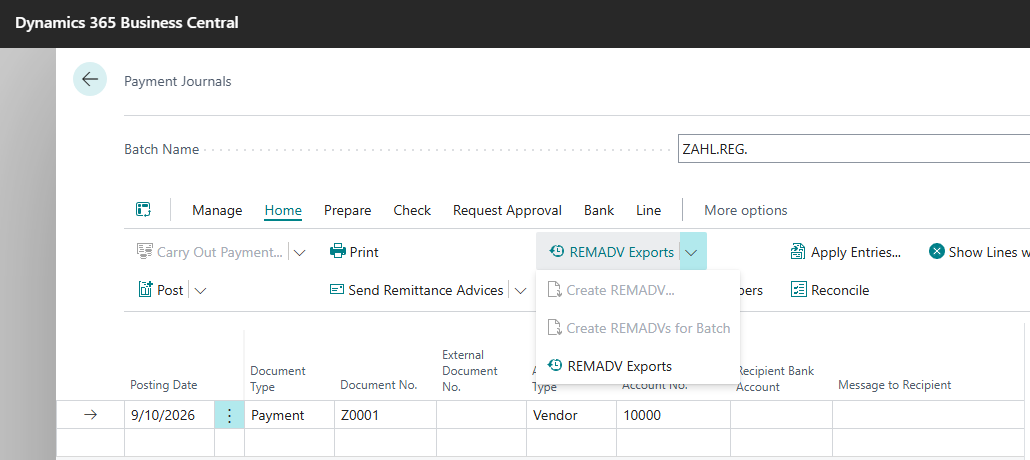
| Action | Effect |
|---|---|
| Create REMADV (line) | creates a REMADV for the selected lines |
| Create REMADVs for Batch | creates REMADVs for every qualifying line in the journal |
| REMADV Exports | opens the history of all exports created so far (see below) |
Both create actions assign a Remittance Advice No. from the existing remittance advice number series if one is not already present. This is the same number series that is used for the PDF remittance advice. See Print and send remittance advice.
How the file is built
Each recipient gets one file. In EDIFACT, the interchange header (UNB) applies to the whole file, so every recipient gets a separate file. If a run pays several recipients, several files are created. Multiple files are downloaded together as a ZIP archive.
Within a file, each payment is one message. Lines that already share a remittance advice no. are combined into one message. Every other qualifying line gets its own remittance advice no. and message. Document lookup matches the PDF remittance advice (application to a document, partial payment, discount). For each document, the message contains the original amount, the paid amount, the document date and the document reference. Discount is transmitted per document as an amount of its own. If a deduction with a reason has been recorded on the document, the deduction amount is transmitted too, with the reason's EDIFACT code and free text. A document whose currency does not match the payment currency is not transmitted and is listed in the summary message.
Recording a deduction on a payment journal line
If you shorten a payment journal line before paying, for example because you do not fully accept a vendor's invoice, record the deduction with Record Deduction as in payment reconciliation, with document, reason and amount. The deduction is transmitted in the REMADV export of that line and posted, mirroring the import, when the payment is posted. The vendor application entry (debit) fully settles the invoice, and the reason's deduction account is credited. Unless No VAT Adjustment is selected, input VAT is corrected proportionally.
The deduction can at most reach the amount that the payment leaves open on the entry: the remaining amount of the entry minus the payment amount of the line, the payment discount and other deductions. If the line settles several entries through an applies-to ID, the limit applies to all marked entries together. Payment and deductions therefore never exceed the open amount of these entries.
REMADV Exports
Every export you create stays in the REMADV Exports history.
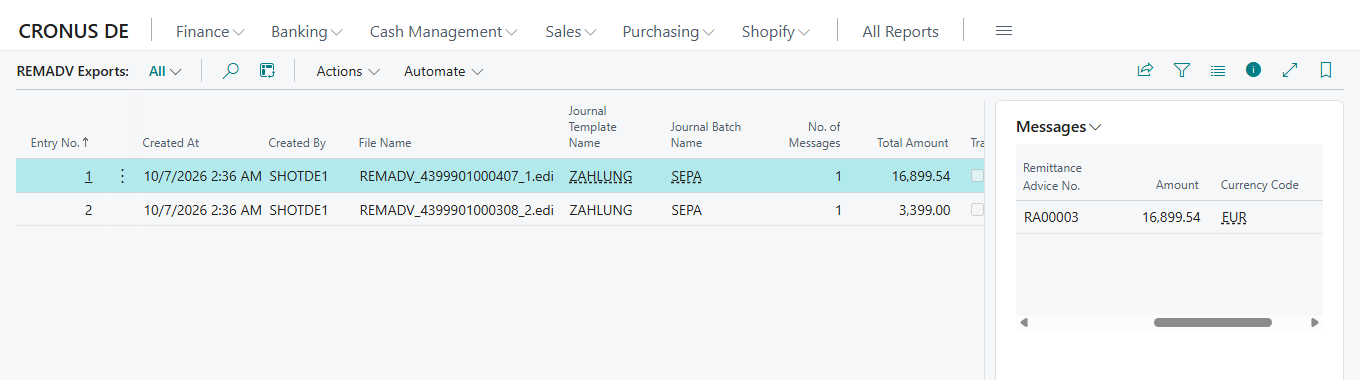
| Field | Meaning |
|---|---|
| Entry No. | unique number |
| Created At, Created By | time and user of creation |
| File Name | name of the file in the format REMADV_<recipient ID>_<entry no.>.edi |
| Journal Template Name, Journal Batch Name | where the export came from |
| No. of Messages | number of payments in the file |
| Total Amount | sum of the file |
| Transmitted, Transmitted By | whether and by whom the file was handed to a partner for transmission |
The Messages FactBox lists, per payment, Message Reference, Account Type/Account No., Remittance Advice No., Amount, Currency Code and No. of Documents. Download File downloads the file again.
Download only without partner transmission
If a partner solution takes over transmission (see below), 365 business Banking does not also offer the file for download. It still appears in the history, with Transmitted set.
Extensibility for partners
Transmission to an EDI system (SFTP, AS2, X.400, a middleware) is not part of 365 business Banking. Partner solutions use the following integration events for this:
| Event | When it fires |
|---|---|
OnBeforeCreateRemittanceAdviceExport | before an export is created; can take over the standard export entirely |
OnAfterBuildRemittanceAdviceMessage | after a message has been built, before it is closed; to append your own segments |
OnBeforeWriteInterchange | before the interchange header (UNB) is written; to change sender/recipient |
OnTransmitRemittanceAdviceExport | after the file is written and its history entry inserted, before it is offered for download; if a subscriber transmits it here, the download is skipped |
OnAfterRemittanceAdviceExport | after an export completes |
For import, the corresponding events are:
| Event | When it fires |
|---|---|
OnBeforeImportRemittanceAdvice | before a file is imported; can take over the standard import entirely |
OnAfterParseRemittanceAdviceMessage | after a message has been mapped to a remittance advice, before it is saved |
OnAfterResolvePayer | after payer resolution; a subscriber can still set the account type/no. itself |
OnAfterImportRemittanceAdvice | after every import attempt of a file, whether it succeeded or not |
See also
- Setup for remittance advices
- Import remittance advices
- Application in payment reconciliation
- Print and send remittance advice
- Payment journal