
Bank working days and lead times for direct debits
How 365 business Banking determines the collection date of a SEPA direct debit from due date, lead time and bank working days.
A SEPA direct debit cannot be collected on the day it is submitted. The payer's bank requires a lead time, which is counted in bank working days. Weekends and bank holidays are not counted. 365 business Banking therefore calculates a collection date for every line in the cash receipt journal that the bank can meet, and rejects an entered date that is too early.
Standard functionality in Business Central
Business Central manages non-working days through base calendars. You create a calendar with weekends and holidays and assign it, for example, to locations, customers or vendors. See Assign base calendars on Microsoft Learn.
What 365 business Banking adds
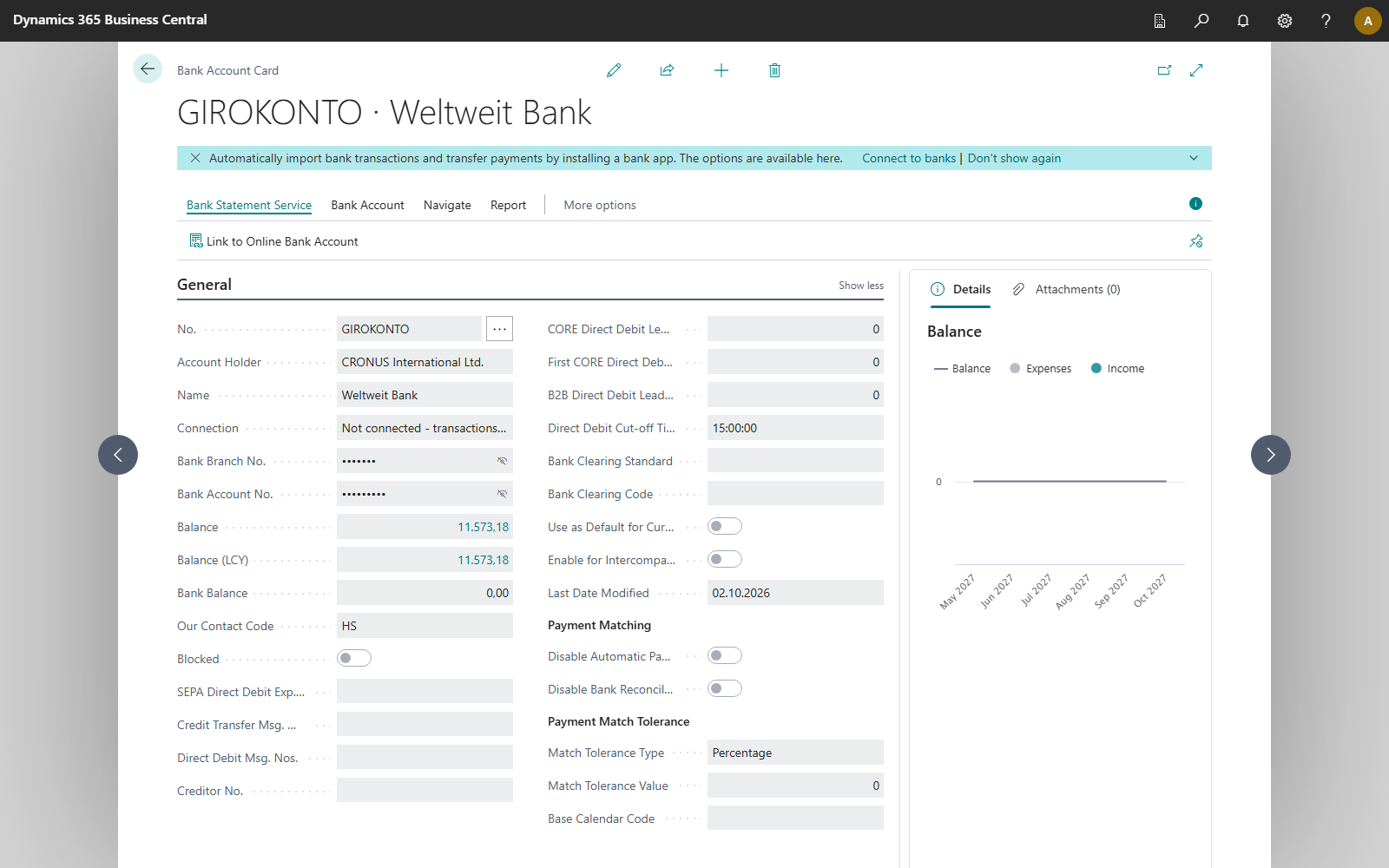
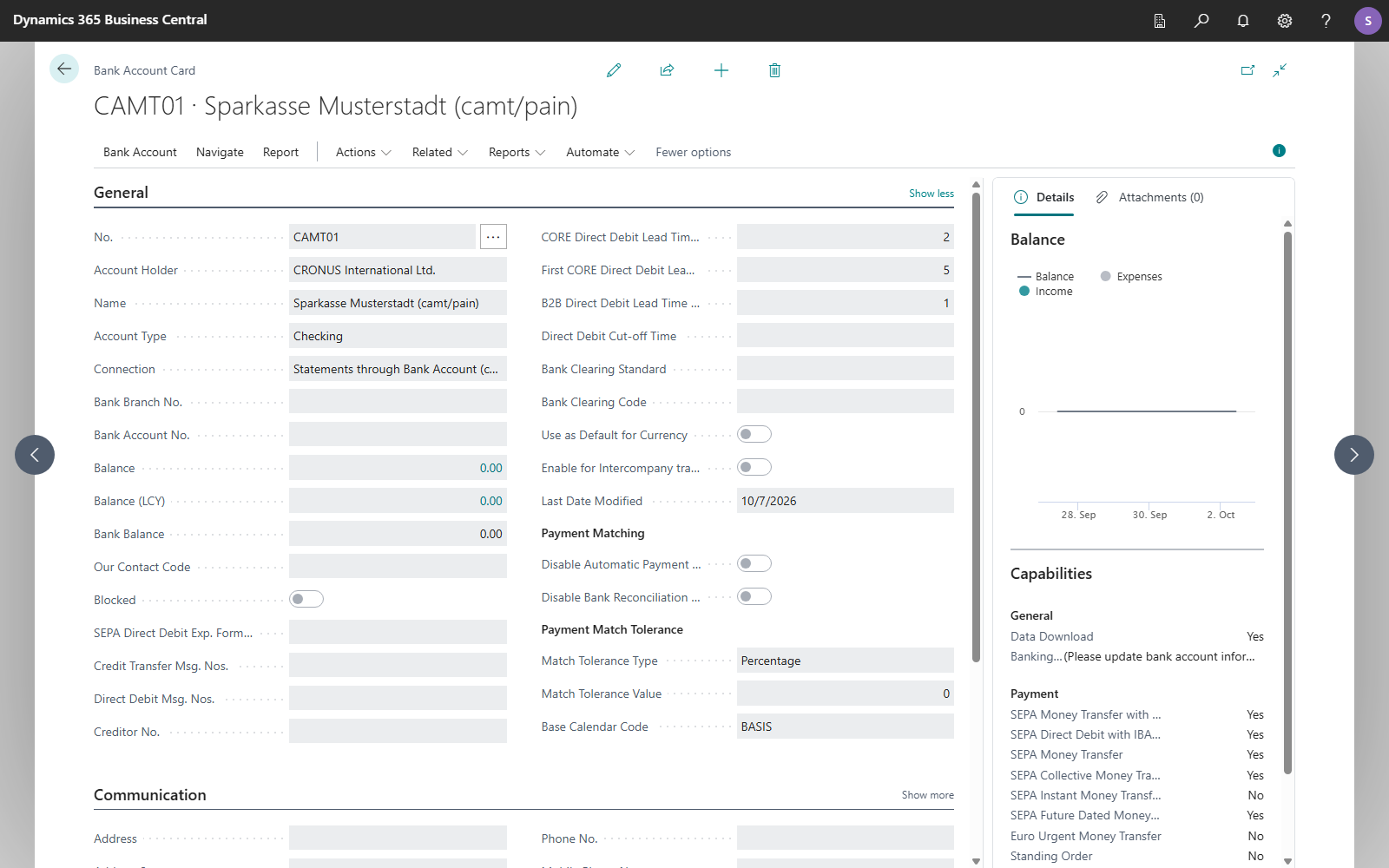
- The Base Calendar Code field on the Bank Account Card, General FastTab. It determines on which days the bank of this account works.
- Three lead times per bank account, separated by type of direct debit, also on the General FastTab of the Bank Account Card.
- The Direct Debit Cut-off Time per bank account: the time of day until which the bank accepts a direct debit for the current bank working day.
- The calculation of the collection date in Suggest Direct Debits and the check on Carry Out Direct Debit.
Which lead time applies
| Direct debit | Lead time |
|---|---|
| CORE direct debit, recurring (customer with Partner Type Person) | CORE Direct Debit Lead Time (Days) |
| CORE direct debit, first or one-off collection of a mandate | First CORE Direct Debit Lead Time (Days) |
| B2B direct debit (customer with Partner Type Company) | B2B Direct Debit Lead Time (Days) |
Whether a collection is the first, a recurring or the last one of a mandate is derived from the mandate's Type of Payment and the counter of previous collections. See SEPA direct debit mandates.
The three fields are on the Bank Account Card, General FastTab. They are only shown after you choose Show more. New bank accounts each receive the value 1, that is one bank working day. The same applies to bank accounts that were already connected at installation and had no lead time. If your bank requires longer lead times, enter them there. The values are always counted in bank working days, not calendar days.
How the collection date is determined
- Earliest collection date: the starting point is today's date. If today is not a bank working day, or the bank account's Direct Debit Cut-off Time has passed, the next bank working day applies. The number of bank working days specified by the lead time is then added.
- Collection date of a line: if the invoice is due after the earliest collection date, the due date is the collection date. If the due date is not a bank working day, it is moved to the next bank working day. If the invoice is already due or is due earlier, it is collected on the earliest possible date.
- Prenotification: the collection date is also no earlier than today plus Prenotification Lead Time (Days) from the Banking Setup, moved to the next bank working day. This ensures that the payer can be informed in time. See Direct debit prenotification.
- Posting date: the line's posting date is its collection date. The receipt is posted on the day the amount is received.
Example: today is Thursday, the lead time is 1 bank working day, and there is no holiday and no prenotification lead time. The earliest collection date is Friday. An invoice due on Saturday is collected on Monday. An invoice that was already due on Wednesday is collected on Friday.
With a cut-off time: if the Direct Debit Cut-off Time is 3:00 PM and you submit on Thursday at 4:00 PM, the lead time counts from Friday. The earliest collection date is then Monday. If the field is empty, the whole day counts.
Fixed collection date
If you enter a Collection Date in Suggest Direct Debits, it applies to all lines of the run. Business Central moves it to the next bank working day and checks it against the lead time of a recurring CORE direct debit (CORE Direct Debit Lead Time (Days)), but not against the prenotification lead time. Lines that require a longer lead time (for example, a first collection) are only rejected individually on Carry Out Direct Debit.
Changing the collection date in a line
If you enter a Collection Date in a line that is not a bank working day, Business Central asks: "… is not a bank working day. Do you want to move the collection date to the next bank working day, …?" Yes enters the next bank working day. No discards the entry, and the previous date is kept. A date that is not a bank working day is therefore not saved; it would be rejected when carrying out. If the line is created without a user interface, for example through the API or a suggestion in the background, Business Central moves the date without asking.
When carrying out
Carry Out Direct Debit checks every line again with its own lead time, because several days can pass between suggestion and execution. The Collection Date must be a bank working day and must not be before the earliest collection date.
Base calendar on the bank account
- Under Base Calendars, create a calendar that marks your bank's holidays as non-working. For euro payments, these are the TARGET2 holidays.
- Open the Bank Account Card and choose the Base Calendar Code on the General FastTab.
- On the same FastTab, check the three lead times and adjust them to your bank's requirements.
Without a base calendar, Monday to Friday count as bank working days, except for the TARGET2 closing days: New Year's Day, Good Friday, Easter Monday, 1 May, 25 and 26 December. Business Central only takes other holidays of your bank into account if they are defined in a base calendar. Therefore, set up a base calendar.
Troubleshooting
| Message | Cause and remedy |
|---|---|
| "The collection date … is too early. The bank needs a lead time, so the earliest possible collection date is …." | The entered date does not allow for the lead time. Choose the date named or a later one, or leave the field empty |
| "The collection date … of cash receipt journal line … is not a bank working day. The next bank working day is …." | Set the collection date to the day named |
| "… is not a bank working day. Do you want to move the collection date to the next bank working day, …?" | Question when entering the date in the line. Yes moves the date, No discards the entry. See Changing the collection date in a line |
| "No bank working day could be found for bank account … after …. Please check the base calendar of the bank account." | The base calendar marks every day as non-working for two years. Correct the calendar |
See also
- SEPA direct debit in the cash receipt journal
- SEPA direct debit mandates
- Bank account card
- Direct debit and payment collection