
Disconnect a bank account
How to disconnect a bank account from its banking service in 365 business Banking, and how transactions, payments and access are handled afterwards.
Disconnect turns a connected bank account back into an ordinary bank account in Microsoft Dynamics 365 Business Central. The bank account itself, its ledger entries and all postings are kept. What happens at the service depends on the bank connection (see the table below).
Do not delete if you only want to disconnect
Delete removes the bank account itself, including its master data, from Business Central. To disconnect only, use Disconnect. If you delete a connected bank account, Business Central first releases it at the service that delivers the transactions (with finAPI after the question "Do you really want to delete the bank account? …"). If you choose No in this question, the bank account is not deleted and stays connected. If finAPI only carries out the payments, for example with statements from camt files, Business Central also releases the account at finAPI when you delete it, without a further question.
Use cases
- You close an account at the bank or no longer keep it in Business Central.
- You stop working with a payment service provider.
- You want to connect an account again from the beginning, for example after changing banks with a new IBAN.
If you only want to change the channel, for example to send payments via EBICS instead of finAPI, do not disconnect the account. Switch the services instead. See Combine banking services.
Check first
- Open payments. Complete payments with the status Pending before you disconnect. After disconnecting, you can neither pay through this account nor request the payment status.
- Open payment reconciliation journals. Transactions already retrieved are kept and can still be applied and posted. No new transactions are retrieved after disconnecting.
Step by step
-
Open the Bank Account Card.
-
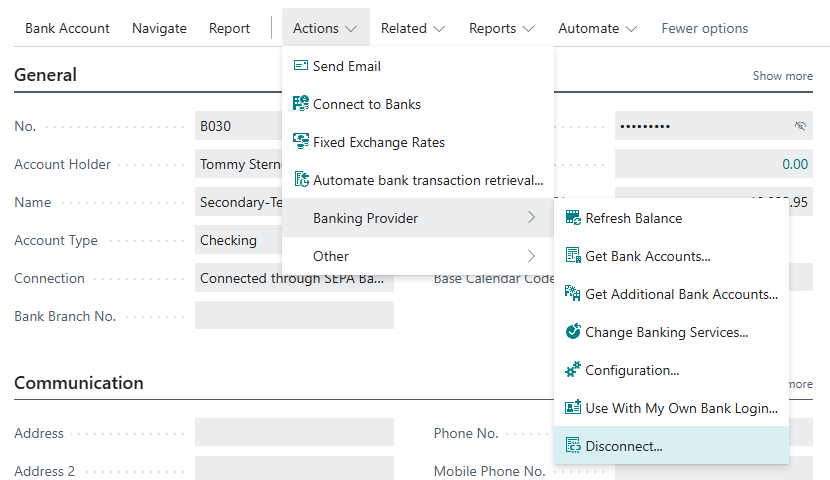
Choose Actions > Banking Provider > Disconnect.
-
Confirm the question "Do you really want to disconnect this bank account from the … banking service?". It names the service the account is connected to; for an account used only for payments, this is the payment initiation service. If statements and payments are transferred through different services, it names both: "Do you really want to disconnect this bank account from the … and … banking services?"
No further confirmation is requested. If the account uses finAPI for statements, payments or both, Business Central then releases it at finAPI without asking again.
The action is enabled as soon as the bank account has an account information service or a payment initiation service, including an account that is used only for payments.
What happens next
On the bank account card:
- Account Information Service and Payment Initiation Service are empty, and Connection shows Not connected. Transactions have to be imported manually.
- Last Updated and Last Update Attempt are cleared, Import Until Date Formula is reset to its default
-1D. - The details the service reported about the account are removed: the Account Type, the Bank Balance with its date and retrieval time, the bank's logo and the last transaction retrieved. If the account was connected from another company, that link is removed as well. A new connection is signed in in this company.
- Last Statement Date and Retrieve Transactions From are kept. If you connect the account again later, retrieval continues from that date. Business Central recognizes existing transactions by their transaction ID and, for camt and Universal accounts, also by the transaction fingerprint. If you connect the account through a different account information service than before, transactions that already arrived through the previous service can arrive again. In that case, check the first retrievals (see Combine banking services).
- The actions under Banking Provider are greyed out; the Banking Interfaces FastTab and the Capabilities FactBox are no longer shown.
- The EBICS Participant field is cleared.
The whole account is always disconnected, with both services. Business Central removes all data belonging to the connection: the stored Capabilities, the Banking Interfaces, the assignments of personal bank accesses, the ISO 20022 File Setup and the Universal Banking Provider Setup. Any remaining data would later be evaluated as if the account were still connected.
In the books:
- Bank account ledger entries, posted payment reconciliations and all other entries are unchanged.
- Carry Out Payment in a journal with this bank account as balancing account stops: "We're sorry, but you can only carry out payments to your bank account if it is an online connected bank account. …"
Per bank connection
| Bank connection | What happens at the service | What remains |
|---|---|---|
| PSD2/XS2A via finAPI (SEPA Bank Account) | The account is released at finAPI, also when finAPI only delivers the statements or only carries out the payments. If the account no longer exists at finAPI, this is not treated as an error. | The Company Bank Access and all other accounts of the same bank connection remain connected. |
| EBICS (SEPA Bank Account (EBICS)) | Nothing happens at the service; no order is sent to the bank. Your EBICS contract does not change. On the bank account card, the EBICS Participant field is cleared. | The EBICS Participant itself remains in the status Ready and continues to serve its other accounts, because it belongs to the bank contract and not to the account. To take it out of service as well, suspend it. See Manage keys and certificates. |
| camt/pain file (Bank Account (camt File Import)) | There is no service. The account's ISO 20022 File Setup is deleted, also when only the payments were created as files. | nothing |
| Payment service providers (PayPal, Stripe, Adyen, Mollie, Klarna, Shopify, Unzer, Amazon Pay) | The account's connection setup (for example PayPal Connection Setup) is deleted, including the credentials stored there. | The key or app authorization at the payment service provider remains valid. Revoke it there if it is no longer needed. |
| Universal | There is no service. The account's Universal Banking Provider Setup is deleted with the whole file description, including the CSV settings and the column mappings. A new connection starts empty. | nothing |
Personal bank accesses
If people used the account with their own bank login, their assignments to this account are removed when you disconnect. The person's bank access itself remains. See Use with my own bank login.
Disconnecting a whole access instead of an account
| What you disconnect | Where | Result |
|---|---|---|
| a person's bank access | Personal Bank Accesses, action Disconnect | After the question "Bank access … will lose access to the banking provider, and the bank account assignments of that access will be removed.", the person no longer pays or reads with their access. The bank accounts remain connected and are used through the company bank access. |
| the company bank access | Banking Setup > Company Bank Access, action Disconnect | The access is released at finAPI. Every bank account that finAPI reads or pays from is disconnected completely (see below). |
| an EBICS participant | participant card, Suspend Access (SPR) | takes effect at the bank immediately and cannot be undone. See Manage keys and certificates |
Disconnecting the company bank access
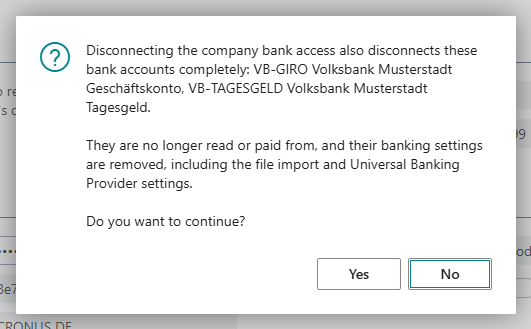
Before Business Central releases the company bank access, it asks for confirmation and lists every affected bank account with its number and name: "Disconnecting the company bank access also disconnects these bank accounts completely: … They are no longer read or paid from, and their banking settings are removed, including the file import and Universal Banking Provider settings. Do you want to continue?"
- Affected are only bank accounts that use finAPI for one direction, as account information service, payment initiation service or both. They are disconnected completely as described above: both services, with capabilities, interfaces, assignments and file or Universal setup.
- Not affected are accounts on EBICS, a camt/pain file or a payment service provider that do not use finAPI. They are independent of the company bank access.
Verification of payee requires the company bank access
Verification of payee runs through the company bank access with every bank connection. Take this into account before you disconnect it.
Connect again
Run the Connect Bank Account wizard again and, for payment service providers and files, choose Use an existing bank account. With PSD2/XS2A and EBICS, the wizard recognizes the existing bank account by its IBAN and does not create it twice.