
Role Center
365 business Address Validation provides its own profile and role center that shows the validation status of your address data at a glance.
This role center is well suited for anyone whose main task is maintaining and checking address data in Microsoft Dynamics 365 Business Central.
Assign the profile
The Address Validation profile opens the bdev.Address Validation RC role center. Assign it like any other role center profile, on the Role Center Setup page.
Not a required profile
The profile is optional. The functionality of 365 business Address Validation is available regardless of the chosen role center, for example through search.
Address Data Quality tile group
In the role center, the Address Data Quality tile group shows two aggregated tiles:
| Tile | Counts | Opens |
|---|---|---|
| Validated | Address data with state Validated or Manually Checked. | The Address Data list, filtered to these two states. |
| Unchecked | Address data with state Not Validated. | The Address Data list, filtered to Not Validated. |
Choosing either tile opens the Address Data list with the corresponding filter.
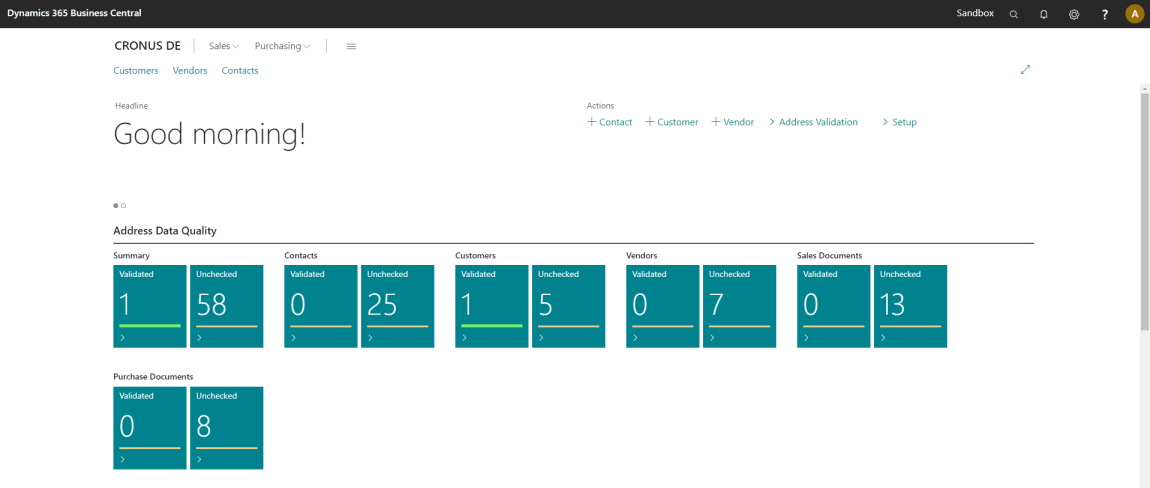
Actions in the role center
In the action bar, under Address Validation, the role center provides the Check Contact Address, Check Customer Address, and Check Vendor Address reports, see Validate addresses in bulk. There is no dedicated action for resource addresses in the role center; the Check Resource Address report is reachable through search.
The action bar also provides shortcuts to create a new contact, customer, or vendor.