
Manage address data
The Address Data page shows every address that 365 business Address Validation already knows, with its validation status.
In Microsoft Dynamics 365 Business Central, an entry in the address directory is created for every address that has been validated, predicted, or initialized. This entry is shared by every record that uses the same address, so an address that is already known does not need to be sent to the service again.
List
The list shows, for each address, the Address Validation Status (Not Validated, Manually Checked, or Validated), the Last Date Validated, the address fields, and the Usage, that is, the number of records currently using this address. Clicking the number in Usage opens the list of records using it.
Actions
| Action | What it does |
|---|---|
| Validate Address | Validates the selected addresses again against the validation service, as with manual validation. |
| Set Validated | Sets the status of the selected addresses to Manually Checked, after confirming a prompt. An address marked this way is skipped by future automatic validations. |
| Reset Validation Status | Resets the status, so the address is validated again the next time it is used. |
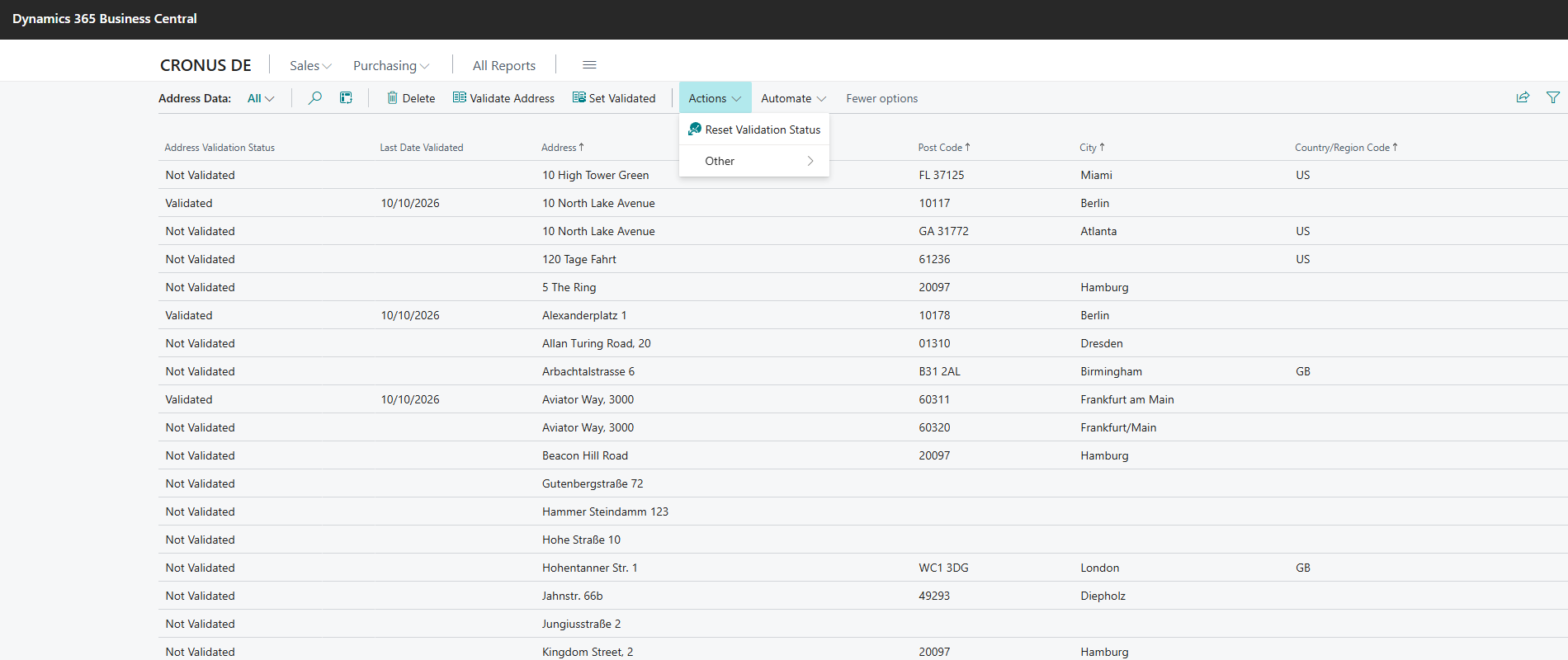
- Source:
app/src/AddressData/View/AddressData.Page.al.
Usage
An address is considered known as long as at least one record uses it. 365 business Address Validation does not compare addresses character by character; instead, it uses a hash value over the address fields, so different spellings of the same address still share the same entry.
See also
- Validate an address
- Validate addresses in bulk
- Initialize address data
- Role Center
- Address directory