
Validate addresses in bulk
365 business Address Validation checks several addresses in one run, either as a batch report or as a bulk compare with a preview.
In Microsoft Dynamics 365 Business Central, a batch report is available for Contact, Customer, Vendor, and Resource, and applies the addresses directly. For Contact, Customer, Vendor, and Ship-to Address, the Compare Address Batch bulk compare is also available, which shows each address for selection before it is applied.
Batch reports
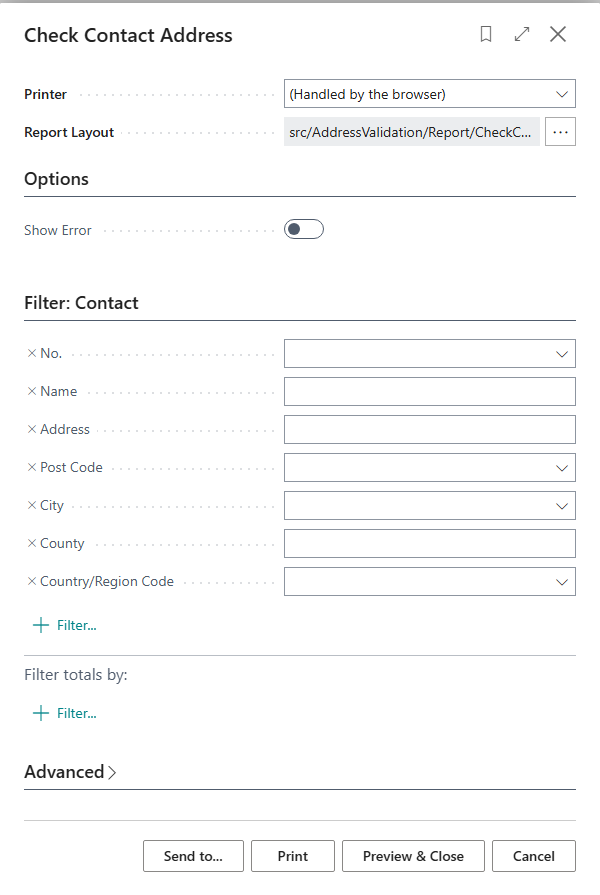
Check Contact Address, Check Customer Address, Check Vendor Address, and Check Resource Address are built the same way. Each report can be filtered on its request page by No., Name, Address, Post Code, City, County, and Country/Region Code, and offers the Show Error option, which aborts further processing on an error.
Records that are already validated are skipped. For every other record, the report validates the address, applies a suggested address without asking, and then lists No., Name, the original and the validated address, and any error text. After the run, Business Central reports the number of records checked.
- Source:
app/src/AddressValidation/Report/CheckContactAddress.Report.al(the same applies to Customer, Vendor, Resource); request page and processing:1-139.
Compare Address Batch bulk compare
A selection of records can be checked in bulk from the Contact List, Customer List, Vendor List, and the Ship-to Address list through the Validate Address action. Business Central asks before starting whether you really want to validate the address data of the selected records, and then shows the Compare Address Batch page.
One record per line
Each line shows the original and the suggested address of a record side by side, with the same AssistEdit ... as on the single Compare Address page, to correct a value before it is applied.
The Accept Changes checkbox on each line determines whether the suggested address is applied; it is disabled and cannot be edited if the check failed for that line. The Toggle Accept Changes action reverses the Accept Changes value for all selected lines, except failed ones.

- Source:
app/src/AddressValidation/View/CompareAddressBatch.Page.al; invocation and confirmationapp/src/AddressValidation/AddressValidationBatch.Codeunit.al:8-33(ValidateBatchoverloads for Contact, Customer, Vendor, Ship-to Address).