
365 business Sanction Screen
Automated sanctions screening during document release
365 business Sanction Screen supports automated sanctions list screening in Microsoft Dynamics 365 Business Central during document release in sales and purchasing documents.
Before you start
On the Sanction Screen Setup page you specify per document type whether it is screened automatically on release. Supported are quote, order, invoice, credit memo and return order in sales, and quote and order in purchasing.
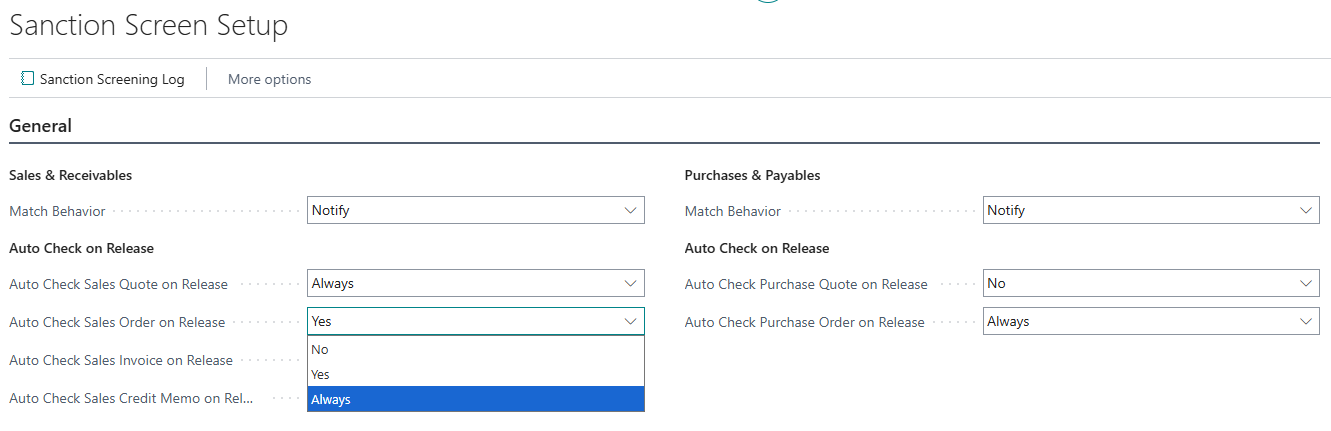
There are 3 options available.
- “No” - The sanctions list screening is disabled for the document type during release.
- “Yes” - The sanctions list screening is performed automatically when the document is released, provided that the sanctions screening interval requires it.
- “Always” - The sanctions list screening is always performed automatically when the document is released, regardless of the sanctions screening interval.
Every address of the document is screened separately on release - in sales the sell-to, ship-to and bill-to address, as far as they differ from one another. Each of those screenings gets a log entry of its own.
See also
Last modified on