


What is the Print Agent Service?
The Print Agent Service handles the communication between:
- Microsoft Dynamics 365 Business Central (Direct Connection Service Mode)
- and the 365 business Print Agent Cloud (Print Agent Cloud Service Mode).
It receives print jobs from Business Central and executes them on the local system.
Each Print Agent Service is identified by a unique Client ID (GUID) and monitors the online status of the shared printers.
The Print Agent should be installed on the Windows system on which the corresponding printers are set up.
Good to know
The Print Agent Service can work with all printers that are installed locally on the system.
Enabling network printers can lead to timeouts, as the response times over the network are longer.
This behavior is a limitation of Windows printer management and cannot be completely circumvented by the 365 business Print Agent.
Recommendation: Install the Print Agent directly on the print server and share locally installed printers there - instead of accessing shared printers from a remote server.
Connect Printers to Print Agent
All printers installed on the system automatically appear in the Printer view of the 365 business Print Agent application:
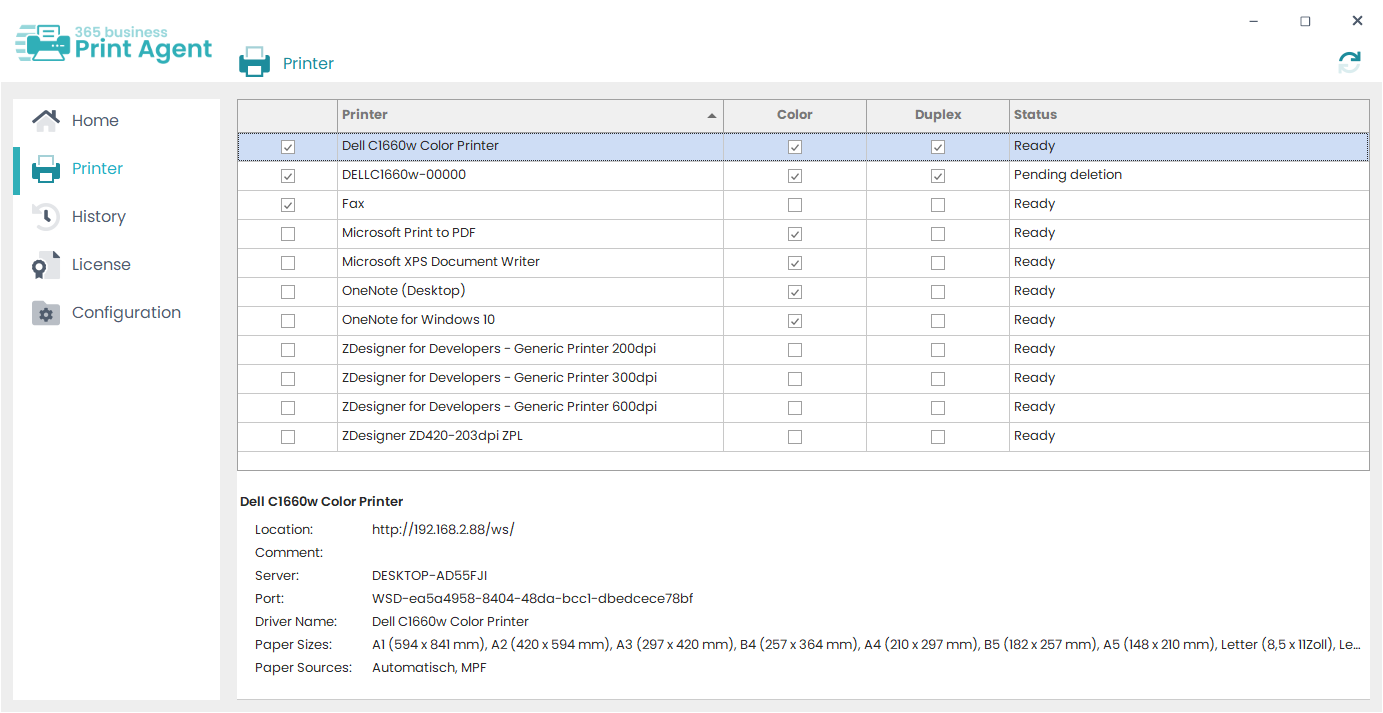
Select the printers you want to make available for Microsoft Dynamics 365 Business Central.
Attention
Once a printer is shared, removing the share or deleting the printer can lead to failed print jobs.
Therefore, manage shared printers with special care.
Tasks of the Print Agent Service
The Print Agent Service performs the following tasks:
- Management of communication with Dynamics 365 Business Central (Direct Connection / Print Agent Cloud).
- Executing incoming print jobs.
- Management and monitoring of approved printers.