
Setup
The address validation setup contains the configuration for the integration of address validation and prediction in Microsoft Dynamics 365 Business Central.
After installation, the basic setup and some setup parameters are already set automatically according to the most common wishes and requirements as part of the installation routines.
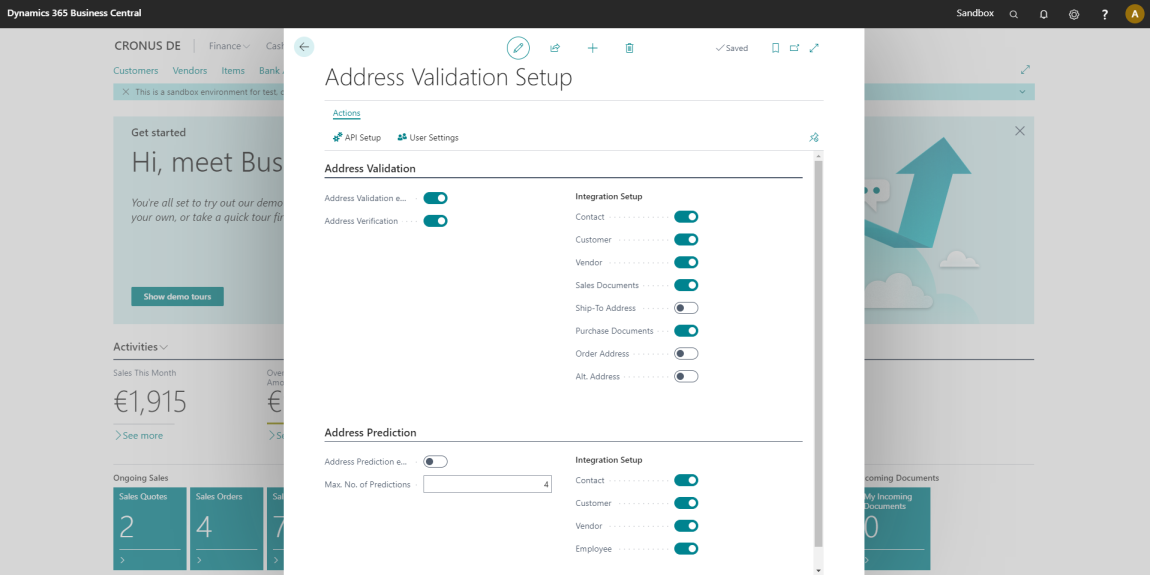
Setup parameters
| Field Name | Group | Description | Default Value |
|---|---|---|---|
| Address Validation enabled | Address Validation | Enables or disables the automatic address validation functionality. | Disabled |
| Address Validation Scope | Address Validation | Specifies the type of sessions the address validation feature is scoped to. A distinction can be made between:
| All |
| Address Verification | Address Validation | Enables the additional manual address verification. If turned on, an additional comparison window will appear every time the address validation has been changed or completed the address data. The user can decide, based on the comparison to apply the changes or not. Find out more at Address Validation. | Enabled |
| Contact | Address Validation | Enables or disables automatic address validation for contacts. | Enabled |
| Customer | Address Validation | Enables or disables automatic address validation for customers. | Enabled |
| Vendor | Address Validation | Enables or disables automatic address validation for vendors. | Enabled |
| Sales Documents | Address Validation | Enables or disables automatic address validation for sales documents, such as sales orders, quotes, and invoices. | Enabled |
| Ship-To Address | Address Validation | Enables or disables automatic address validation for delivery to addresses. | Disabled |
| Purchase Documents | Address Validation | Enables or disables automatic address validation for purchasing documents, such as purchase orders, requests, and invoices. | Enabled |
| Order Address | Address Validation | Enables or disables automatic address validation for order addresses. | Disabled |
| Alternate Address | Address Validation | Enables or disables automatic address validation for alternate addresses. | Disabled |
| Address Prediction enabled | Address Prediction | Enables or disables the complete functionality of address prediction. | Enabled |
| Max. No. of Predictions | Address Prediction | Specifies the maximum number of address predictions shown in the drop down auto complete functionality. | 4 |
| Contact | Address Prediction | Enables the address prediction for Contacts. | Enabled |
| Customer | Address Prediction | Enables the address prediction for Customers. | Enabled |
| Vendor | Address Prediction | Enables the address prediction for Vendors. | Enabled |
| Sales Documents | Address Prediction | Enables or disables address prediction for sales documents, such as sales orders, quotes, and invoices. | Enabled |
| Ship-To Address | Address Prediction | Enables or disables address prediction for delivery to addresses. | Disabled |
| Purchase Documents | Address Prediction | Enables or disables address prediction for purchasing documents, such as purchase orders, requests, and invoices. | Enabled |
| Employee | Address Prediction | Enables the address prediction for Employees. | Enabled |
| Initialization Batch Size | Address Data Initialization | Specifies the number of records read from a source table within a single batch of the address data initialization. Smaller batches keep the database transactions short and allow the initialization to be run in smaller steps. Find out more at Address Data Initialization. | 1,000 |
| Initialization Completed | Address Data Initialization | Specifies whether the address data initialization has been completed for the current company. | Disabled |
| Initialization Progress | Address Data Initialization | Specifies the progress of the address data initialization, in percent. | 0 |
Actions
| Action | Description |
|---|---|
| API Setup | Opens the 365 business API Setup page to configure connection and authentication with 365 business API cloud services. |
| User Settings | Opens the Address Validation User Settings. |
| Initialize Address Data | Reads the address data of the current company into the address data dictionary. The address data is read in batches which are saved separately, so the initialization continues where it stopped if the session is interrupted. No address is validated by this action. Find out more at Address Data Initialization. |
| Address Data Initialization | Opens the Address Data Initialization page, which shows the initialization progress per source table and allows to read the address data in single batches. |
Permissions
There are two permission sets included with 365 business Address Validation:

With the ADDRESSVALIDATION permission set, users are given full access to address validation, prediction, and setup for address validation.
With the ADDRVALIDATION-BASIC permission set, users get access to the objects necessary to run address validation and prediction. However, setup data cannot be changed.
Info
Please note that the authorization sets do not include permissions for standard tables, such as Customer, Vendor and Contact.
These permissions should be assigned separately via individual or standard authorization sets, if necessary.