Reconciliation Rules
With 365 business Banking you can define advanced reconciliation rules for the bank reconciliation process to automate the matching of bank transactions. The Reconciliation Rules go beyond the text-to-account mapping available in Microsoft Dynamics 365 Business Central and allow you to define more complex criteria to automatically assign transactions to the correct general ledger accounts.
In addition, reconciliation rules allow you to specify dimensions to apply and to define field values in custom fields that should be used when creating posting lines.

What criteria can be used in reconciliation rules?
Reconciliation rules can use various criteria to identify bank transactions and assign them automatically. These include, among others:
- Matching text: A text pattern that must be contained in the bank transaction description.
- ZKA Code: The ZKA Code of the bank transaction.
- SEPA Purpose Code: The SEPA Purpose Code of the bank transaction.
- Bank account no.: The bank account number on which the transaction occurred.
- Business partner IBAN: The IBAN of the business partner associated with the bank transaction.
Step-by-step guide
Follow these steps to define reconciliation rules in 365 business Banking:
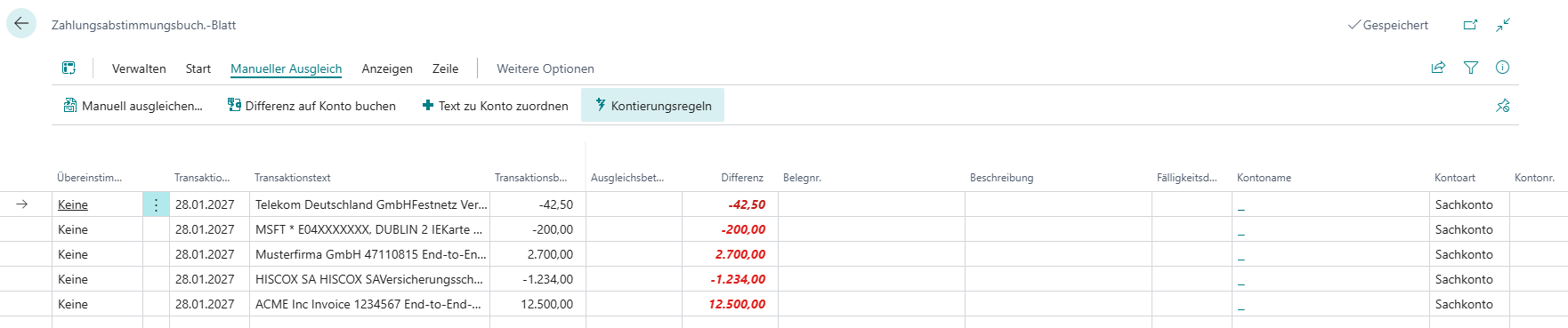
- Select Bank Reconciliation Journals in the Microsoft Dynamics 365 Business Central search.
- Open the desired bank reconciliation journal.
- Select the bank transaction for which you want to create a reconciliation rule.
- Choose Reconciliation Rules on the ribbon.
 Good to know By selecting the bank transaction beforehand, the relevant fields in the reconciliation rule are automatically populated with the corresponding values from the transaction.
In addition to the criteria, the fields for the posting setup (posting type, business posting group, VAT business posting group, product posting group, VAT product posting group) are prefilled with the values from the selected bank transaction, as well as the chosen dimensions. - Set the desired criteria and posting settings in the reconciliation rule.
- Close the Reconciliation Rules page.
- Select Yes to apply the reconciliation rules to the current bank reconciliation journal.