


SEPA Purpose Codes
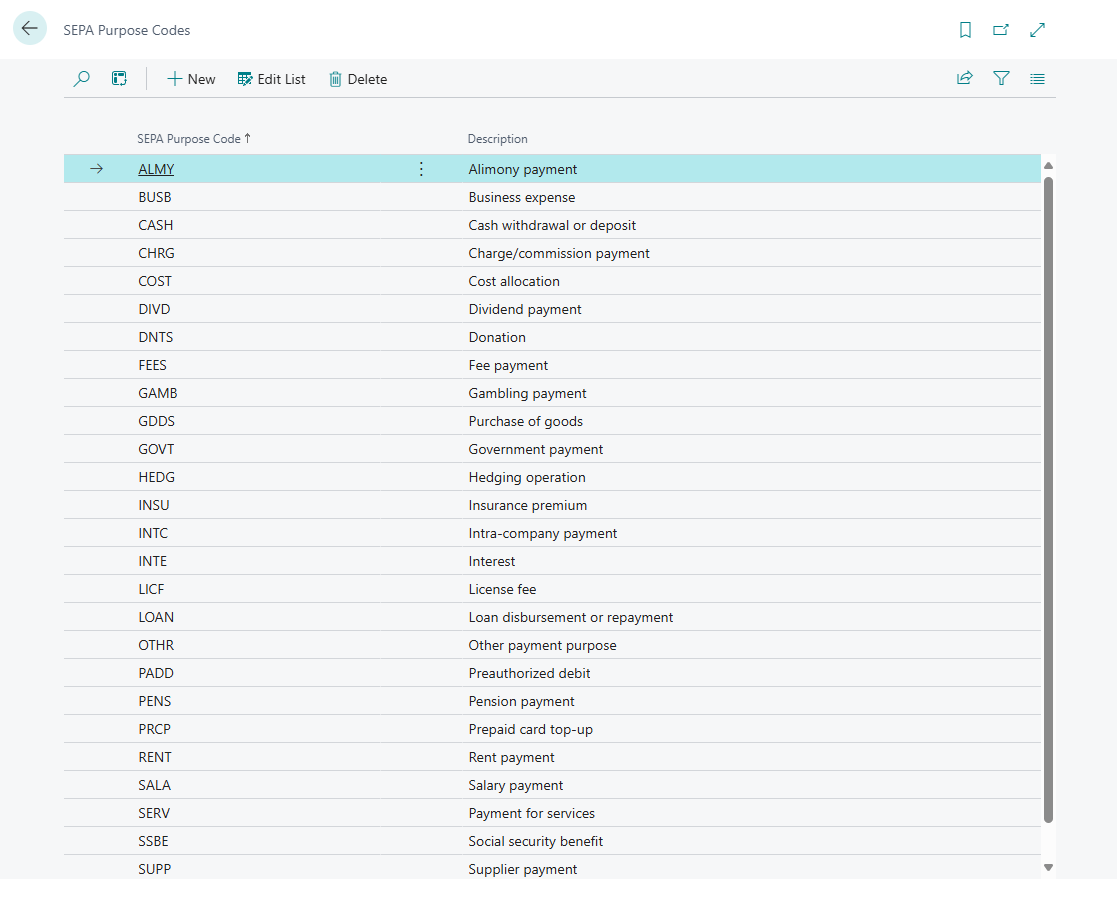
The SEPA Purpose Code is used to identify the purpose of a SEPA credit transfer. This code is optional and can be used to specify the purpose of the payment. Using the SEPA Purpose Code can improve the assignment of payments to open entries or general ledger accounts and increase the efficiency of payment reconciliation.
The SEPA Purpose Code is a standardized four-character code defined by ISO 20022, used in SEPA payment transactions (e.g., in PAIN.001 credit transfers or PAIN.008 direct debits) to clearly indicate the purpose of the payment.
365 business Banking supports the use of SEPA Purpose Codes in payment reconciliation and the creation of SEPA credit transfers. During the installation of 365 business Banking, the most common SEPA Purpose Codes are automatically set up. However, you can also add your own SEPA Purpose Codes or modify existing codes to meet your specific requirements.
Did you know?
During the installation of 365 business Banking, some common SEPA Purpose Codes are already set up.
You can adjust or expand these at any time to optimize the assignment to open entries.
Step-by-Step Guide
Follow these steps to manage SEPA Purpose Codes in 365 business Banking:
- Select SEPA Purpose Codes in the search bar of Microsoft Dynamics 365 Business Central.
- Click New to add a new SEPA Purpose Code, or select an existing code from the list to edit it.
Functionality
- Supports the categorization of payments (e.g., salary, tax, fees)
- Enables better automation in banking systems
- Used by banks for compliance checks (e.g., AML, sanctions screening)
Example
| Code | Meaning |
|---|---|
| SALA | Salary |
| PENS | Pension |
| SUPP | Supplier Payment |
| TAXS | Tax Payment |
| INTC | Intra-Company Payment |
| FEES | Fees |
| CHRG | Charges |
A complete list of SEPA Purpose Codes can be found in the ISO 20022 Documentation.