

ZKA Codes (Transaction Codes)
The ZKA Code (Transaction Code, GV-Code) is a three-digit numeric identifier in German payment transactions that describes the type of banking transaction. It originates from the FinTS/HBCI and DFÜ specifications of the German Banking Industry Committee (formerly ZKA). The use of the ZKA Code is optional but recommended to improve the assignment of payments to open entries or general ledger accounts.
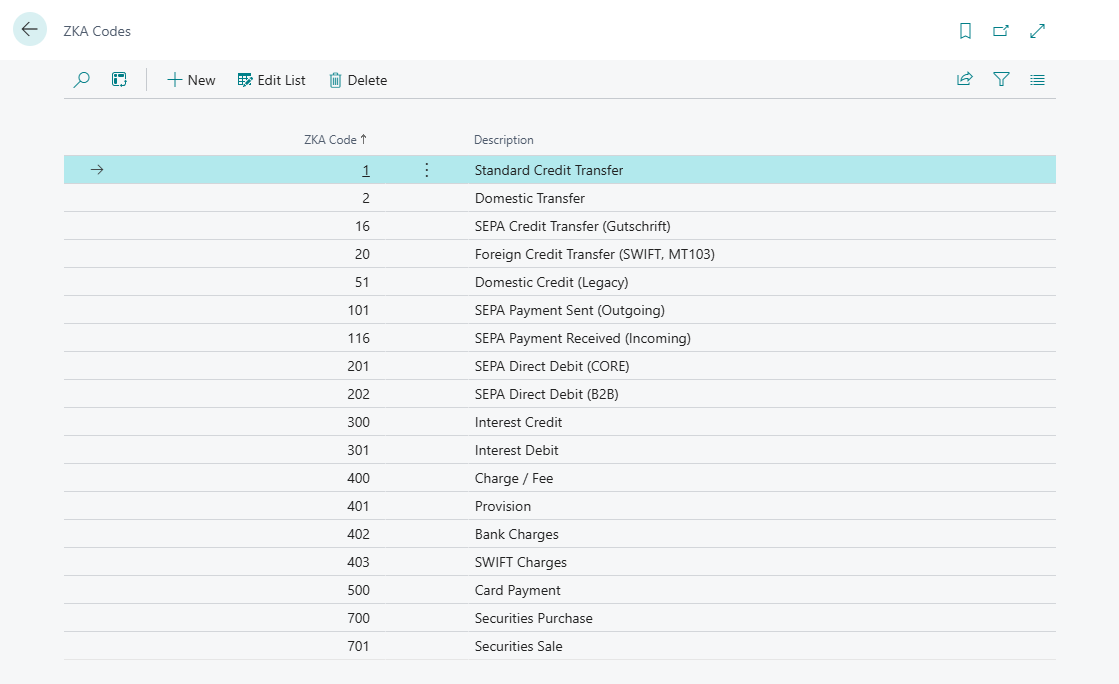
365 business Banking supports the use of ZKA Codes in payment reconciliation. During the installation of 365 business Banking, the most common ZKA Codes are automatically set up. However, you can also add your own ZKA Codes or modify existing codes to meet your specific requirements.
Did you know?
During the installation of 365 business Banking, some common ZKA Codes are already set up.
You can adjust or expand these at any time to optimize the assignment to open entries.
Step-by-Step Guide
Follow these steps to manage ZKA Codes in 365 business Banking:
- Select ZKA Codes in the search bar of Microsoft Dynamics 365 Business Central.
- Click New to add a new ZKA Code, or select an existing code from the list to edit it.
Functionality
- Included in CAMT messages and account statement formats (e.g., MT940)
- Used for automatic classification of transactions
- Basis for booking logic (e.g., fees, interest, transfers)
Example
| Code | Meaning |
|---|---|
| 16 | SEPA Credit Transfer (Credit) |
| 20 | Foreign Credit Transfer (SWIFT, MT103) |
| 101 | SEPA Payment Sent (Outgoing) |
| 116 | SEPA Payment Received (Incoming) |
| 201 | SEPA Direct Debit (CORE) |
| 202 | SEPA Direct Debit (B2B) |
| 300 | Interest Credit |
| 400 | Charge / Fee |