What is 365 business Print Agent?
365 business Print Agent is a modern printing solution developed for Microsoft Dynamics 365 Business Central to create a seamless printing environment in Microsoft Dynamics 365 Business Central. With the 365 business Print Agent you can access your printer infrastructure in Microsoft Dynamics 365 Business Central and create printer-configuration.md for each printer within Microsoft Dynamics 365 Business Central.
365 business Print Agent is supporting both SaaS environments and On-Premises environments of Microsoft Dynamics 365 Business Central.
It basically consists of at least two components:
- An App for Microsoft Dynamics 365 Business Central, available via Microsoft AppSource
- Print Agent Service (Connector), a Windows service
Architecture
365 business Print Agent is able to operate in two separate so-called Service Modes, the 365 business Print Agent Cloud and the Direct Connection mode.
Please note: Existing configurations in Microsoft Dynamics 365 Business Central must be removed before switching.
Print Agent Cloud (recommended)
The Print Agent Cloud mode is the recommended operating mode: Setup is minimal, and no complex adjustments to firewalls or network routes are usually required. After installation and basic setup, the service is immediately ready for use.
Communication between the Print Agent Service and the cloud is realized via state-of-the-art technologies such as SignalR and all data is transmitted in transport-encrypted form.
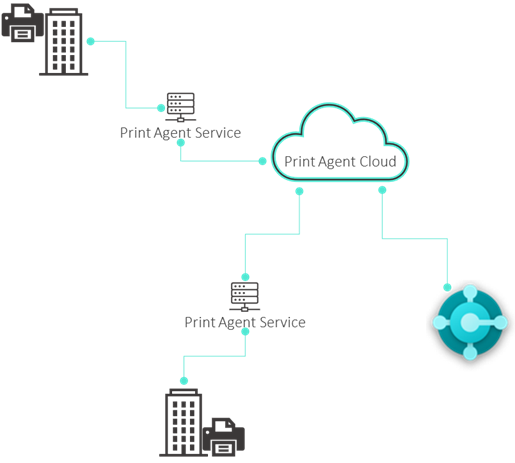
No print jobs or printer data are stored. (Except when using Secure Print!)
The service acts exclusively as an intermediary in real time.
| Component | Description |
|---|---|
| Microsoft Dynamics 365 Business Central | Microsoft Dynamics 365 Business Central with installed 365 business Print Agent App |
| Print Agent Cloud | Cloud service that controls the communication between the app and one or more Print Agent Services |
| Print Agent Service | Windows service that handles the communication between printers and the Print Agent Cloud |
| Printer | Printer that are shared via the Print Agent Service |
Direct Connection
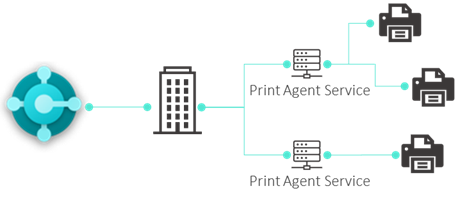
The Direct Connection mode is only recommended for On-Premise environments. This mode is not ideal for SaaS environments, as additional firewall and network configurations are required to enable secure and reliable access from Microsoft Dynamics 365 Business Central SaaS environments.
| Component | Description |
|---|---|
| Microsoft Dynamics 365 Business Central | Microsoft Dynamics 365 Business Central with installed 365 business Print Agent App |
| Print Agent Service | Windows service that handles direct communication between the app and printers |
| Printer | Printer that are shared via the Print Agent Service |
How do I choose the right type of connection?
We recommend the Print Agent Cloud mode due to its simple setup.
Here is an overview of the advantages and disadvantages:
| Print Agent Cloud | Direktverbindung | |
|---|---|---|
| Support for Business Central Online (SaaS) | * | |
| Support for Business Central On-Premise | ||
| Running multiple Print Agent services | ||
| Secure Print Feature |
* Additional configuration is required to establish the connection from Business Central Online (SaaS) to the locally installed Print Agent Service.
Prerequisite
Operating System
- Windows 10 oder höher (64-Bit)
- Windows Server 2016 oder höher (64-Bit)
Software
- .NET 8.0