Bank Transaction Split Rules
In some cases, it may be necessary to split bank transaction lines to allocate amounts to multiple general ledger accounts. This can occur, for example, with direct debits from tax authorities or with loans (principal and interest), where multiple amounts are included in a single transaction.
In addition to manually splitting bank transaction lines, as described in the step-by-step guide to retrieving bank transactions, you can also set up automatic split rules. These rules allow you to automatically split certain transactions based on predefined criteria. The rules are applied when retrieving bank transactions and help optimize and automate the payment reconciliation process.
Step-by-Step Guide
Follow these steps to set up bank transaction split rules in 365 business Banking:
- Select Bank Transaction Split Rules in the search of Microsoft Dynamics 365 Business Central.
- Click New to create a new split rule.
- Enter the Code and Description for the rule to uniquely identify it.
- If necessary, set filters for the rule to determine which bank account and/or which business partner IBAN the rule should apply to.
- On the Assignment tab, define the rule for allocation:
- Search Type in Purpose: Choose where in the transaction purpose to search for the keyword (Contains, Starts with, Regular Expression).
- Search Pattern: Enter the search pattern or regular expression (if "Regular Expression" is selected) that should be found in the transaction purpose.
- Behavior on Deviation: Specify how the rule should be applied if the search pattern is not found (Skip, Create remainder line, Distribute proportionally).
- Create the lines for the individual amounts expected when the rule is applied.
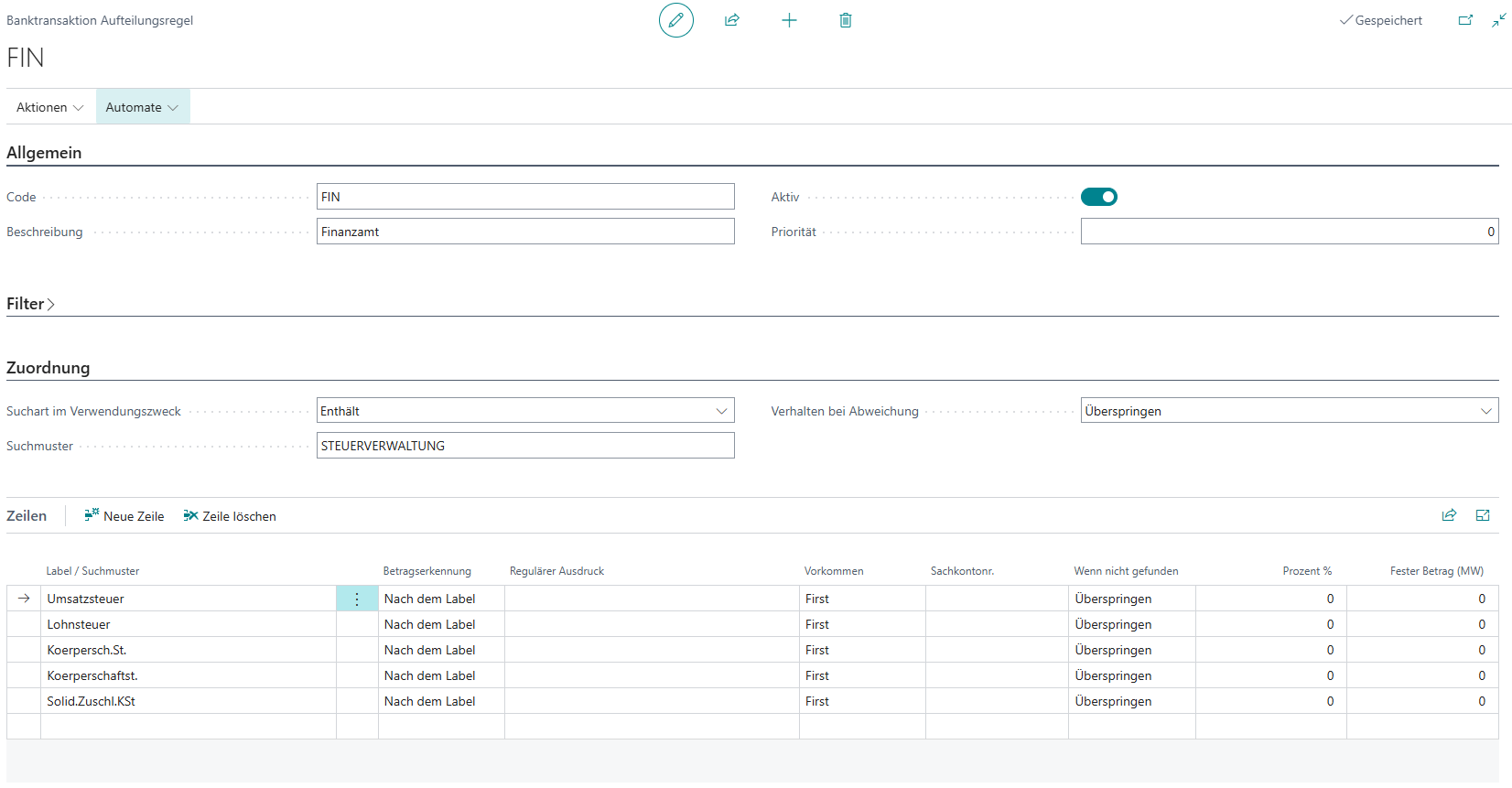
Split Rule Lines
In the lines of the split rule, you define the individual amounts expected when the rule is applied. Each line represents a partial amount of the total transaction and contains the following fields:
- Label / Search Pattern: Specifies a label or search pattern to be found in the transaction purpose to identify the amount.
- Amount Recognition: Indicates whether the amount should be recognized After the Label (directly after the search pattern) or using its own regular expression (Regular Expression).
- Occurrence: Specifies whether the first, last, or every occurrence of the search pattern should be considered.
- G/L Account No.: Specifies the general ledger account to which the amount should be allocated (optional).
What happens if a line is not found?
In some cases, not every partial amount can be clearly identified from the transaction purpose. However, the split is known and can be defined, for example, with a fixed amount or a percentage. In this case, you can specify the percentage or fixed amount in the If not found field.