import { Callout } from "zudoku/ui/Callout";
# LPD / LPR Support
The **365 business Print Agent** supports communication via the **Line Printer Daemon Protocol (LPD)** for all printers that emulate **ZPL (Zebra Programming Language)**.
The Line Printer Daemon Protocol (LPD) is a network protocol originally developed in the 1980s by the University of California, Berkeley.
It is used to manage and transmit print jobs over a network, especially in UNIX environments.
---
## Problem
The **365 business Print Agent** uses Microsoft's **LPR** tool for LPD printing, which is included with **Windows Server editions**.
---
## Solution
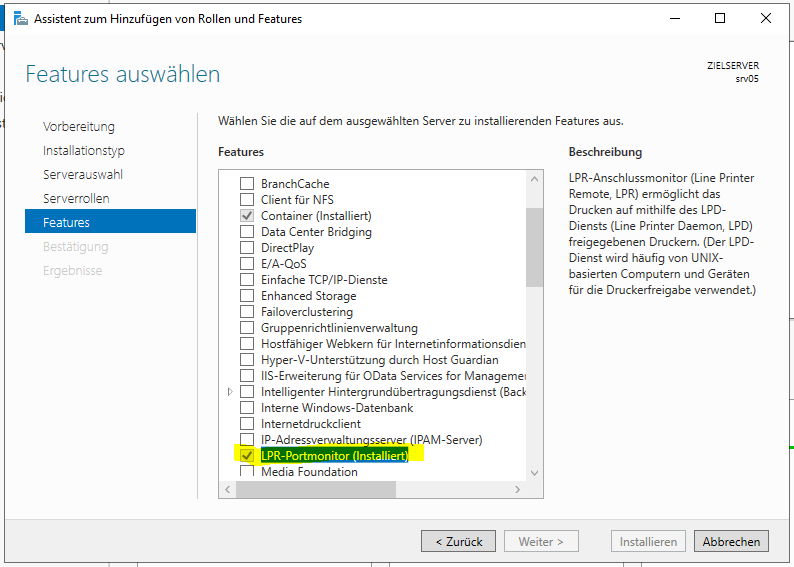
Install the Windows feature **LPR Port Monitor** to enable the LPR service on Windows Server.
---
## Perform a Test Print
After installation, ensure the printer is properly configured and test the print process using the following command:
```cmd
lpr -S Server_IP_Address -P "Printer Name" -o l "File_to_print"
lpr -S 10.1.0.10 -P "ZDesigner ZD420-203dpi ZPL" -o l "c:\Users\Administrator\Documents\HelloWorld.zpl"
```
---
Make sure the printer name is specified exactly as configured.