import { Callout } from "zudoku/ui/Callout";
# Bank Account Reconciliation Context Words
With 365 business Banking, you can retrieve bank transactions and use them in payment reconciliation in Microsoft Dynamics 365 Business Central. This enables efficient management of your bank accounts and seamless integration into your financial processes. Beyond the Microsoft standard, the payment reconciliation analyzes the purpose of use or extracts document numbers to optimize the assignment to open entries. Partial document numbers, up to four characters, are also considered to allow for more precise assignment in collective transfers.
To optimize the assignment of partial document numbers, you can define common context words that are considered during the analysis of the purpose of use and increase the weighting of a partial document number.
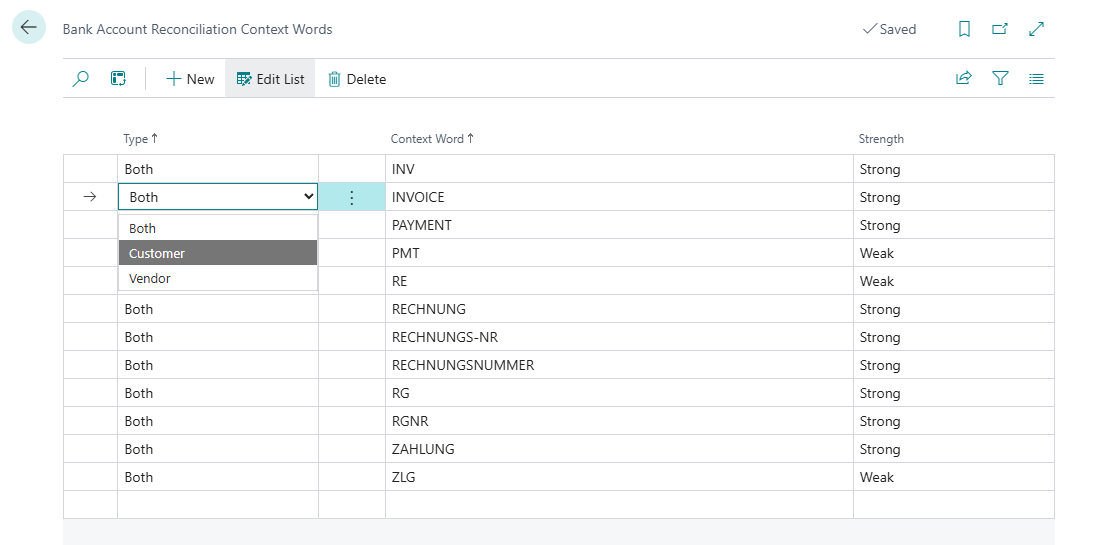
When installing 365 business Banking, some common context words for payment reconciliation are already set up.
You can adjust or expand these at any time to optimize the assignment to open entries.
## Step-by-Step Guide
Follow these steps to define context words for payment reconciliation:
1. Select **Bank Account Reconciliation Context Words** in the search bar of Microsoft Dynamics 365 Business Central.
2. Select **New** to add a new context word.
3. Choose the **Type** to specify whether the context word applies to customers, vendors, or both.
4. Enter the **Context Word** to be considered during the analysis of the purpose of use.
5. Select the **Strength** of the context word to influence its weighting during the analysis.
Case sensitivity is not considered during the analysis of the purpose of use.
This means that the context word is recognized regardless of its capitalization.