Bank Account Reconciliation Context Words
With 365 business Banking, you can retrieve bank transactions and use them in payment reconciliation in Microsoft Dynamics 365 Business Central. This enables efficient management of your bank accounts and seamless integration into your financial processes. Beyond the Microsoft standard, the payment reconciliation analyzes the purpose of use or extracts document numbers to optimize the assignment to open entries. Partial document numbers, up to four characters, are also considered to allow for more precise assignment in collective transfers.
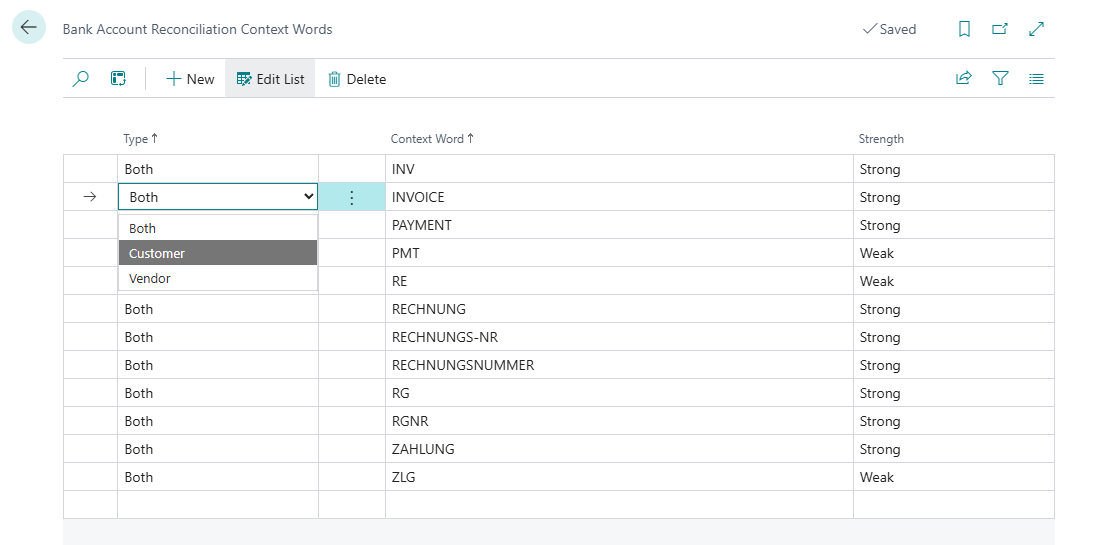
To optimize the assignment of partial document numbers, you can define common context words that are considered during the analysis of the purpose of use and increase the weighting of a partial document number.
You can adjust or expand these at any time to optimize the assignment to open entries.
Step-by-Step Guide
Follow these steps to define context words for payment reconciliation:
- Select Bank Account Reconciliation Context Words in the search bar of Microsoft Dynamics 365 Business Central.
- Select New to add a new context word.
- Choose the Type to specify whether the context word applies to customers, vendors, or both.
- Enter the Context Word to be considered during the analysis of the purpose of use.
- Select the Strength of the context word to influence its weighting during the analysis.
This means that the context word is recognized regardless of its capitalization.