import { Callout } from "zudoku/ui/Callout";
# Setup for remittance advices (REMADV)
The setup that you complete before importing or exporting REMADV advices: payment application settings, deduction reasons, REMADV partners, the customer/vendor card and Banking Setup.
## Payment application settings
On the **Payment Application Settings** page, 365 business Banking adds the **Remittance Advice & Deductions** group.

| Field | Default | Effect |
|---|---|---|
| **Enable Remittance Advice Matching** | on | applies open remittance advices to matching bank transactions in payment reconciliation automatically |
| **Default Deduction G/L Account No.** | blank | G/L account for a deduction whose reason has no G/L account of its own |
| **Record Undocumented Difference as Deduction** | off | posts an unexplained amount deviation on an applied document automatically as a deduction, instead of leaving it an open difference |
| **Undocumented Deduction Reason** | *43 Reason unknown* | reason used for that deduction |
| **Deduction Posting Text** | `Deduction {Reason} {DocumentNo}` | template for a deduction's posting text, with placeholders. See [Application in payment reconciliation](payment-reconciliation.mdx#posting-text). The **…** button opens the **Posting Text** dialog, where **Insert Placeholder** offers the placeholders of a deduction, see [Posting text with placeholders](../bank-reconciliation/posting-text.mdx). |
If **Record Undocumented Difference as Deduction** is not selected, 365 business Banking does not post an unexplained deviation automatically. In this case, you record the deviation manually as a deduction, or leave the line with a difference.
From the same page, the actions **Deduction Reasons** and **REMADV Partners** open the two master data pages below.
## Deduction Reasons
The **Deduction Reasons** page holds the reasons a payer uses to shorten an invoice.
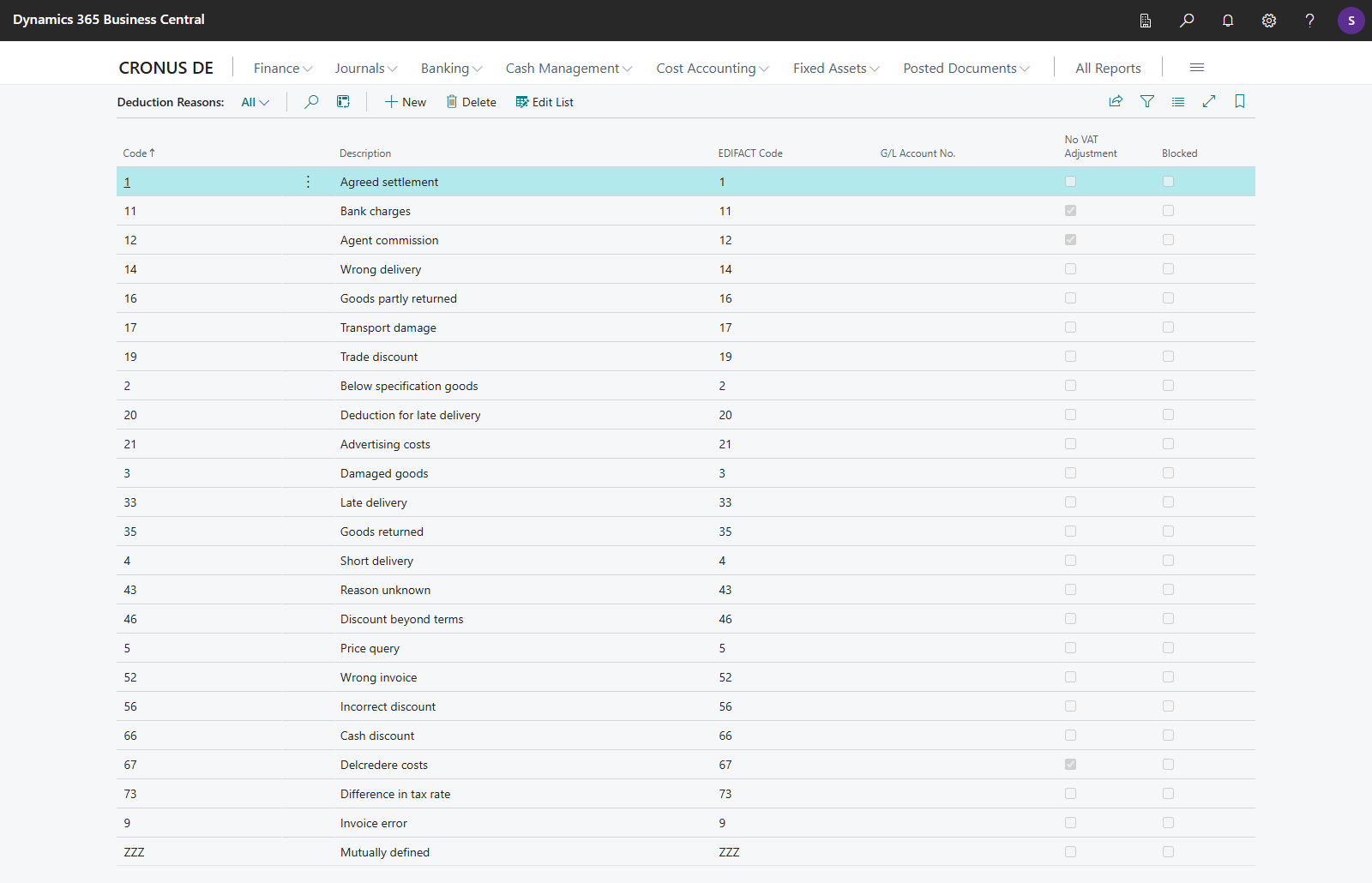
| Field | Meaning |
|---|---|
| **Code** | unique code of the reason |
| **Description** | label shown in payment reconciliation and in the posting text |
| **EDIFACT Code** | the EDIFACT 4465 code by which an imported advice or camt adjustment data is matched to this reason |
| **G/L Account No.** | G/L account for this reason; if the field is blank, the **Default Deduction G/L Account No.** is used from the payment application settings |
| **No VAT Adjustment** | when selected, a deduction with this reason posts without a proportional VAT correction (gross) |
| **Blocked** | a blocked reason can no longer be selected and is not mapped to a reason code on import |
Installation creates the common EDIFACT 4465 codes. The descriptions are created in the language of the session in which the app is installed. You can adjust the code, description and G/L account at any time:
| Code | Description | No VAT Adjustment |
|---|---|---|
| 1 | Agreed settlement | |
| 2 | Below specification goods | |
| 3 | Damaged goods | |
| 4 | Short delivery | |
| 5 | Price query | |
| 9 | Invoice error | |
| 11 | Bank charges | ✓ |
| 12 | Agent commission | ✓ |
| 14 | Wrong delivery | |
| 16 | Goods partly returned | |
| 17 | Transport damage | |
| 19 | Trade discount | |
| 20 | Deduction for late delivery | |
| 21 | Advertising costs | |
| 33 | Late delivery | |
| 35 | Goods returned | |
| 43 | Reason unknown | |
| 46 | Discount beyond terms | |
| 52 | Wrong invoice | |
| 56 | Incorrect discount | |
| 66 | Cash discount | |
| 67 | Delcredere costs | ✓ |
| 73 | Difference in tax rate | |
| ZZZ | Mutually defined | |
365 business Banking also assigns this reason automatically. If an advice claims more discount than the payment terms and the discount tolerance still allow, the excess is posted as a deduction with reason **46 Discount beyond terms**. See [Discount rule](payment-reconciliation.mdx#discount-rule).
## REMADV Partners
If a payer sends you advices under an ID other than their own GLN or REMADV partner ID (for example as a central settlement agent), you record the mapping on the **REMADV Partners** page.

| Field | Meaning |
|---|---|
| **ID Qualifier** | EDIFACT code list 3055, such as `14` for a GS1/GLN location number |
| **Partner ID** | the ID under which the advice names the payer |
| **Account Type** | *Customer* or *Vendor* |
| **Account No.** | the customer or vendor to which the ID is mapped |
| **Description** | free text |
| **Paid Amount Qualifier** | the MOA qualifier under which this partner's advices carry the paid amount: *Remitted* (`12`, the default for new partners) or *Due* (`9`). If an advice lacks the configured amount, the import reads the other one. The export writes the paid amount under this qualifier. Partners that already exist when the app is updated get the value *Due*. |
On import, a REMADV partner is checked before a customer's GLN and before the customer's or vendor's own REMADV partner ID. See [How the payer is resolved](import.mdx#how-the-payer-is-resolved).
## Customer and vendor card
The customer and vendor card get the **Electronic Remittance Advice (REMADV)** group.

| Field | Meaning |
|---|---|
| **Send Remittance Advice (REMADV)** | turns on the REMADV export for payments or refunds to this customer/vendor |
| **REMADV ID Qualifier** | qualifier of this customer's/vendor's own ID, such as `14` for a GLN |
| **REMADV Partner ID** | the ID by which this customer/vendor is addressed on export |
If **REMADV Partner ID** is blank, export uses the **GLN** on the customer/vendor card with qualifier `14`. On the customer card, the **Remittance Advices** action opens that customer's remittance advices.
## Banking Setup
For export, 365 business Banking adds the **Electronic Remittance Advice (REMADV)** group with your own sender identification to **Banking Setup**.
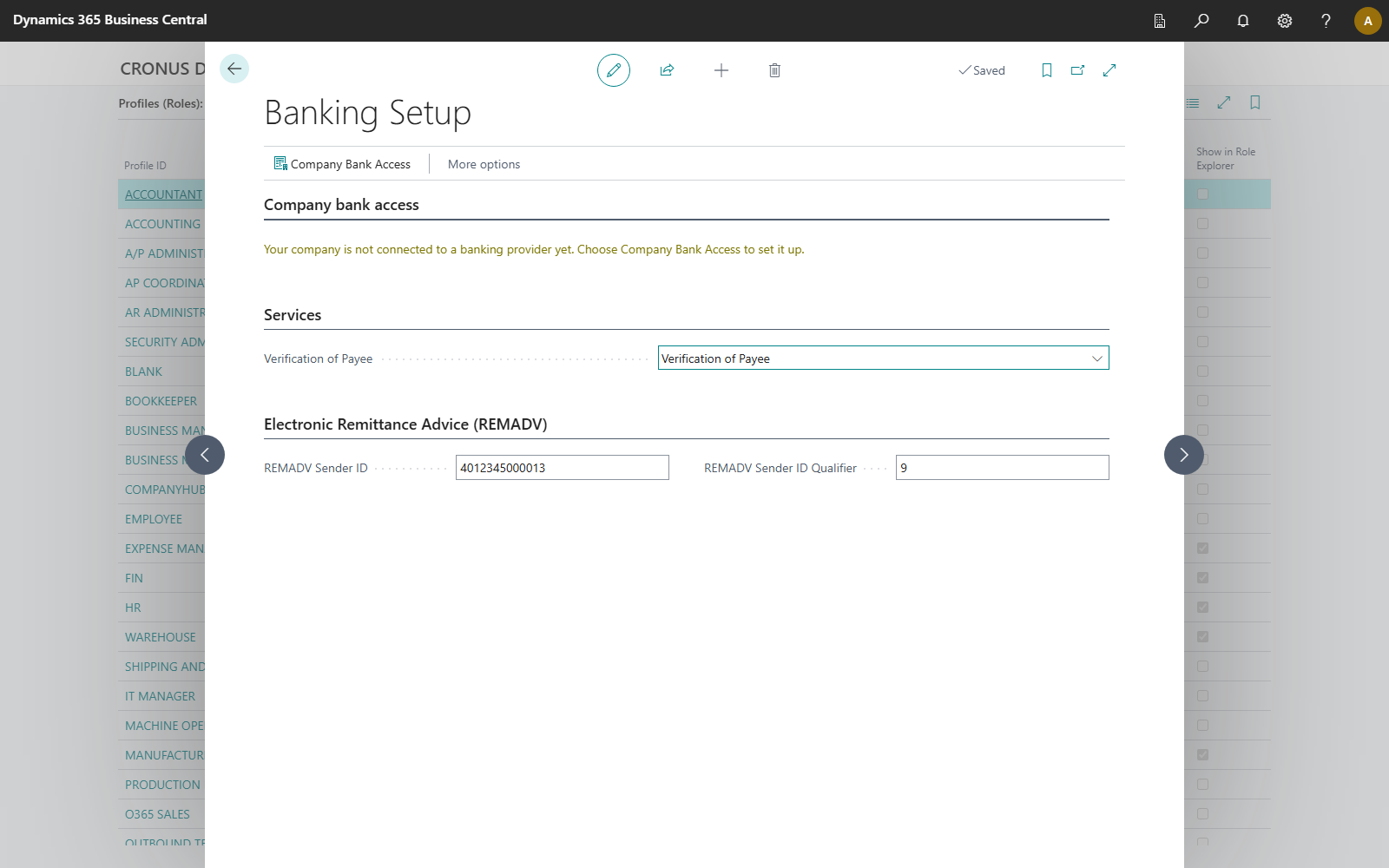
| Field | Default | Meaning |
|---|---|---|
| **REMADV Sender ID** | blank | the ID under which your company sends REMADV files |
| **REMADV Sender ID Qualifier** | `14` | qualifier of this ID |
If **REMADV Sender ID** is blank, export uses the **GLN** from Company Information, with qualifier `14`. If this field is also blank, export stops with a message that names the **REMADV Sender ID** and **GLN** fields.
## See also
- [Import remittance advices](import.mdx)
- [Application in payment reconciliation](payment-reconciliation.mdx)
- [Export remittance advices](export.mdx)
- [Payment application settings](../setup/payment-application-settings.mdx)