import { Callout } from "zudoku/ui/Callout";
# Connect Adyen
How to connect Adyen to 365 business Banking: API key, merchant account and access to settlement reports in the Connect Bank Account wizard.
**Applies to:** Adyen
## Prerequisites
- An **API key** from the Adyen Customer Area under **Developers** > **API credentials**.
- The name of your **merchant account**.
- For transaction retrieval: user and password of an Adyen API credential with the *Merchant Report Download* role for downloading the settlement reports. If your contract includes the Adyen Balance Platform, you need the **Balance Account ID** instead.
## Step by step
1. Choose the **Search** icon, enter **Bank Accounts** and choose the **Connect Bank Accounts** action. The **Connect Bank Account** wizard opens.
2. Choose **Next**.
3. On the **Choose your banking provider** page, set **Provider** to *Adyen* and choose **Next**.
4. On the **Choose the bank account** page, choose **Create a new bank account** or **Use an existing bank account**.
5. On the **Enter your Adyen credentials** page, enter the **API Key** and your **Merchant Account** and choose **Next**. Business Central checks them with Adyen immediately.
6. Choose **Finish**.
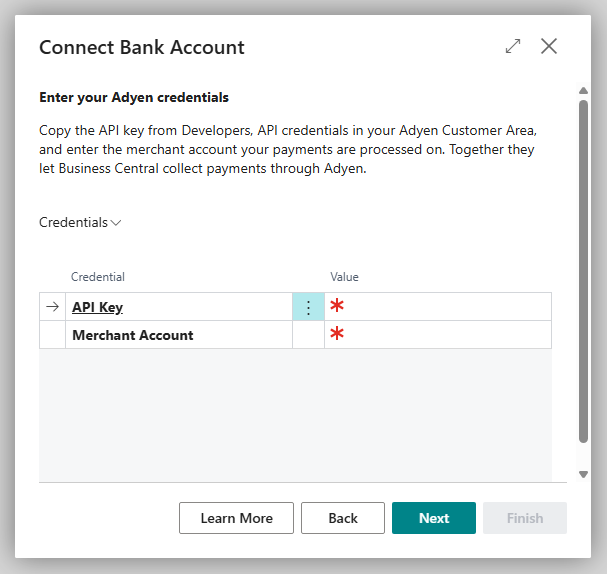
The wizard only asks for the details needed for collection. So that Business Central can also retrieve settlements, complete the **Transaction Retrieval** FastTab in the **Adyen Connection Setup** afterwards (see below). Without these details, retrieval reports that no Adyen report credentials are set up for the bank account.
## Adyen Connection Setup
Open the page on the bank account card via **Banking Provider** > **Configuration**.
| FastTab | Field | Description |
|---|---|---|
| **Authentication** | **API Key** | key from the Customer Area (masked) |
| | **Merchant Account** | your Adyen merchant account |
| | **Live URL Prefix** | prefix of your live endpoints from the Customer Area; empty = the Adyen test environment |
| **Transaction Retrieval** | **Report Download URL** | address where Adyen provides the settlement reports |
| | **Report User** / **Report Password** | access for downloading the reports (password masked) |
| | **Last Settlement Batch Number** | number of the batch last retrieved; the next retrieval continues with the following one |
| | **Balance Account ID** | only with the Adyen Balance Platform: retrieval via the balance account instead of the settlement reports |
| **Payment Authorization** | **Success Redirect URL** / **Cancel Redirect URL** | pages after payment authorization; empty = the standard pages of 365 business Banking |
| **Status** | **Is Authenticated**, **Environment** | whether the connection is established and whether it uses the test or the live environment |
After a change, choose **Authenticate**.
Via the settlement reports, Business Central retrieves Adyen by payout batch, not by date. If you want to start with a particular batch, enter the number of the batch before it in **Last Settlement Batch Number**. With a **Balance Account ID**, Business Central retrieves by date instead: from 30 days before the **Last Statement Date**, but not earlier than **Retrieve Transactions From** on the bank account card. If neither field is filled in, the last two years are retrieved.
## Disconnect
On the **Bank Account Card**, choose **Actions** > **Banking Provider** > **Disconnect** and confirm the question "Do you really want to disconnect this bank account from the … banking service?". Business Central deletes the payment service provider's setup for this bank account, including the credentials; transactions that are already imported are kept. To connect the account again later, enter the credentials in the wizard again.
## See also
- [Adyen](../adyen.mdx)
- [Retrieve Adyen transactions](retrieve-transactions.mdx)
- [Collect payments via Adyen](collect-payment.mdx)