


Payment Journal
The payment journals in Microsoft Dynamics 365 Business Central are the central place for initiating outgoing payments. A bank account and a payment method are assigned to the journal. The payment method determines whether it is a SEPA transfer, a SEPA instant transfer, or a SEPA direct debit.
Accordingly, there can be one or more payment journals for each bank account, each configured for a specific payment method. This allows for flexible handling of payments and easy adaptation to specific requirements.
Making Payments
To initiate payments, use the payment journals in Microsoft Dynamics 365 Business Central. Follow these steps:
- Select Payment Journals in the search of Microsoft Dynamics 365 Business Central.
- Select an existing journal for your bank account and payment method or create a new journal.
- Choose the action Edit Journal to modify the journal.
- Enter the journal lines for your payments, or use the action Suggest Payments to automatically generate payment suggestions.
- Review the journal lines and ensure all information is correct. Pay particular attention to amounts, payment references, and the recipient's bank account.
- Choose the action Process Payments to process the payments.
- Confirm the execution of the payments and the posting of the journal.
Good to know
The payment journal also offers the action Process and Post Payments. This action combines the execution of payments with the posting of the journal in one step.
This is especially useful if you want to post the payments immediately.
Posting Payments
After processing the payments, the journal lines in the payment journal can be posted. If the action Process and Post Payments was used, the posting is done automatically. Otherwise, you need to manually post the payment using the Post action in the payment journal.
Printing the Payment Journal
With the function to print the payment journal in 365 business Banking, users can generate the journal in a printable format. This allows users to create a physical copy of the journal that can be used for review, approval, and archiving purposes. The printout contains all relevant information of the journal, including payment details, recipient data, and the bank account to be used.
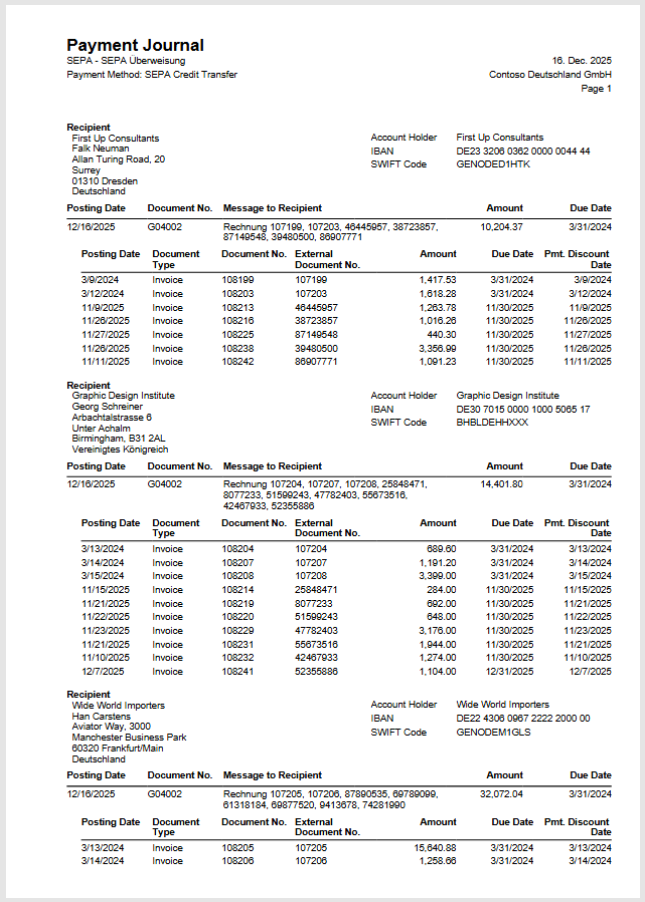
Step-by-Step Guide
- Select Payment Journals in the search of Microsoft Dynamics 365 Business Central.
- Select an existing payment journal.
- Choose the action Print in the menu bar.
- Select Print Approval, if the printout should include a section for signatures to approve the payments.
- Choose Print to start the printing process.