import { Callout } from "zudoku/ui/Callout";
# Direct debit prenotification
How to announce SEPA direct debits in time in 365 business Banking: setup, printing and sending by email.
Before a SEPA direct debit, the payer must be informed which amount is collected on which day, so that sufficient funds are available. You create this prenotification directly from the [cash receipt journal](../cash-receipt-journal.mdx) for a single line or for the whole journal, as a printout or as an email with a PDF attachment.
## Set up
The settings are in the **Banking Setup**:
| Field | FastTab | Meaning |
|---|---|---|
| **Prenotification Mandatory** | **Direct Debit** | If selected, a line can only be carried out after its prenotification has been sent. The field is cleared after installation, because many companies already announce the collection on the invoice |
| **Prenotification Lead Time (Days)** | **Direct Debit** | Number of calendar days before the collection by which the payer must be informed. Default: 14 days according to the SEPA rulebook, unless a shorter period has been agreed with the payer. **Suggest Direct Debits** does not propose an earlier collection date (see below) |
| **Prenotification Nos.** | **Numbering** | The numbers of the prenotifications. Installation creates the series *DDP* starting at *DDP00001* |
### How the lead time sets the collection date
If you leave the **Collection Date** empty in **Suggest Direct Debits**, Business Central derives the date per line from the due date and the [bank's lead time](lead-times.mdx), but never earlier than today plus **Prenotification Lead Time (Days)**, moved to the next bank working day. With the default of 14 days, a suggested collection date is therefore no earlier than 14 days from today. If the field is empty or 0, this lower limit does not apply.
The prenotification lead time is only a default for the suggestion. A **Collection Date** that you enter manually on the request page or on the line is not checked against it. **Carry Out Direct Debit** also does not check whether the required number of days lies between sending the prenotification and the collection date. Therefore, send prenotifications in good time before the collection.
## Print and send prenotifications
The actions are in the cash receipt journal of a direct debit journal batch:
| Action | Where | Result |
|---|---|---|
| **Print Prenotifications** | **Prenotifications** | Prints the prenotifications of all direct debit lines in the journal in one run |
| **Send Prenotifications** | **Prenotifications** | Queues an email for every line and reports how many were queued and how many were skipped because the payer has no email address |
| **Print Prenotification** | line | Prints the prenotification of the selected line in the payer's language |
| **Send Prenotification** | line | Opens the email of the selected line in the email editor |
Process:
1. On the first print or send, the line gets a **Prenotification No.** from the number series. When printing, the number is only assigned after you confirm the request page. A cancelled print does not use up a number. The number is kept when you print or send again, because the payer has already received this reference.
2. **Prenotification Sent** is then selected, but only if the prenotification can actually reach the payer:
- **Print:** Business Central shows the request page first. If you cancel it, nothing is printed and nothing is marked.
- **Send Prenotification:** Only if you send the email in the editor. If you save it as a draft or discard it, the field remains cleared.
- **Send Prenotifications:** As soon as the email has been queued for sending.
3. Lines without a mandate are skipped when sending.
The prenotification is printed directly without a preview. In Business Central online, you receive it as a PDF to download. This is the only way for Business Central to detect whether you cancelled the print, because a preview could not be distinguished from it. Printing [remittance advices](../bank-payment/remittance-advice.mdx) works the same way.
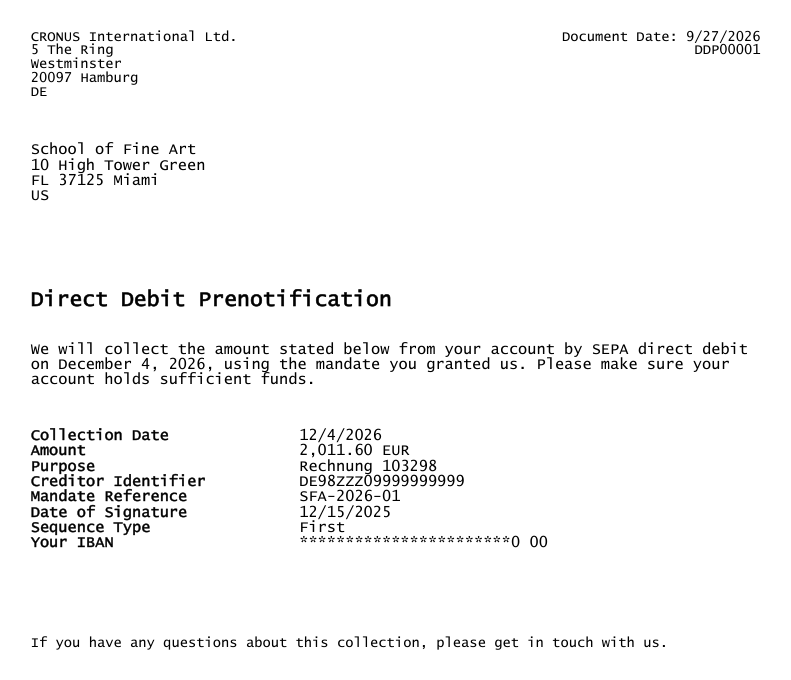
### What the prenotification contains
- the heading **Direct Debit Prenotification** with **Prenotification No.** and document date
- the sentence that the amount will be collected by SEPA direct debit on the collection date under the mandate granted, and the request to make sure the account holds sufficient funds
- **Amount** and currency, **Collection Date**, **Purpose** (the **Message to Recipient**)
- **Mandate Reference**, **Date of Signature** and **Sequence Type** (*One Off*, *First* or *Recurring*)
- your company with address and the **Creditor Identifier** of the collecting bank account
- name and address of the payer and the payer's IBAN, partly masked
### Who the email goes to
The email is sent to the address set up for the customer under **Document Layouts** for **Direct Debit Prenotification**. If no address is set up there, the customer's **Email** is used. The subject is "‹name from Company Information› - Direct debit collection on ‹collection date›", the prenotification is attached as a PDF, and the email text contains the amount and collection date, so that the payer sees this information in the inbox preview. Text and attachment appear in the payer's language.
It is sent through the email account assigned to the **Direct Debit Prenotification** email scenario, otherwise through the default account. See [Set up email](https://learn.microsoft.com/en-us/dynamics365/business-central/admin-how-setup-email) on Microsoft Learn.
## Layout and report selection
The prenotification is the **Direct Debit Prenotification** report with two layouts: **Direct Debit Prenotification** for printing and **Direct Debit Prenotification Email** for the email text.
- **For all customers:** **Report Selection - Sales** has the usage **Direct Debit Prenotification**. Installation enters the report there and sets the email layout as the layout for the email body.
- **For a single customer:** under **Document Layouts** on the customer, choose your own report, layout or email address for **Direct Debit Prenotification**.
When a run prints or sends for several payers, the report selection setup applies, not that of the individual customer. You create your own layouts as for any other report. See [Manage report layouts](https://learn.microsoft.com/en-us/dynamics365/business-central/ui-manage-report-layouts) on Microsoft Learn and [Report selection and email for Banking documents](../setup/reports-and-email.mdx).
## Troubleshooting
| Message | Cause and remedy |
|---|---|
| "There are no direct debit lines to print a prenotification for in cash receipt journal …." | The journal contains no direct debit lines. Create them first with **Suggest Direct Debits** |
| "There are no direct debit lines to send a prenotification for in cash receipt journal …." | See above |
| "Cash receipt journal line … does not collect a direct debit, so it has no prenotification." | The selected line is not a direct debit line |
| "… of … prenotifications were queued for sending. … were skipped because the payer has no email address." | Enter an email address on the customer or print the prenotification for these payers |
| "The prenotification for cash receipt journal line … has not been sent or printed yet. …" | **Prenotification Mandatory** is selected. Send or print the prenotification before carrying out |
## See also
- [SEPA direct debit in the cash receipt journal](../cash-receipt-journal.mdx)
- [SEPA direct debit mandates](../payment-types/direct-debit.mdx)
- [Report selection and email for Banking documents](../setup/reports-and-email.mdx)
- [Banking Setup](../setup/banking-setup.mdx)