import { Callout } from "zudoku/ui/Callout";
# Retrieve bank statements via EBICS
This page describes how 365 business Banking retrieves bank statements via EBICS, why a statement is delivered only once and how to recover missing transactions.
**Applies to:** EBICS as account information service
## Retrieve transactions
In the payment reconciliation journal or in the list of payment reconciliation journals, choose **Retrieve Bank Transactions**, as with any other bank account. Business Central fetches the bank statements (camt.053) that have not been acknowledged yet via EBICS and creates the transactions in the payment reconciliation journal.
You can [automate](../../bank-reconciliation-automation.mdx) the retrieval as usual. Unlike PSD2, retrieval via EBICS runs without interruption, because there is no consent that expires.
In application, an EBICS account counts as a regular bank account: matching uses the payer's IBAN, name and account holder, and partial document numbers. See [How automatic application works](../../concepts/how-matching-works.mdx). The bank account's **Import Until Date Formula** only applies with EBICS when all transactions are retrieved, not when only new transactions are retrieved.
## No new transactions
If you retrieve several times a day, the bank often has no new transactions. In this case, Business Central shows the following message:
> *"No new bank transactions found for bank account …."*
**This message does not indicate an error.** Your bank was reached, it answered and it reported no new transactions. Without this message, a successful retrieval without results could not be distinguished from a retrieval that did not run.
## When transactions are missing
**EBICS delivers a bank statement only once.** With PSD2, transactions that you delete from a payment reconciliation journal are delivered again with the next retrieval. With EBICS, the statement counts as delivered as soon as Business Central has acknowledged it.
The following safeguards therefore apply:
1. **Acknowledgement takes place only once the lines exist**, that is, not when the file arrives, but when its transactions are in the payment reconciliation journal. If an error occurs before that, the next retrieval fetches the same statements again, and transactions that already exist are recognized.
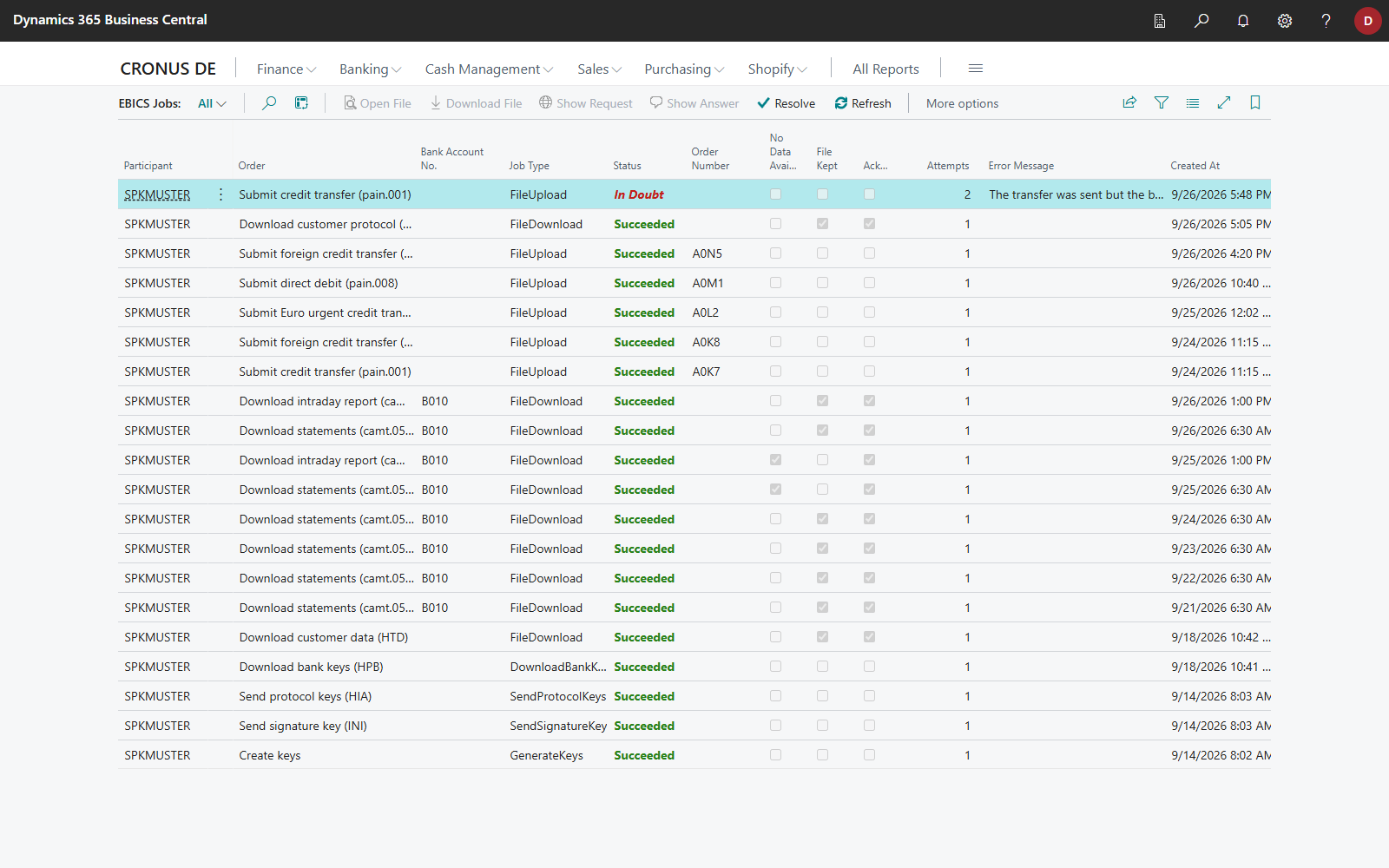
2. **The file is kept.** The **EBICS Jobs** page stores the file that your bank sent for each retrieval (column **File Kept**).
3. **Statements of several accounts are kept for all of them.** If the bank delivers statements of other accounts of the same participant in one retrieval, those accounts read them from the kept file on their next retrieval. This also applies to accounts in other companies reached through the same participant. See [One bank access for several companies](../multi-company.mdx#ebics-retrievals-for-several-companies). The retrieval is only acknowledged once each of these accounts has imported it. This ensures that no statement of another account is lost.
## Read statement again
If transactions are missing, for example because lines were deleted by mistake, recover them from the kept file:
1. Choose the **Search** icon, enter **EBICS Jobs** and open the page.
2. Select the retrieval containing the statement concerned.
3. Choose **Read Statement Again**.
Business Central reads the same file again **without contacting your bank**. Transactions that already exist are recognized and skipped; only missing transactions are added.
Whether your bank still keeps days that it considers delivered is decided by the bank. A corresponding function would therefore usually return no data and is not provided. The kept file is the reliable way to recover missing transactions.
The files contain your account transactions. Without a policy, they are kept indefinitely. Under **Retention Policies**, set a period for **EBICS Jobs** that complies with your retention rules. See [Retention policies](../../setup/retention-policies.mdx).
## Pending transactions
If **Import Pending Bank Entries** is turned on in the **Banking Setup**, Business Central also fetches the intraday report (camt.052) after the statements and shows the pending transactions it contains for information. Automatic application and quick application do not consider them, a pending line with an application is not posted, and it is replaced once the booked transaction arrives. See [Pending bank entries](../../bank-reconciliation/pending-entries.mdx).
Your bank must have enabled the intraday report for the participant:
| EBICS version | Order type |
|---|---|
| EBICS 3.0 (H005) | service **STM** with message camt.052 |
| EBICS 2.5 (H004) | **C52** |
Whether your contract includes it is shown under **Bank Orders** on the card of the [EBICS participant](participant.mdx). After a contract change, fetch the current state with **Refresh Customer Data (HTD)**. If your bank rejects the order, Business Central still takes over the statements; only pending transactions are not shown.
Even with the switch turned off, Business Central requests the intraday report for the **Bank Balance**, on **Refresh Balance** and on **Get Bank Accounts**. The transactions it contains are not taken over in this case. These downloads are therefore also shown on the **EBICS Jobs** page. Many banks send no intraday report outside business hours. See [Bank balance and balance chart](../../bank-accounts/balance.mdx).
## See also
- [Retrieve bank transactions](../../bank-reconciliation/retrieve-transactions.mdx)
- [EBICS jobs and submissions](jobs-and-submissions.mdx)
- [Switch from another EBICS program](migration.mdx)