# Document No. Matching
Document No. matching is an essential process in bank account reconciliation, in which bank transactions are automatically linked to the corresponding documents in Microsoft Dynamics 365 Business Central. This feature allows you to efficiently match bank transactions and improve the accuracy of reconciliation.
The features and steps described in this section relate to the matching of document numbers in the context of bank account reconciliation and describe the features and additions provided by 365 business Banking to the Microsoft Dynamics 365 Business Central standard.
For more information on the Microsoft Dynamics 365 Business Central standard, see the [official documentation](https://learn.microsoft.com/en-us/dynamics365/business-central/receivables-apply-payments-auto-reconcile-bank-accounts) from Microsoft.
The following extensions for document number matching are provided by 365 business Banking:
Advanced document no. and purpose identification
Extended related party name matching
Definition of payment application fields for reference number matching
## Advanced Document No. and Purpose Identification
Beyond the Microsoft standard, the purpose of the bank transaction is analyzed and document numbers are extracted during payment reconciliation to optimize the allocation to open entries. Partial document numbers are also considered — depending on the length of the document number, up to four characters — to allow for more accurate allocation in batch payments.
To optimize the allocation of partial document numbers, you can define common context words that are considered during the analysis of the purpose and increase the weighting of a partial document number.
For more information, see the documentation on [Context Words](../setup/context-words.md).
Your document numbers are `25002019` and `25002021`. In the purpose of the bank transaction, the sender specifies `Invoice 25002019, 2021`. The document number `25002019` is automatically recognized as it matches exactly. The partial document number `2021` is also recognized as a "weak" match and offered for reconciliation.
By using context words, such as `Invoice`, the partial document number `2021` is recognized as a "strong" match and prioritized for reconciliation.
## Payment Application Settings - Payment Application Fields
As part of payment reconciliation, various fields are available to you to optimize the reconciliation of bank transactions. These fields help you improve the allocation of transactions to open entries and simplify the reconciliation process.
By default, the **Document No.**, the **External Document No.**, and the **Payment Reference** of the open entries are used for reconciliation. Additionally, the **Payment Application Settings** page offers you the option to specify additional fields from the **Customer Ledger Entry** and **Vendor Ledger Entry** tables for reconciliation.
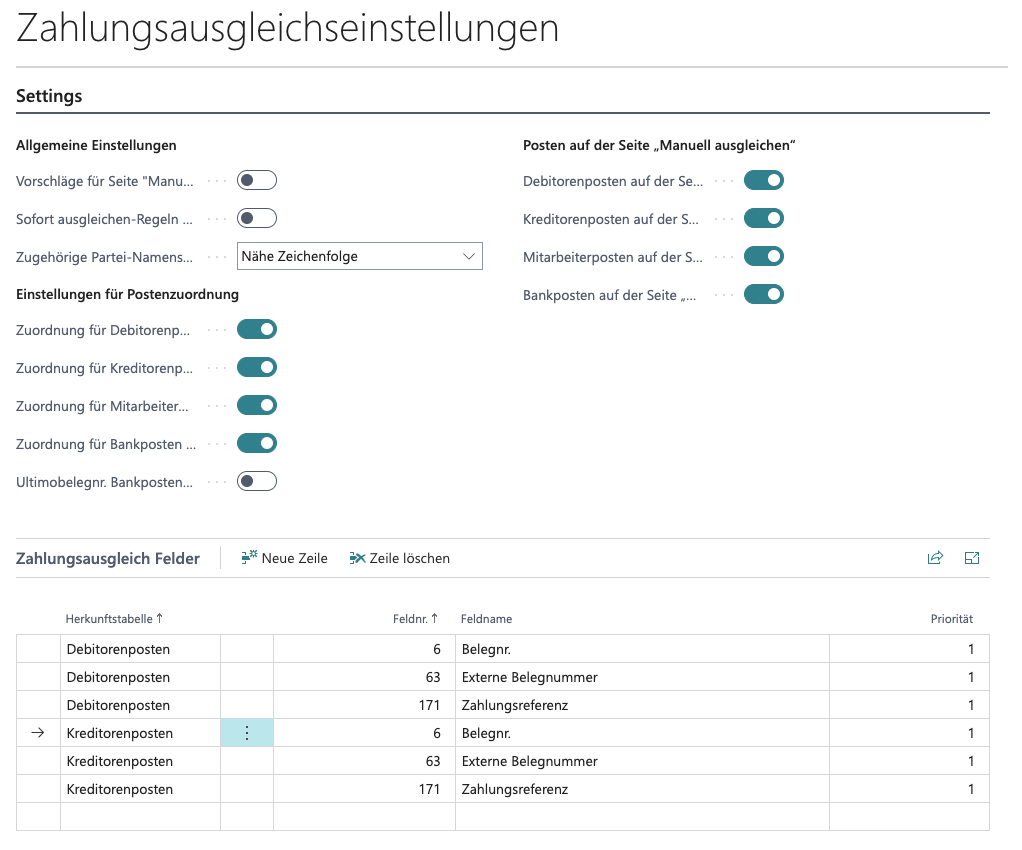
The fields defined in **Payment Application Fields** are considered when analyzing bank transactions to improve the allocation to open entries. This allows for more accurate allocation of transactions to the respective accounts and improves the efficiency of reconciliation. Any field can be used, regardless of origin (e.g., `Microsoft Base Application`).