import { Callout } from "zudoku/ui/Callout";
# Date tolerance: apply entries posted after the payment date
With the date application policy, 365 business Banking also applies entries posted after the payment date, either always or within a tolerance period.
A payment can arrive before the related invoice. For example, the customer pays after the order confirmation, and the invoice is posted two days later. Similarly, a purchase invoice may only be entered after the transfer. In such cases, Microsoft Dynamics 365 Business Central does not apply. With the **Date Application Policy**, you allow this application.
## Standard functionality in Business Central
Automatic application only considers open entries whose **posting date is on or before the transaction date**. An entry posted later is not a candidate. On posting, Business Central also checks that a payment is not posted before the entry it is applied to.
For more information from Microsoft, see [Reconcile payments using automatic application](https://learn.microsoft.com/en-us/dynamics365/business-central/receivables-how-reconcile-payments-auto-application).
## What 365 business Banking adds
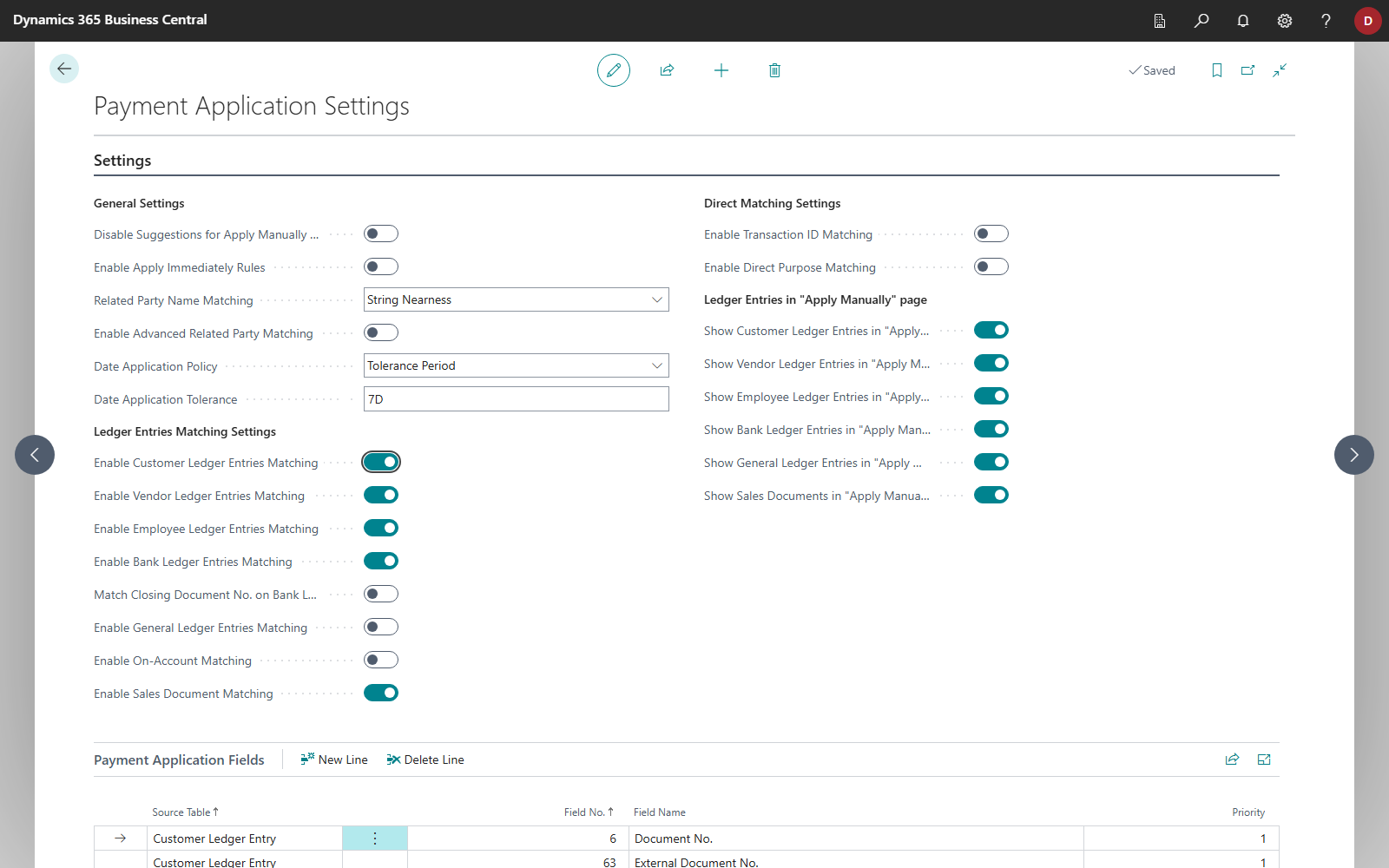
The **Payment Application Settings** page has two fields:
| Field | Values |
|---|---|
| **Date Application Policy** | *blank*: as in the standard
*Always*: The posting date of the entry is not considered.
*Tolerance Period*: The entry may be posted up to a period **after** the transaction date. |
| **Date Application Tolerance** | the period as a date formula, for example `7D` or `1M`. The field is marked as mandatory when *Tolerance Period* is chosen. Without a formula, the entry must be posted on or before the transaction date. |
When a policy is set, two further rules apply:
- **The sign must fit.** An entry that would have to be settled by a payment in the other direction, such as a credit memo for an incoming payment, is discarded in automatic application. Without a date limit, the risk of assigning a payment to the wrong document would be too high.
- **The posting check is relaxed.** For journal lines with the document type *Payment*, the check "payment before the applied entry" is skipped, entirely with *Always* and within the period with *Tolerance Period*. This applies only to posting from the payment reconciliation journal. Other journals, such as the payment journal, keep the standard check.
The policy also affects [G/L entry matching](gl-entry-matching.mdx). On the **Payment Application** page (**Apply Manually**), it does not restrict the entries shown.
## Set up
1. Choose the **Search** icon, enter **Payment Application Settings** and open the page.
2. In the **General Settings** group, choose *Always* or *Tolerance Period* in the **Date Application Policy** field.
3. For *Tolerance Period*, enter a date formula such as `7D` in the **Date Application Tolerance** field.
365 business Banking applies the date formula exactly as you enter it, forwards from the transaction date. An entry is a candidate if it was posted no later than the day the formula returns from the transaction date. Compound formulas such as `1W+2D` are therefore supported (nine days in this case). Month, quarter and year terms and current-period terms also count from the transaction date. With `CM`, the entry may be posted up to the end of the month in which the payment arrived.
## Examples
A payment of €500.00 arrives on March 3. The invoice for €500.00 is posted on March 5.
| Date Application Policy | Is the invoice a candidate? |
|---|---|
| *blank* | No, it was posted after the transaction date. |
| *Tolerance Period*, `7D` | Yes, March 5 is within 7 days after March 3. |
| *Tolerance Period*, `1D` | No, March 5 is two days later. |
| *Always* | Yes |
A credit memo of the same customer for €500.00 is **not** a candidate for this incoming payment with *Always* or *Tolerance Period*, because it would have to be settled by an outgoing payment.
## See also
- [How automatic application works](../concepts/how-matching-works.mdx)
- [Payment application settings](../setup/payment-application-settings.mdx)
- [Check application](check-application.mdx)
- [Apply bank transactions](apply.mdx)