import { Callout } from "zudoku/ui/Callout";
# Print and send remittance advice
How to tell vendors, customers and employees in 365 business Banking with a remittance advice which documents a payment settles, printed or by email.
If a transfer combines many invoices, the payment reference is not long enough to name all of them. The **Remittance Advice** contains the corresponding list: it shows every settled invoice with amount and payment discount, and the payment reference only refers to the remittance advice, for example "Remittance Advice RA00012 as of 03/05/26". Your vendor can then match the payment without further inquiry. The same applies to refunds to customers and payments to employees.
## Standard functionality in Business Central
Business Central itself has no remittance advice for transfers. 365 business Banking uses the standard tools of Business Central, however: **Report Selections**, the vendor's **Document Layouts**, report layouts and email scenarios. See [Microsoft Learn: Report selections](https://learn.microsoft.com/en-us/dynamics365/business-central/across-report-selections) and [Document layouts for customers and vendors](https://learn.microsoft.com/en-us/dynamics365/business-central/ui-define-customer-vendor-document-layouts).
## When a remittance advice is created
- **Automatically in the payment suggestion.** With the **Purpose Exceed Option** *Create Remittance Advice* or *Always Create Remittance Advice*, the [extended payment suggestion](payment-suggestion.mdx) and [Suggest Vendor Payments](suggest-vendor-payments.mdx) assign a remittance advice number. See [Summarize payments](payment-suggestion/purpose.mdx).
- **On request for a line.** If you choose **Print Remittance Advice** or **Send Remittance Advice** on a line without a remittance advice, Business Central asks "No remittance advice has been created for this payment journal line. Are you sure, you want to create a remittance advice for this payment journal line?" and assigns a new number.
The number comes from the **Remittance Advice Nos.** series in **Banking Setup** and is also set as the line's **Payment Reference**.
If no **Remittance Advice Nos.** series is set, **Print Remittance Advice** or **Send Remittance Advice** on a line without a remittance advice reports the following before the question: "A remittance advice cannot be created because no number series is specified in the … field in the … window." From the message, you open **Banking Setup** and enter the number series.
## Print and send
| Action in the payment journal | Effect |
|---|---|
| **Print Remittance Advice** (line) | Shows the report's request page and prints the remittance advice of the selected line. For vendors, it is printed in the vendor's language, with the report and layout from the vendor's document layouts; for customers and employees, with the report from the report selection in your language. |
| **Send Remittance Advice** (line) | Opens the email editor with the remittance advice as the PDF attachment "Remittance Advice ….pdf", subject "… - Remittance Advice per …" with the posting date of the payment. |
| **Print Remittance Advices** | Prints the remittance advices of all lines of the journal that have a remittance advice number, per vendor with that vendor's report, layout and language. The request page appears once per report; its options apply to all remittance advices printed with that report. |
| **Send Remittance Advices** | Puts the remittance advices of all lines into the email outbox and reports "… of … remittance advices were queued for sending. … were skipped (incomplete data)." Lines without an email address of the recipient, vendor and customer lines without a **Recipient Bank Account**, and lines to a G/L account or bank account are skipped. |
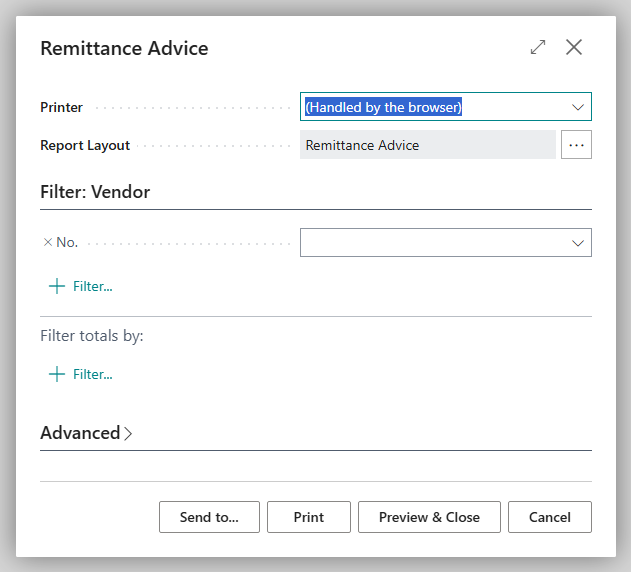
**Print Remittance Advices** and **Send Remittance Advices** are only available if at least one line of the journal has a remittance advice. **Print Remittance Advice** and **Send Remittance Advice** are available on lines with the document type *Payment* or *Refund* whose balancing account is a bank account.
After printing or sending, **Remittance Advice Printed** is set on the line. If you cancel the request page or close the email editor without sending, the flag remains cleared, because the remittance advice has not reached the recipient. For this reason, printing always happens without a preview; in Business Central online, you receive the remittance advice as a PDF download. This is the only way to detect whether printing was cancelled. If you post a journal with remittance advices that have not been printed, Business Central asks: "There are remittance advices that have not been printed for payment journal …. Do you want to post the lines anyway?" After posting, the number is shown on the bank account ledger entry in the **Remittance Advice No.** field.
The email **recipient** is the business partner the line pays:
| Account type of the line | Email address | Language of the email |
|---|---|---|
| Vendor | the address from the vendor's **Document Layouts** for the *Remittance Advice* usage, otherwise the **Email** on the vendor card | the vendor's language |
| Customer | the send-to email of the customer's report selection for *Remittance Advice*, otherwise the **Email** on the customer card | the customer's language |
| Employee | the **Company Email** on the employee card, otherwise the **Private Email** | your language |
If the recipient has no language, your language applies. Lines to a G/L account or bank account have no recipient; for them, **Send Remittance Advice** reports "The account type must be Vendor, Customer or Employee to send a remittance advice."
## What the remittance advice contains
- your address and the recipient's address and the **Date** of the remittance advice (the posting date of the payment),
- the **No.** of the remittance advice and the recipient's number, captioned by account type as **Vendor No.**, **Customer No.** or **Employee No.**,
- *Accounting* as **Contact Person** with the **Phone No.** and **E-Mail** from the company information,
- the recipient's bank details (**Your Bank**, **IBAN**, **BIC/SWIFT**),
- for each settled document **Document Type**, **Document No.** (the vendor's invoice number or the external document number), **Document Date**, **Amount**, **Payment Discount** and **Payment Amount**, plus the **Total Amount**.
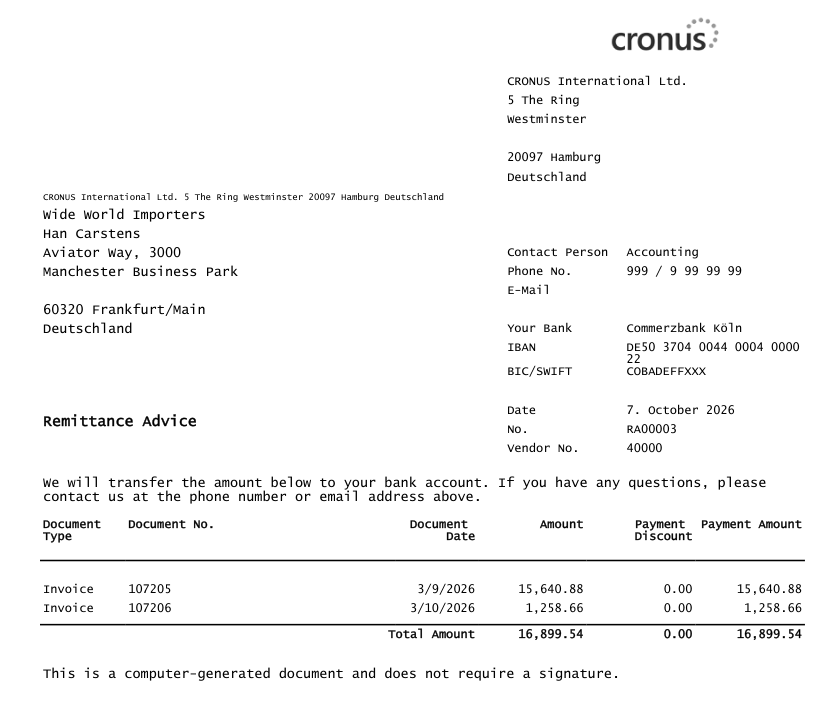
The remittance advice is created before posting, when no payment discount has been granted yet. If the payment settles an entry in full and its posting date is on or before the payment discount date or the later payment discount tolerance date, the advice nevertheless states the remaining discount under **Payment Discount** and, as the **Payment Amount**, the amount less the discount, as the [payment suggestion](payment-suggestion/payment-discount.mdx) built the line. The total then equals the amount transferred. For a line that settles a single document with **Applies-to Doc. No.**, the advice states the amount of the line as the **Payment Amount**.
## Set up layout and email
1. **Number series:** In **Banking Setup**, **Numbering** FastTab, enter the **Remittance Advice Nos.** series. Installation creates a number series.
2. **Report selection:** **Report Selection - Purchase** has the *Remittance Advice* usage. Installation enters the **Remittance Advice** report there together with the email layout.
3. **Layouts:** The report includes the **Remittance Advice** layout (printout) and the **Remittance Advice Email** Word layout (email text). You create your own layouts as for any other report. See [Microsoft Learn: Manage report layouts](https://learn.microsoft.com/en-us/dynamics365/business-central/ui-manage-report-layouts).
4. **Per vendor:** In a vendor's **Document Layouts**, define a report, a layout or a different email address for *Remittance Advice*.
5. **Email account:** Assign the account that remittance advices are sent from to the **Remittance Advice** email scenario. See [Microsoft Learn: Set up email](https://learn.microsoft.com/en-us/dynamics365/business-central/admin-how-setup-email).
Order of precedence: the vendor's document layout takes precedence over the report selection, and the report selection over the report included with the app. The overview of all banking documents is under [Report selection and email for banking documents](../setup/reports-and-email.mdx).
For electronic data interchange with your vendor, the REMADV remittance advice in UN/EDIFACT format is also available: [Export remittance advices (REMADV)](../remittance-advice/export.mdx).
## See also
- [Summarize payments and build the payment reference](payment-suggestion/purpose.mdx)
- [Payment journal](../payment-journal.mdx)
- [Banking Setup](../setup/banking-setup.mdx)
- [Export remittance advices (REMADV)](../remittance-advice/export.mdx)