import { Callout } from "zudoku/ui/Callout";
import { IconCardsGrid } from "../../../../src/components/ColumnsCards";
# Extended payment suggestion
The extended payment suggestion in 365 business Banking creates payments to vendors, customers and employees in one run, controlled by templates.
The extended payment suggestion (action **Suggest Payments**, report **Ext. Payment Suggestion**) fills a **Payment Journal** in Microsoft Dynamics 365 Business Central with the payments that are due: vendor invoices, customer credit balances and employee expenses. Which entries it includes and how it builds the lines is defined in an **Extended Payment Suggestion Template**. For recurring payment runs with the same settings, you set up the template once and afterwards only choose the template.
## Standard functionality in Business Central
The standard product offers three separate functions in the payment journal: **Suggest Vendor Payments** (with payment discount, priority and available amount), **Suggest Employee Payments** and **Net Customer/Vendor Balances**. Each function is run separately, and you enter the settings again for every run. See [Microsoft Learn: Suggest vendor payments](https://learn.microsoft.com/en-us/dynamics365/business-central/payables-how-suggest-vendor-payments) and [Consolidate balances](https://learn.microsoft.com/en-us/dynamics365/business-central/finance-consolidate-customer-vendor-balances).
## What 365 business Banking adds
- **One run for all three account types:** vendors, customers (paying out credit balances) and employees.
- **Templates** instead of entries for every run: [Set up extended payment suggestion templates](payment-suggestion/templates.mdx).
- **Message to recipient with placeholders** per account type: [Message to recipient with placeholders](payment-suggestion/message.mdx).
- **Summarizing with a complete payment reference:** split or remittance advice when 140 characters are not enough: [Summarize payments](payment-suggestion/purpose.mdx).
- **Customer-vendor netting with a netting statement** in the same run: [Customer-vendor netting](payment-suggestion/netting.mdx).
- **Payment groups:** payments to members of a [payment group](../payment-groups.mdx) are routed through the central account.
The standard **Suggest Vendor Payments** remains available and is also extended by 365 business Banking. See [Suggest Vendor Payments](suggest-vendor-payments.mdx).
## Step by step
1. Open the **Payment Journal** and choose the journal batch the payment is to be made from.
2. Choose **Payment** > **Suggest Payments**.
3. On the **Options** tab, choose the **Template Code**. If the template has a **Last Due Date Formula**, **Last Due Date** is prefilled with the work date plus this formula.
4. Adjust **Last Due Date** if needed. A blank field means: no limit.
5. Narrow the entries on the filter tabs if needed (see below).
6. Choose **OK**. Business Central reports "… payment journal line(s) have been created." If lines were created without a recipient bank account because the recipient's bank account is not released, the message also states their number. See [Recipient bank accounts](recipient-bank-accounts.mdx#status-new-and-released). If a netting statement was created, Business Central asks whether you want to open it.
7. Check the lines and carry out the payment: [Carry out payment](carry-out-payment.mdx).
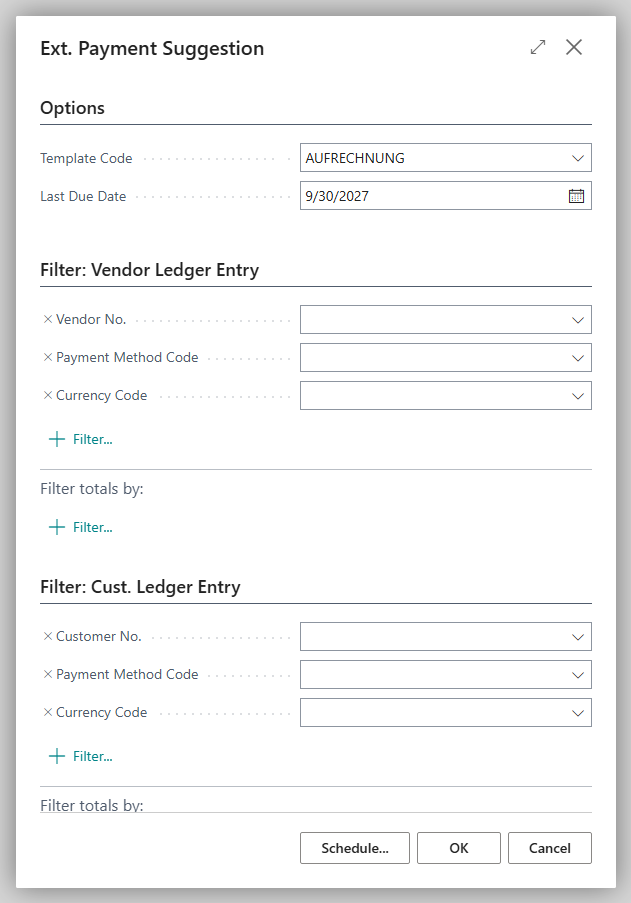
The request page saves your last entries.
## Request page
| Tab | Fields | Note |
|---|---|---|
| **Options** | **Template Code**, **Last Due Date** | The template code is mandatory. |
| Vendor ledger entries | **Vendor No.**, **Payment Method Code**, **Currency Code** | only effective if the template suggests vendor payments |
| Customer ledger entries | **Customer No.**, **Payment Method Code**, **Currency Code** | only effective if the template suggests customer payments |
| Employee ledger entries | **Employee No.**, **Payment Method Code**, **Currency Code** | only effective if the template suggests employee payments |
If the journal batch has a **Payment Method Code**, the **Payment Method Code** filter on all three tabs is prefilled with "this code or blank". Entries without their own payment method are therefore included and get the payment method of the journal batch. Entries with a different payment method are excluded.
If the template has its own entry filters (see [Set up templates](payment-suggestion/templates.mdx)), both apply: an entry is only suggested if it meets the request page filters and the template filters.
**Suggest Payments** is also available in journals whose bank account is not connected through 365 business Banking. The lines are created in the same way but are not banking payments: **Carry Out Payment** is only available for a connected bank account.
## What is in the journal afterwards
- One line per entry, or one line per account and currency if the template uses **Summarize per Account**.
- **Document Type** *Payment* for vendors and employees, *Refund* for customers.
- **Posting Date** = work date or, if the template specifies it, the entry's due date. If **Find Payment Discounts** is also turned on, it is the payment discount date for an entry with a payment discount (the work date at the earliest), so that the discount does not lapse (see [Payment discount](payment-suggestion/payment-discount.mdx)).
- Balancing account, payment method and the recipient's bank account are set. If the bank account is not released for payments, **Recipient Bank Account** remains blank; the entries are linked to the line through the applies-to ID.
- With netting, additionally two netting lines "Netting …" per netted pair of vendor and customer, one for the vendor and one for the customer.
The details are described on the subpages:
## Troubleshooting
| Message | Cause and remedy |
|---|---|
| "You must specify a payment suggestion template." | **Template Code** is blank. Choose a template. |
| "The payment journal batch is not specified. Start the suggestion from the payment journal." | The suggestion was not started from a payment journal. |
| An expected entry is missing | See [Which entries are suggested](payment-suggestion/entry-selection.mdx). Often the entry is not due yet, is **On Hold**, or is already included in another journal. |
## See also
- [Payment journal](../payment-journal.mdx)
- [Suggest Vendor Payments](suggest-vendor-payments.mdx)
- [Carry out payment: process per bank connection](carry-out-payment.mdx)
- [Extended payment suggestions (new feature)](../features/details/extended-payment-suggestion.mdx)