import { Callout } from "zudoku/ui/Callout";
# Bank account capabilities
365 business Banking shows under Bank Account Capabilities which payments and retrievals your bank allows for an account. The payment methods are based on these capabilities.
Not every bank allows every function on every account. Savings accounts often do not allow credit transfers, not every bank offers instant credit transfers, and direct debits have to be enabled by the bank. 365 business Banking stores for every connected bank account which functions are permitted and checks them before a payment is sent to the bank. A payment that is not permitted is therefore rejected in Business Central with a clear message, not by the bank.
## Where you see the capabilities
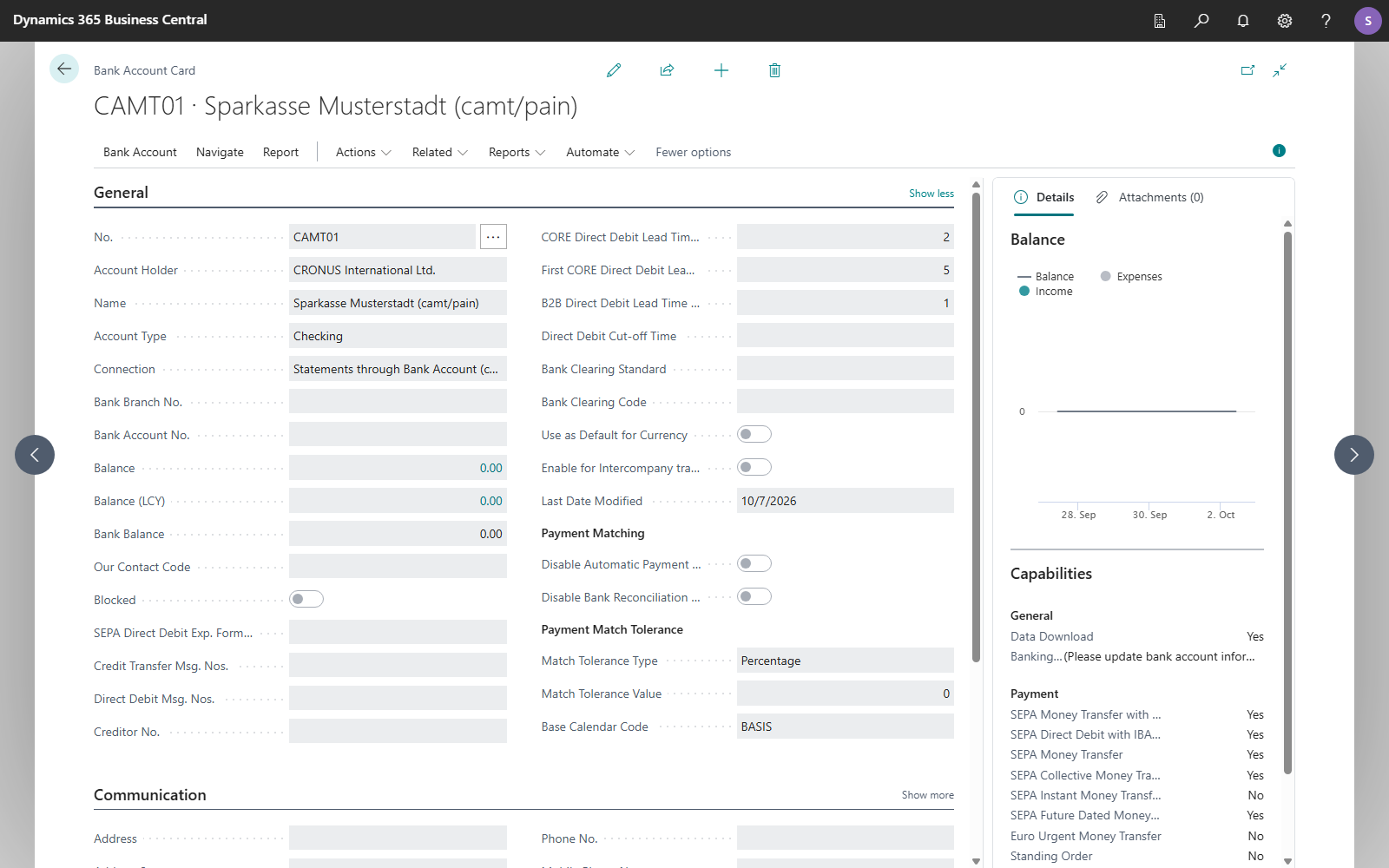
The capabilities are shown on the **Bank Account Card** and in the **Bank Accounts** list, in the **Capabilities** FactBox. The FactBox appears for bank accounts that have an IBAN and are connected via PSD2/XS2A, EBICS or a camt/pain file with the **Payment Scheme** *SEPA*. For file accounts with the payment scheme *International*, the capabilities are stored and checked, but the FactBox is not shown.
## Capabilities in detail
### Shown in the FactBox
| Group | Capability | Meaning |
|---|---|---|
| **General** | **Data Download** | Balances and bank transactions of the account can be retrieved. |
| | **Banking Interfaces** | The technical channels through which the account is reached, for example *XS2A*, *FinTS* or *EBICS*. *(Please update bank account information to see available interfaces)* means that no interface is recorded yet. |
| **Payment** | **SEPA Money Transfer with IBAN only** | Credit transfers only require the recipient's IBAN, no BIC. |
| | **SEPA Direct Debit with IBAN only** | Direct debits only require the payer's IBAN. |
| | **SEPA Money Transfer** | Single credit transfers are permitted. |
| | **SEPA Collective Money Transfer** | Several credit transfers can be submitted as one batch booking. |
| | **SEPA Instant Money Transfer** | Instant credit transfers are permitted. |
| | **SEPA Future Dated Money Transfer** | Credit transfers with a posting date in the future are permitted. Without this capability, the posting date must be the current date. |
| | **Euro Urgent Money Transfer** | Same-day urgent transfer in euro, only for EBICS accounts whose contract includes the order (CCU or XCT with option URG). Without this capability, **Carry Out Payment** refuses a journal with the payment method *Euro Urgent Credit Transfer*. See [Euro urgent payment via EBICS](../payment-types/euro-urgent-payment.mdx). |
| | **Standing Order** | Standing orders are permitted. See [Standing order](../payment-types/standing-order.md). |
| | **SEPA BASIC Direct Debit** | Direct debits under the CORE scheme (consumers) are permitted. |
| | **SEPA BASIC Collective Direct Debit** | CORE direct debits can be submitted as one batch booking. |
| | **SEPA B2B Direct Debit** | Direct debits under the B2B scheme (companies) are permitted. |
| | **SEPA B2B Collective Direct Debit** | B2B direct debits can be submitted as one batch booking. |
### Recorded but not shown
These capabilities are also stored and checked, but are not shown in the FactBox:
| Capability | What it is checked for |
|---|---|
| **Domestic Money Transfer** / **Domestic Collective Money Transfer** | Transfers that some banks carry out domestically outside the SEPA schemes. |
| **SWIFT Money Transfer** / **SWIFT Collective Money Transfer** | International payments under the SWIFT rules. File accounts with the payment scheme *International* always have them, EBICS accounts if your EBICS contract includes the foreign credit transfer (AXZ or XCT without an option). |
| **Capture** | For payment service providers: collecting an amount from a payment method the payer authorized once. See [Collect a payment](../payment-services/collect-payment.mdx). |
From version 18.5, 365 business Banking also connects bank accounts via SWIFT, with Cobase as provider, for bank statements and payments outside the SEPA area. For more information, see [SWIFT payments via Cobase](../features/details/swift-payments.mdx).
## Where they come from
| Bank connection | Source of the capabilities |
|---|---|
| PSD2/XS2A via finAPI | from the bank connection at finAPI, when connecting and on **Get Bank Accounts**. **Standing Order** and the domestic transfers follow the institution in the [Banks](banks.mdx) list. |
| EBICS | from the permissions of your EBICS contract, which Business Central requests from the bank when connecting and on **Get Bank Accounts** (customer data, HTD). Collective orders apply wherever single orders are permitted, because with EBICS both are the same order type. The foreign credit transfer (AXZ, XCT without an option) becomes **SWIFT Money Transfer** and **SWIFT Collective Money Transfer**, the Euro urgent credit transfer (CCU, XCT with option URG) becomes **Euro Urgent Money Transfer**; neither counts as a SEPA credit transfer. If the bank reports no permissions, Business Central assumes the usual SEPA capabilities. The bank refuses anything the contract does not cover. |
| camt/pain file | No bank reports capabilities. Business Central derives the capabilities from the **Payment Scheme** of the ISO 20022 file setup and rewrites them whenever you change the scheme. *SEPA*: **SEPA Money Transfer**, **SEPA Collective Money Transfer**, **SEPA Future Dated Money Transfer**, **SEPA BASIC Direct Debit** and **SEPA B2B Direct Debit**, each also as a collective direct debit, plus the two *IBAN only* capabilities. *International*: **SWIFT Money Transfer**, **SWIFT Collective Money Transfer** and future-dated transfers, but no direct debits. Instant credit transfers are never included, because a file that is uploaded manually hours later is not an instant payment. Standing orders are not included either. If the statements are retrieved via finAPI and only the payments are created as files, only the payment capabilities come from the file setup; **Data Download** is still reported by finAPI. |
| payment service providers | only **Capture**, for PayPal, Stripe and Adyen. |
If your bank has enabled a capability for you, for example instant credit transfers or the Euro urgent credit transfer, update the details with **Get Bank Accounts** in the **Bank Accounts** list or on the bank account card. This applies to PSD2/XS2A and EBICS. For EBICS, the action requests the customer data (HTD) again and rewrites the capabilities of every account of the EBICS participant, see [Get Bank Accounts](bank-account-card.mdx#get-bank-accounts). **Refresh Customer Data (HTD)** on the EBICS participant card, by contrast, only reads the order types again that Business Central checks on submission.
## Where they are checked
| When | Message if the capability is missing |
|---|---|
| **Carry Out Payment** in the payment journal | "We're sorry, but payment method … is not supported by bank account …." |
| Posting date in the future without **SEPA Future Dated Money Transfer** | "The bank account does not support future dated SEPA credit transfer. The posting date must be today." |
| Direct debit, depending on the payer's **Partner Type**: CORE direct debits for persons, B2B direct debits for companies | "We're sorry, but bank account … cannot collect a … direct debit from a payer of type …." |
| Releasing a standing order | "The bank account … does not support standing orders." |
| SEPA payment import | "The selected bank account does not support SEPA Credit Transfers. …"; without **SEPA Money Transfer with IBAN only**, every payment must contain a BIC. |
You set which payment method a payment method code uses in [Payment methods](../setup/payment-method-setup.md).
## See also
- [Bank account card](bank-account-card.mdx)
- [Carry out payment: process per bank connection](../bank-payment/carry-out-payment.mdx)
- [Bank connections](../connections/index.mdx)