import { Callout } from "zudoku/ui/Callout";
# Address Validation Setup
The **Address Validation Setup** page bundles all settings for address validation, address prediction, and address data initialization.
After installation, the most important fields are already preset. This page describes every field individually, grouped by FastTab, in Microsoft Dynamics 365 Business Central.
## Open Address Validation Setup
1. Choose the **Search** icon, enter **Address Validation Setup**, and open the page.
2. The page is organized into four FastTabs: **Address Validation**, **Address Prediction**, **Address Data Initialization**, and **User Interface**.
3. The actions give you access to **API Setup**, **User Settings**, **Initialize Address Data**, and **Address Data Initialization**.
During installation, 365 business Address Validation already sets the default values listed in the following tables, once per company. A reinstallation or an update does not overwrite your own settings afterwards.
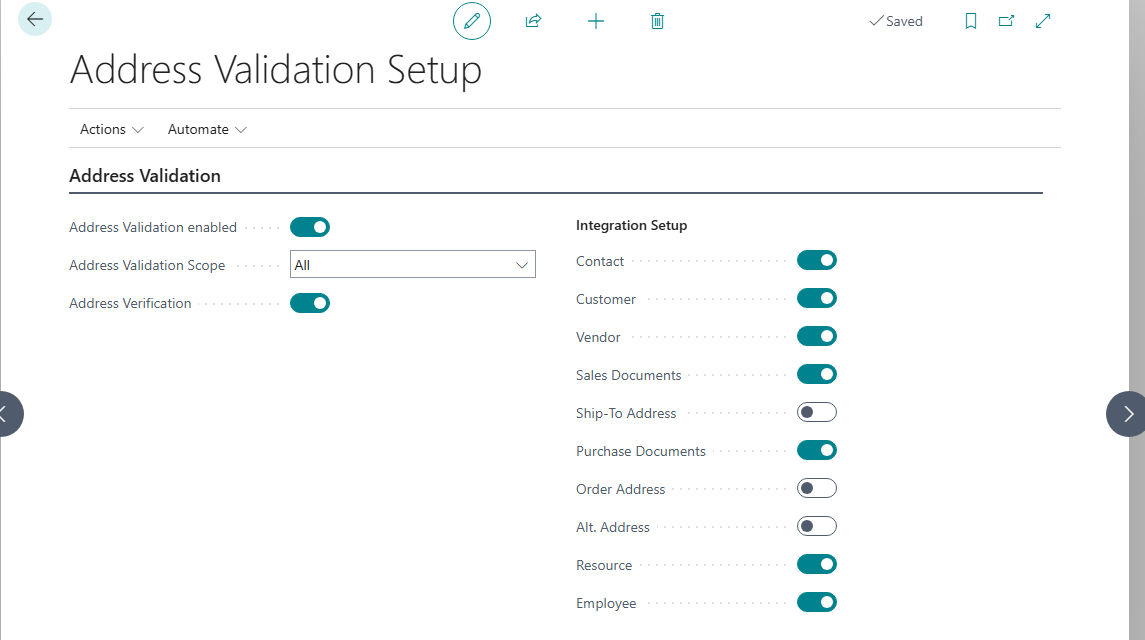
## Address Validation FastTab
| Field | Description | Default value |
|---|---|---|
| **Address Validation enabled** | Enables address validation. Enabling address validation may result in usage based transaction fees. | Disabled |
| **Address Validation Scope** | Specifies the type of sessions the automatic address validation applies to: *All*, *Only enabled for client sessions with user interface*, or *Only enabled for sessions without user interface*. | *All* |
| **Address Verification** | Enables the additional manual address verification. If enabled, an additional comparison window is shown every time address validation has changed or completed a deviating address. The user decides, based on the comparison, whether to apply the changes. | Enabled |
The **Integration Setup** group specifies, per source table, whether automatic address validation is triggered when an address field changes:
| Field | Description | Default value |
|---|---|---|
| **Contact** | Enables the automatic address validation for Contacts. | Enabled |
| **Customer** | Enables the automatic address validation for Customers. | Enabled |
| **Vendor** | Enables the automatic address validation for Vendors. | Enabled |
| **Sales Documents** | Enables the automatic address validation for Sales Documents, like Sales Orders or Sales Quotes. | Enabled |
| **Ship-To Address** | Enables the automatic address validation for Ship-To Addresses. | Disabled |
| **Purchase Documents** | Enables the automatic address validation for Purchase Documents, like Purchase Orders or Purchase Quotes. | Enabled |
| **Order Address** | Enables the automatic address validation for Order Addresses. | Disabled |
| **Alt. Address** | Enables the automatic address validation for Alternative Addresses. | Disabled |
| **Resource** | Enables the automatic address validation for Resources. | Disabled |
| **Employee** | Enables the automatic address validation for Employees. | Disabled |
With **Resource** enabled, 365 business Address Validation automatically validates resource addresses on every change, the same way it does for contacts, customers, and vendors.
With **Employee** enabled, 365 business Address Validation automatically validates employee addresses on every change, the same way it does for resources.
## Address Prediction FastTab
| Field | Description | Default value |
|---|---|---|
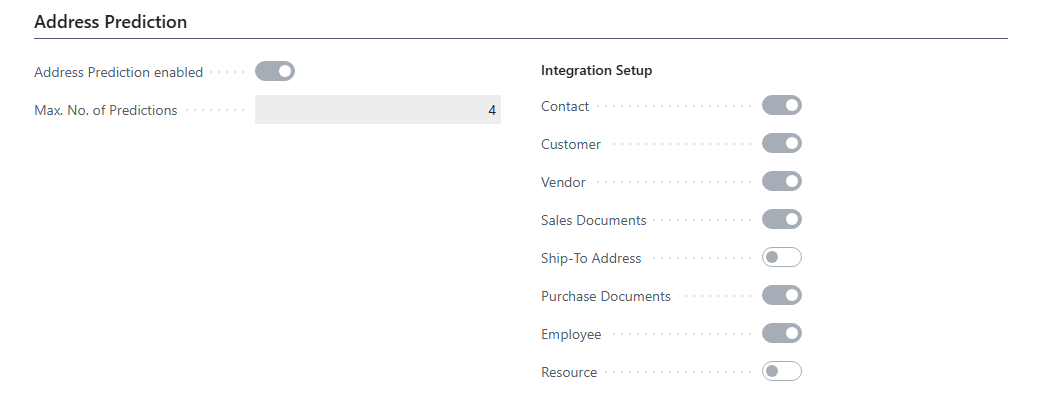
| **Address Prediction enabled** | Enables the address prediction feature, which enables auto complete functionality in the Name and Address fields. | Enabled |
| **Max. No. of Predictions** | Specifies the maximum number of address predictions shown in the drop down auto complete functionality. Range *1* to *10*. | *4* |
The **Integration Setup** group specifies, per table or document, whether address prediction is offered:
| Field | Description | Default value |
|---|---|---|
| **Contact** | Enables the address prediction for Contacts. | Enabled |
| **Customer** | Enables the address prediction for Customers. | Enabled |
| **Vendor** | Enables the address prediction for Vendors. | Enabled |
| **Sales Documents** | Enables the address prediction for Sales Documents, like Sales Orders and Sales Quotes. | Enabled |
| **Ship-To Address** | Enables the address prediction for Ship-To Addresses. | Disabled |
| **Purchase Documents** | Enables the address prediction for Purchase Documents, like Purchase Orders and Purchase Quotes. | Enabled |
| **Employee** | Enables the address prediction for Employees. | Enabled |
| **Resource** | Enables the address prediction for Resources. | Disabled |
With **Purchase Documents** enabled, 365 business Address Validation also offers address prediction on purchase quotes and purchase orders.
## Address Data Initialization FastTab
| Field | Description | Default value |
|---|---|---|
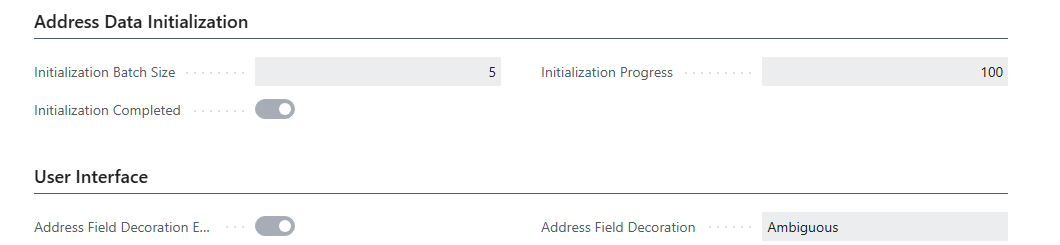
| **Initialization Batch Size** | Specifies the number of records read from a source table within a single batch of the address data initialization. Smaller batches keep the database transactions short and allow the initialization to be run in smaller steps. Leave the field empty to use the default batch size. | *1,000* |
| **Initialization Completed** | Specifies whether the address data initialization has been completed for the current company. Not editable. | Disabled |
| **Initialization Progress** | Specifies the progress of the address data initialization, in percent. Choose the **Address Data Initialization** action to see the progress per source table. Not editable. | *0* |
For more information, see [Initialize address data](./address-data-initialization.mdx).
## User Interface FastTab
| Field | Description | Default value |
|---|---|---|
| **Address Field Decoration Enabled** | Specifies whether to enable text decoration for address fields. Non-validated address data is visually highlighted to inform the user of potentially invalid address data. | Enabled |
| **Address Field Decoration** | Specifies the type of visual highlighting used to inform the user of potentially invalid address data. | *Ambiguous* |
## Actions
| Action | Description |
|---|---|
| **API Setup** | Opens the 365 business API Setup page to configure connection and authentication with 365 business API cloud services. |
| **User Settings** | Opens the [User settings](./user-settings.mdx). |
| **Initialize Address Data** | Reads the address data of the current company into the address data dictionary, in the configured batches. No address is validated. See [Initialize address data](./address-data-initialization.mdx). |
| **Address Data Initialization** | Opens the [Address Data Initialization](./address-data-initialization.mdx) page, which shows the progress per source table and allows reading the data in single batches. |
## See also
- [Setup](index.mdx)
- [Permissions](permissions.mdx)
- [User settings](./user-settings.mdx)
- [Initialize address data](./address-data-initialization.mdx)
- [Validate an address](../address-validation.mdx)
- [Address prediction](../address-prediction.mdx)